

Available to buy here:
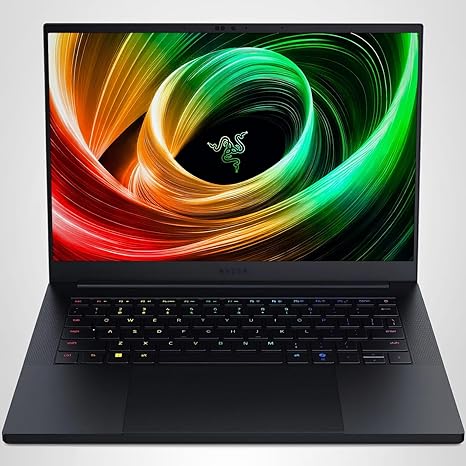
Welcome back to Reviews inside tv, and today we’ve got a look at the Razer Blade 14 (2025), a 14‑inch gaming laptop that’s been redesigned to be thinner and lighter yet still packs what Razer claims is serious performance. This model pairs an AMD Ryzen AI 9 365 processor with an NVIDIA GeForce RTX 5070 Laptop GPU, a vibrant 3K 120 Hertz OLED display, a generous 32 GB of LPDDR5X memory, and a 1 Terra byte SSD. If you’re curious whether this sleek machine lives up to its promise of power and portability for gamers, creators, and power users alike, stick around because we’re breaking it all down.
Starting with the core components, the Ryzen AI 9 365 brings 10 Zen 5 cores with a boost clock up to around 5 gigahertz, offering solid multi‑core performance that stays stable even under sustained workloads. Compared to higher‑end chips with more cores and higher power limits, it’ll be a bit behind, but for gaming and creative work it delivers what most people will need without a huge sacrifice in efficiency. The RTX 5070 Laptop GPU in this model is configured up to 115 watts, which gives it respectable graphics horsepower in a chassis this thin, and it benefits from NVIDIA’s DLSS 4 support to lift frame rates in supported titles. The 32 GB of LPDDR5X running at 8000 megahertz is both fast and power‑efficient, helping with multitasking and creative workflows while also conserving battery where possible. Storage is a fast NVMe SSD, so app and game load times feel snappy and responsive.
That 3K (roughly 2880×1800) 120 Hertz OLED panel is a real highlight here. OLED technology delivers deep blacks and vivid color that really makes movies, games, and creative content pop. The high refresh rate keeps motion smooth and responsive whether you’re gaming or just scrolling through apps, and the overall brightness and color accuracy sit well with what you’d expect in a premium panel. For creators who care about color and gamers who want fluid visuals, this screen delivers a big step up from standard high‑refresh IPS panels.
In real‑world day‑to‑day use, this Blade 14 feels agile. Browsing with a lot of tabs open, document editing, video calls, and productivity tasks are handled without noticeable lag. The fast RAM and responsive SSD keep things feeling fluid across typical workloads. Media playback is a treat on the OLED screen, and while speakers on thin gaming laptops often struggle with bass, they get loud and clear enough for casual viewing and gaming. The keyboard has a comfortable feel for long typing sessions with good key travel and feedback, and the trackpad is large and accurate, making office tasks and creative editing more pleasant than most gaming‑oriented designs would suggest.
Now let’s talk gaming and performance with real numbers. In Cyberpunk 2077 Phantom Liberty at balanced, high settings and the native 2560×1600 resolution, this RTX 5070 Laptop sits around the mid‑60s frames per second when you let the GPU draw closer to its 115 watt headroom. That means you get playable performance on demanding AAA titles, though you’ll see the biggest benefits when you enable DLSS 4 or drop to lower internal resolution targets, where frame rates can climb higher and better match the 120 Hertz panel. In titles like Alan Wake 2 with custom settings, DLSS variants push average frame rates into the 50s and 60s at quality presets, and with more aggressive upscaling you can see figures much closer to what this GPU ultimately can deliver. These figures tell you this hardware isn’t meant to chase 120 FPS in the most demanding games at native resolution, but it absolutely holds its own for smooth 60 FPS experiences and better with AI upscaling engaged. One thing to be aware of: gaming at full native resolution with ray tracing can drop performance into ranges below the panel’s maximum potential, so sticking with a mix of detail levels and upscaling gets the best balance of smoothness and visual fidelity. Under sustained load, thermals remain reasonable for a machine this thin thanks to Razer’s vapor chamber cooling, but fans do spin up audibly, and the underside and keyboard deck can feel warm under heavy gaming or long export tasks.
Battery life on paper can look promising with a 72 watt‑hour battery, and Razer quotes up to 11 hours of on‑screen time. In reality, you’re much more likely to see around 5 to 7 hours for lighter office or web tasks with moderate brightness, and gaming on battery will drop that into the low hours if you even get that far, since the GPU power is throttled aggressively to save juice. If battery endurance is a priority, especially unplugged gaming or long workdays away from a plug, this isn’t where the Blade shines brightest compared to some competitors that trade off thinner design for bigger cells.
Port selection is generous for a 14‑inch machine, with USB‑A, multiple USB‑C/Thunderbolt‑capable ports that can handle power delivery and displays, HDMI for direct monitor hookup, a microSD card reader for quick media grabs, and a combo audio jack. Wi‑Fi 7 and Bluetooth deliver modern connectivity for wireless peripherals and online gaming, and while the Blade’s memory is soldered and not upgradeable later, the 32 GB onboard is ample for multitasking and content creation workloads.
Carrying this around feels excellent thanks to its lightweight and compact footprint, and the CNC aluminum chassis looks and feels premium. Fingerprints will show, and this level of finish does carry a price premium, but it also translates to durability and stable hinge action that inspires confidence whether you’re on a flight or at a cafe.
Mid‑way through if you’re enjoying this breakdown, take a moment to like, subscribe, and hit that bell so you don’t miss future laptop reviews and deep dives just like this one.
So where does this all leave the Blade 14? For gamers and creators who want a portable, premium 14‑inch gaming laptop with a vibrant OLED screen, strong performance for AAA titles at balanced settings, and excellent build quality, it’s a compelling choice. Performance isn’t quite on par with some rivals that offer higher‑tier GPUs or CPUs, and the battery life doesn’t stretch nearly as far as Razer’s quoted figures suggest. Comparatively, machines like the Asus ROG Zephyrus G14 with a higher‑end GPU option can deliver better raw performance and more gaming headroom for the price, though often at the cost of a bit more weight or less slick industrial design.
If you’re the kind of buyer who prioritizes design, display quality, and all‑around versatility with the flexibility to handle gaming, creative tasks, and everyday work reliably, this Blade 14 ticks a lot of those boxes. But if you want maximum gaming punch for the dollar or the longest possible unplugged battery life, there are alternatives that push a bit harder in those specific directions.
Thanks for watching Reviews inside tv. If you’ve got questions about this Razer Blade or you already own one, drop a comment below and share your experience. We’ll be back with more reviews, and until then, stay sharp and game on.
Available to buy here:


