

Available to buy here:
Welcome back to Reviews Inside TV, your go-to destination for the latest and greatest in tech and gaming gear. Today, we’re diving into a product that combines portability, performance, and some seriously cool RGB magic—the Razer Joro Portable Wireless Gaming Keyboard. Whether you’re on the go or setting up your gaming station at home, this keyboard promises to offer the perfect balance of convenience and functionality. Let’s see if it delivers.
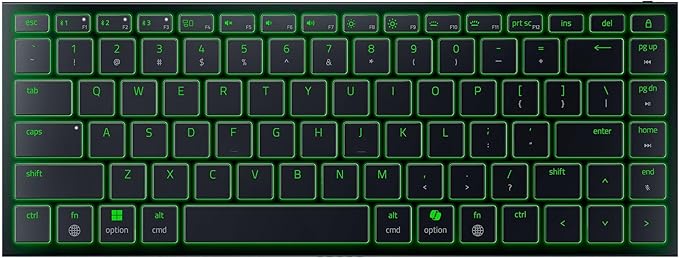
The Razer Joro is all about portability and design. At just 374 grams and a slim profile of 16.5 millimeters, this is a keyboard that’s built to be lightweight and easy to carry around. But it doesn’t sacrifice essential features to maintain that sleek look. Despite its ultra-thin build, it still manages to pack in a full function row and a set of arrow keys, making it surprisingly versatile for its size. This compact form factor is ideal for anyone who needs a portable solution but doesn’t want to compromise on core functionality. It’s a great option if you’re looking for a travel-friendly keyboard that can easily slide into a bag, whether you’re gaming on a laptop or taking it with you to work.
What truly sets the Razer Joro apart from other portable keyboards is its RGB lighting. Powered by Razer Chroma, this keyboard offers up to 16.8 million colors, which you can customize to your heart’s content. If you’re a fan of dynamic lighting effects, you’ll be happy to know that this keyboard supports hundreds of Chroma-integrated games, so your gameplay can come alive in a full spectrum of colors. Whether you’re looking to match your setup or just want a little extra flair, the lighting options are a welcome addition.
Now, when it comes to the typing and gaming experience, the Joro features ultra-low-profile switches. These are designed for minimal strain, making it comfortable for both long gaming sessions and work tasks. The low-profile design doesn’t just add to its sleek look; it’s also functional, providing quick, precise actuation that’s responsive yet satisfying with every press. Whether you’re typing up a report or scoring that perfect headshot, the keys feel responsive without being overly sensitive.
In terms of connectivity, the Razer Joro has Bluetooth 5.0, allowing you to pair up to three devices at once, including Windows, Mac, mobile devices, and even handheld gaming consoles like the Steam Deck. This means you can seamlessly switch between your PC, smartphone, and tablet with just the press of a button—great for multitasking or switching between gaming and work setups. No need to fumble with cables or reconnecting each time you change devices.
One of the standout features of the Joro is its long-lasting battery life. Razer’s Power Saving Mode extends the keyboard’s battery life significantly, allowing you to play or work for longer stretches without worrying about recharging. When it’s time to plug in, the included USB cable keeps you connected without interruptions, so you can keep gaming while charging. However, it’s important to note that actual battery life may vary depending on usage and settings, but if you’re in Power Saving Mode, you can definitely expect a longer-lasting experience than you might with other portable keyboards.
And then there’s Razer Snap Tap, a feature that adds a little extra edge to your gameplay. With Razer Synapse 4, this function lets you prioritize inputs between two keys without having to release the first one. This makes it perfect for situations where you need rapid, near-instant directional changes in your game, whether you’re playing an action-packed shooter or an intensive strategy game. It’s a subtle but impactful feature that adds to the overall responsiveness of the keyboard, giving you that competitive advantage when every millisecond counts.
When it comes to the pros, the Razer Joro nails portability and convenience. Its slim profile and lightweight design are perfect for gamers or professionals who need a keyboard that won’t weigh them down. The Bluetooth connectivity, along with the ability to pair up to three devices, adds another layer of convenience for multi-platform users. The RGB lighting is a great touch for those who like to personalize their setup, and the low-profile switches make for a comfortable, responsive typing experience.
On the downside, while the low-profile switches offer comfort, they might not provide the same tactile feedback that some gamers or typists might prefer. The compact size of the Joro also means there’s a bit of a trade-off when it comes to ergonomics, especially for those used to a more traditional, full-sized keyboard. And while it’s lightweight, the lack of a wrist rest might make it less comfortable for extended sessions, especially if you’re someone who typically prefers extra support.
In terms of value for money, the Razer Joro sits in the mid-range pricing for wireless keyboards. It offers a lot of premium features, especially with its Bluetooth connectivity, RGB lighting, and Razer’s Snap Tap function. But when compared to other wireless keyboards, like the Logitech MX Keys or Corsair K70, the Joro stands out for its portability and multi-device pairing. While it’s not the cheapest option on the market, if you’re looking for a compact, feature-packed wireless keyboard with some added flair, it’s a solid choice.
When comparing it to alternatives, the Razer Joro’s ultra-slim profile and multi-device functionality put it in a different league than bulkier models. It’s a direct competitor to other portable keyboards that offer Bluetooth connectivity, but it’s the addition of Razer Chroma RGB and the Snap Tap feature that make it a standout for gamers who value personalization and quick reflexes. Some competitors, like the Logitech G915 TKL, may offer more premium features at a higher price point, but for a portable and solid performing wireless keyboard, the Joro offers a balanced value.
Build quality is where the Joro shines. The keyboard’s lightweight plastic construction feels durable, and while it’s slim, it doesn’t feel flimsy. The key switches are solid, and the overall assembly is tight, with no noticeable wobbling or flex. The compact design ensures portability without sacrificing build integrity, so it’s a product you can trust to last through frequent travel and regular use.
As for customer support, Razer has a solid reputation in the gaming community for providing responsive and helpful service. While I haven’t had to personally interact with their support team, the brand’s track record suggests that they’re reliable should you ever need assistance. The Joro itself has also received positive feedback from users who appreciate its portability and responsive key switches, though as with any product, individual preferences may vary.
If software updates or firmware updates were critical for this product, I’d mention them here, but since the Razer Joro is more about plug-and-play convenience, these aren’t really a concern. Razer’s Synapse software does allow for personalization and key remapping, but there’s no major ongoing update process that would impact the core experience.
To wrap things up, the Razer Joro Portable Wireless Gaming Keyboard is a highly capable, compact device that strikes a great balance between portability, functionality, and gaming-specific features. It’s not perfect for everyone—especially if you’re someone who prefers a more tactile typing experience or needs a full-sized keyboard for extended work sessions—but for those looking for a travel-friendly, multi-device compatible option, it does the job very well. With its slim profile, RGB lighting, and excellent connectivity, it’s definitely a great pick for gamers and on-the-go professionals who need versatility and a bit of style.
Thank you for tuning in today! Don’t forget to like, subscribe, and hit that bell icon so you don’t miss out on future reviews. If you’ve tried the Razer Joro or have any questions, drop a comment below—we’d love to hear from you. Until next time, keep gaming, keep creating, and remember, there’s always more to discover inside Reviews Inside TV. Catch you in the next one!
Available to buy here:


