

Available to buy here:
Tackle
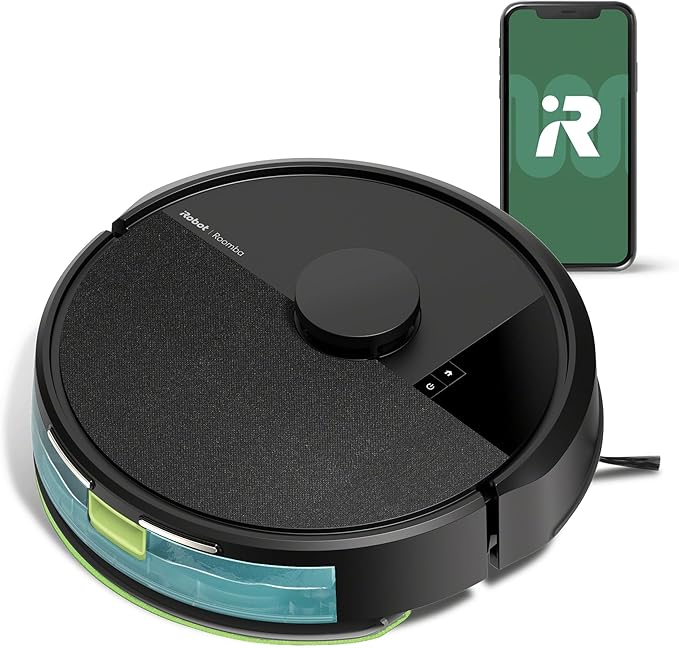
Tackle the perpetual battle of pet hair, dust, and mystery crumbs with the all-new iRobot Roomba 105 Combo Robot Vacuum & Mop. Hey there, I’m your host on Reviews Inside TV—glad you’ve joined us today—to unpack what this combo cleaning marvel is all about.
This compact disk-shaped bot brings 70-times more suction than the old 600-series Roombas, backed by a four-stage system that pairs a multi-surface brush and a corner-targeting edge-sweeper with a reusable microfiber mop pad. It navigates with LiDAR-based mapping, scans your home even in the dark for tidy, systematic passes, and smartly avoids rugs when mopping—no special programming needed. You decide whether it vacuums, mops, or does both, and fine-tune suction strength, passes, and mop solution. Control comes via the Roomba Home app, voice assistants like Alexa/Siri/Google, or a tap on the robot itself.
Right off the bat, setting this fella up was refreshingly straightforward—unbox, charge, connect to my 2.4 GHz network (my phone hopped back to 5 GHz with zero trouble), and follow the intuitive app prompts. Mapping took under ten minutes, and soon it was charting my living room like a champ. I tested it on everything from fine dust to cereal spills, switching between vacuum-only, mop-only, and combo modes. Vacuuming scooped up daily debris effortlessly, though I found the mop didn’t fully handle sticky spills in a single run—it’s solid for maintenance cleaning but you’ll want a manual mop now and then.
Around edges it did tidy up very well—those corner jobs happen. But in particularly grimy areas, the mop left behind streaks until I ran a second cycle. On the plus side, that carpet-avoidance really works, so my area rugs stayed dry without instruction.
I’ve noticed the strengths clearly: it’s reliable for daily upkeep, the app controls are sleek, and LiDAR mapping gives confident, predictable paths. On the flip side, the mop’s scrubbing isn’t transformative compared to mid-range mopping bots, and it can leave behind a bit of residue if over-tasked. That said, those mop shortcomings are fairly subjective—if you mostly need light mopping, it’s more than fine.
Let me throw in a quick thought: if you’ve found value here so far, go ahead, smash that Like button, hit subscribe, and tap the bell so future robot reviews don’t sneak past you—keeps your home—and your cleaning game—sharp.
Now, price/value—this model sits at around $219 for the bot alone, or about $329 with the AutoEmpty dock that holds 75 days of dirt—which edges it into mid-price territory. You get solid build and ease of use, but if you compare with something like the Roborock S8 Plus (~$300) with stronger suction, mopping vibration, and self-emptying dock, that one out-features the Roomba 105 for a similar spend. So the Roomba holds up best if you value the app design, smart rug avoidance, and brand reputation more than raw specs.
Build quality feels trusty—straightforward plastic housing, standard brushes and filters, familiar iRobot durability. No long-term reports yet, but early feedback from owners praises its reliability as a daily companion.
Customer support hasn’t been an active part of my journey—no need so far—but iRobot typically earns good marks for responsive service and parts availability.
Skipping update talk here—nothing critical to mention on firmware.
Wrapping this up: if you’re on the hunt for a user-friendly, LiDAR-equipped vacuum-mop combo that handles regular upkeep, dodges rugs, and fits smoothly into voice and app ecosystems, the Roomba 105 Combo delivers. Just temper expectations on mopping depth. It suits busy homes wanting effortless cleaning cycles more than deep-mop performance.
Thanks for hanging out with me on Reviews Inside TV. You’ll find the link to grab this cleaner down in the comments—drop a question or share your thoughts if you already own one. Goodbye till next time—and remember, inside each review, there’s a little sparkle for your smart home journey.
Available to buy here:


