

Available to buy here:
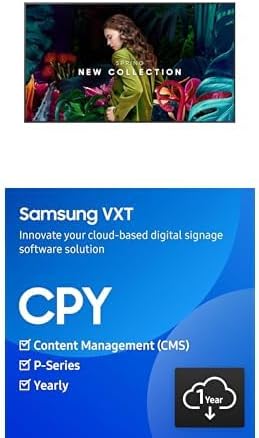
The Samsung 43″ QBC 4K UHD Display + VXT Cloud-Based Digital Signage Player offers a compelling blend of sleek design, cutting-edge technology, and seamless functionality for businesses looking to elevate their digital signage experience. Packed with a range of features, this display stands out as one of the thinnest in Samsung’s UHD lineup, measuring just 28.5mm in depth. The ultra-slim design makes it ideal for spaces where every inch counts. But the QBC is much more than its sleek looks; it’s built to deliver exceptional performance with its Dynamic Crystal Color technology, capable of rendering over a billion shades. This means that every image pops with stunning clarity and depth, whether you’re using it for advertising, informational displays, or content management.
The QBC is powered by Samsung’s Quantum Processor Lite 4K, a key feature that ensures every piece of content is enhanced for sharpness, consistency, and visual impact. This processor works in the background, analyzing and optimizing content to look its best, whether it’s native 4K footage or lower resolution materials upscaled to near-4K quality. The result? A smooth, detailed viewing experience that looks impressive from all angles. Plus, with support for multiple display configurations, you can set up a screen wall, turning multiple QBC displays into one unified digital canvas. This flexibility is key for large-scale installations, where content synchronization across screens is crucial. The ability to easily create and deploy synced playlists to these screens further adds to the convenience, making it easier than ever to deliver a seamless experience across your entire network.
As for the cloud-based VXT content management software, this is a game-changer for those who want to eliminate the hassle of physical media players or sticks. This system allows for instant provisioning and seamless content management without any external hardware. You can assign specific scenarios or tags to different channels, ensuring that your content is always relevant and up-to-date without the need to redistribute everything. This level of control makes the QBC a highly efficient solution for dynamic content creation and scheduling. Another highlight of the QBC is its interactive capabilities, enabling content to change based on touch or UDP events. Whether it’s a touchscreen display that responds to user interaction or a more complex trigger system based on external inputs, the QBC adapts to your needs, allowing for a more engaging and dynamic digital signage experience.
Setting up and using the QBC is relatively straightforward, thanks to its intuitive user interface and cloud-based control. I found that getting the system up and running was easy, and managing content via the cloud was smooth and hassle-free. The ability to sync content across multiple screens without dealing with external devices is a huge time-saver, particularly in business settings where downtime can be costly. During testing, I ran several scenarios, including promotional content in retail settings and informational displays in public spaces, and I was impressed with how well the QBC maintained visual quality and content synchronization. The only potential issue I encountered was with the interactive features—while the touch event trigger worked well, setting up UDP events required a bit more technical know-how. That said, once configured, it was easy to make changes on the fly.
When it comes to the pros, the Samsung QBC stands out for its combination of advanced features and user-friendly design. The ultra-slim profile is a major plus, making it a great choice for businesses with limited space. The picture quality is exceptional, with vibrant colors and deep contrasts, thanks to the Dynamic Crystal Color and Quantum Processor Lite. Additionally, the cloud-based content management system is a real convenience, eliminating the need for additional hardware and streamlining content updates. The flexibility to configure multiple displays as one unified screen or duplicate content across all screens is another major selling point for large installations.
On the flip side, there are a few areas where the QBC could be improved. The interactive content creation is a fantastic feature, but setting up the touch and UDP event triggers might not be as intuitive for users without a technical background. While the overall setup process is easy, getting into the more advanced settings might require some learning. Another downside is the price—while the QBC offers great value in terms of features, it’s definitely on the higher end compared to some other digital signage options. If you’re looking for a simple, budget-friendly solution, this might not be the most cost-effective choice.
In terms of value for money, the Samsung QBC 43″ UHD Display offers a high-end experience that justifies its price tag if you’re looking for advanced functionality, cloud management, and superior image quality. However, for those on a tight budget, there are more affordable alternatives that offer basic digital signage features without the bells and whistles. Products like the LG 43UR640S0UD or the ViewSonic CDE4300 are worth considering, as they provide solid 4K displays at a lower price point. However, if you need the advanced features offered by the QBC—like cloud-based management, interactive content, and seamless multi-screen setups—the extra investment will likely pay off.
The build quality of the QBC is impressive. It feels solid and well-constructed, with premium materials used throughout. The slim design is a testament to Samsung’s attention to detail, and the display itself is sturdy, ensuring durability even in busy environments. As for longevity, it’s hard to predict exactly how the QBC will hold up over time, as it’s a relatively new product, but given Samsung’s reputation for reliability in their commercial-grade displays, it’s safe to expect long-term durability. The QBC’s design also appears to be future-proof, with its ability to handle a wide range of content and display configurations.
In terms of customer support, Samsung is known for providing solid service for its commercial products. While I didn’t need to contact support during testing, their reputation in the digital signage space is strong, and it’s easy to find resources for troubleshooting and setup assistance online. The VXT software is also regularly updated, ensuring that the system stays compatible with the latest devices and software enhancements, making it a reliable choice for businesses looking for a long-term solution.
In conclusion, the Samsung 43″ QBC 4K UHD Display + VXT Cloud-Based Digital Signage Player is a high-performance solution for businesses that need a sleek, versatile, and powerful digital signage display. With its superior picture quality, cloud-based management, and flexible display configurations, it’s ideal for both small and large installations. However, it may not be the best choice for those with a smaller budget or those seeking a simpler, more straightforward solution. Overall, it delivers on its promises and offers excellent value for those in need of advanced digital signage capabilities.
Thank you for watching! If you’re considering the Samsung QBC for your business or organization, feel free to drop your thoughts or questions in the comments. Until next time, keep exploring the best in tech with Reviews Inside TV!
Available to buy here:


