

Available to buy here:
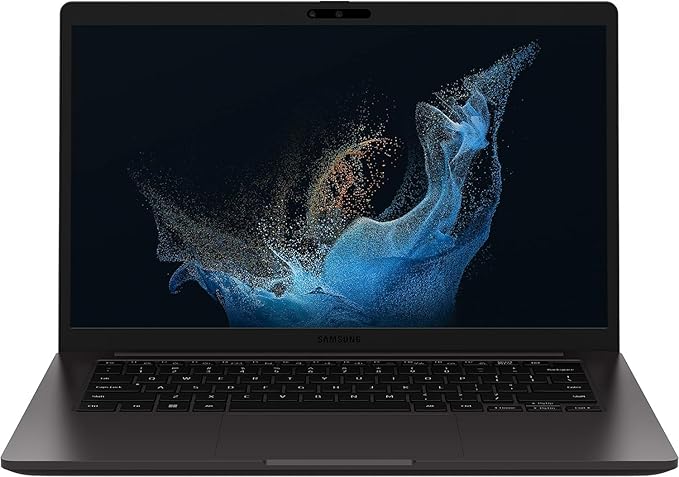
Welcome to “Reviews inside tv.” Today, we’re checking out the Samsung 14″ Galaxy Book2 Business Laptop, model NP641BEF-KA2US. Aimed at business professionals, this laptop promises top-notch security, impressive durability, and solid performance for those on the go. If you’re someone who needs a reliable, secure, and efficient work machine, let’s see if this laptop lives up to the promise.
This device packs a 12th Gen Intel Core i7P processor, which is part of Intel’s vPro platform. Designed with enhanced security and performance in mind, this CPU offers up to 28 watts of power, which strikes a good balance between everyday productivity tasks and some more demanding workloads. It’s built to be secure from the start, with features like a root of trust for BIOS validation and Auto-Recovery to prevent system compromise, ensuring that your business data remains protected.
When it comes to multitasking, the 16GB of RAM in this laptop makes a noticeable difference. For business users, it’s perfect for running multiple apps simultaneously without feeling the lag—whether you’re juggling spreadsheets, emails, or video calls. The 512GB SSD storage provides fast read/write speeds, meaning your data is accessed quickly, which is especially useful when loading large files or software.
Moving on to the display, the 14-inch screen is an IPS panel, offering good color accuracy, though it’s not the most vivid out there. It’s certainly serviceable for office work, presentations, and streaming videos, but don’t expect an OLED or mini-LED level of richness. The anti-glare feature is a nice touch, particularly for work environments with bright lighting. It makes the laptop easier to use in various settings without worrying too much about reflections.
Battery life is always crucial for a business laptop, and the Galaxy Book2 doesn’t disappoint. Thanks to its efficient components, this device offers decent longevity. Under moderate use—think light office work and browsing—you’re looking at around 8 to 10 hours. Heavy tasks will naturally shorten that, but this laptop still should last through a workday with ease. In terms of charging, it’s fairly fast, but it could be a bit more portable for those looking to charge on the go. The laptop weighs in at about 3.08 pounds, making it reasonably light for travel without feeling flimsy.
Now, let’s talk about comfort. The keyboard is comfortable for extended typing sessions. The key travel is solid, and the feedback is just right—no mushiness, but not too clicky either. The trackpad is smooth and responsive, which is a relief for those who don’t carry a mouse everywhere. If you like additional input options, it also comes with a fingerprint reader, which adds another layer of security while being convenient for quick logins.
When it comes to ports and connectivity, this laptop has you covered. It includes USB-A and USB-C ports, an HDMI port, and an SD card reader. These should be more than enough for most business professionals, but it’s worth noting that there’s no Thunderbolt port for those who need ultra-fast data transfer speeds. It also comes equipped with WiFi 6E, which offers incredibly fast and reliable connectivity, especially if your office setup supports it. Bluetooth is also present, ensuring smooth connections with peripherals like headsets and mice.
Thermals are usually a concern with business laptops, but here, Samsung has done a solid job. During light use, the laptop stays cool, but under heavier loads like video editing or extended gaming, the fans kick in and might become noticeable. Don’t expect it to be silent during demanding tasks, though it’s not excessively loud either. The chassis holds up well under pressure, but like most thin laptops, it can get warm during prolonged heavy use.
As for the competition, this model stands strong against other business-oriented devices in its category. Its vPro platform and advanced security features put it ahead of similar models that lack those protections. However, you’ll find that alternatives like the Dell Latitude 7420 or HP Elite Dragonfly might offer slightly better displays or battery life, though they often come at a higher price point.
The Galaxy Book2 is built with durability in mind. Samsung touts its reliability in demanding work environments, and the overall construction feels solid. The magnesium alloy body gives it a premium feel, and the hinge feels strong with no noticeable wobble. It’s a laptop designed for professionals who need a dependable machine for the long haul.
When it comes to value for money, the Galaxy Book2 offers great performance for business users, especially those who prioritize security and productivity over flashy specs. It might not be the best choice for power users or gamers, but it excels in the areas that matter most for professionals. At its price point, you’re paying for solid performance, excellent security features, and a laptop that’s built to last.
So, who is this laptop best suited for? If you’re in a hybrid work environment, need to collaborate remotely, or simply require a machine that can handle business tasks with security as a top priority, the Galaxy Book2 is a strong contender. However, if you’re looking for a high-performance machine for gaming or content creation, this might not be your ideal choice.
Thanks for watching! If you’re interested in the Samsung Galaxy Book2, you’ll find the link in the comments box below. Feel free to share your thoughts if you already own one or ask any questions you have. Until next time, stay productive, and remember, there’s always more to discover inside!
Available to buy here:


