

Available to buy here:
Welcome back to Reviews inside tv, where we bring you honest, in-depth reviews to help you find the right tech. Today, we’re talking about the Samsung Galaxy Chromebook 2, a compact yet powerful device that’s been turning heads with its ultra-thin design and solid performance. But does it really live up to the hype? Let’s dive in and see what this Chromebook has to offer.
The Samsung Galaxy Chromebook 2 is powered by an Intel Core i3 processor, paired with 8GB of RAM and 128GB of storage. For most users, this configuration should be more than enough for light productivity tasks, web browsing, and even some media consumption. But how does it hold up in the real world? Let’s break it down.
Starting with the processor, the Intel Core i3 is a mid-range chip from Intel’s 10th generation. It’s not going to be the powerhouse you’d find in a gaming laptop or high-end ultrabook, but it’s more than adequate for everyday tasks like writing, browsing the web, and watching videos. You won’t have issues with lag when you have a few tabs open, and simple productivity tasks should run smoothly.
The 8GB of RAM is another solid feature here. It’s a nice sweet spot for multitasking on a Chromebook. If you’re someone who likes to have multiple tabs open, this Chromebook can handle that without much slowdown. However, keep in mind that Chrome OS is a bit lighter than Windows or macOS, so the 8GB is probably more than enough for your typical needs. For those who want to store more files locally, the 128GB of eMMC storage won’t be the fastest option. If you do a lot of media-heavy tasks, you might find it a bit limiting, but it does come with the convenience of being fairly cost-effective.
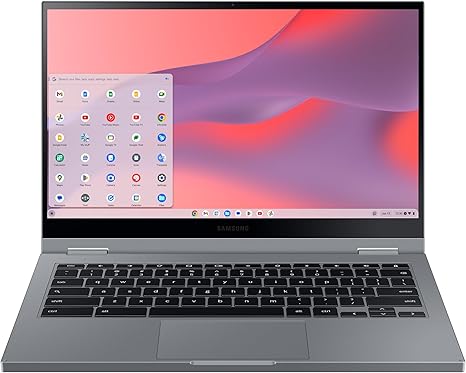
The display is one of the standout features of this Chromebook. It sports a 13.3-inch QLED panel, which is a pretty rare sight on Chromebooks at this price point. The colors pop, and the brightness is decent, sitting at around 300 nits, making it fine for most indoor usage. If you plan to use it outdoors in direct sunlight, you might struggle a bit, but inside, the screen is vibrant, with good contrast and deep blacks, making it a pleasure to use for streaming or watching videos.
Now, onto the battery life. The Samsung Galaxy Chromebook 2 is equipped with a 45.5 Wh battery, which promises to last up to 13 hours on a single charge. In real-world use, expect around 8 to 10 hours of usage, depending on your tasks. That’s a solid battery life for a Chromebook, especially if you’re using it for office work or casual browsing. You won’t have to worry too much about charging during the day if you’re on the go.
One of the reasons this Chromebook is so portable is its slim design. At just 13.9mm thick and weighing only 2.7 pounds, it’s light enough to carry around in a bag all day without it feeling like a burden. The all-metal chassis gives it a premium feel while also providing some durability, though it’s not completely immune to dents or scratches if you’re too rough with it.
The keyboard on the Galaxy Chromebook 2 is pretty comfortable for extended typing sessions. The key travel isn’t as deep as some laptops, but it’s sufficient for most users. The trackpad is responsive, and I found it easy to navigate through tasks without any issues. However, the lack of a backlit keyboard may be a dealbreaker for some, especially if you’re working in dimly lit environments.
On the connectivity side, this Chromebook offers Wi-Fi 6, which is up to three times faster than standard Wi-Fi, ensuring a smooth internet experience. It also has Bluetooth 5.0 for connecting peripherals. As for ports, you’ll get two USB-C 3.2 ports, one USB-A 3.0 port, and a microSD card slot for expanding storage. Unfortunately, there’s no HDMI or Ethernet port, which may limit your connectivity options, but given the nature of a Chromebook, most users won’t miss these features too much.
When it comes to thermals, the Galaxy Chromebook 2 stays relatively cool under light use. You won’t hear the fans running most of the time unless you’re really pushing the system with multiple tabs or demanding tasks. In that case, the fans do kick in, but they’re not overwhelmingly loud. If you’re using the laptop for long periods of time on your lap, it’s comfortable enough, though you may notice some warmth around the keyboard area during heavier workloads.
Now, let’s talk performance. In terms of real-world usage, the Galaxy Chromebook 2 is a solid performer for basic office tasks and media consumption. For productivity, I found that the Intel Core i3 processor handles multitasking and web browsing without much issue. Watching YouTube, streaming Netflix, and working with Google Docs or spreadsheets were all a breeze. If you’re into light photo editing or web design, you’ll find it capable, but this isn’t a machine for heavy video editing or running complex 3D design software.
When it comes to gaming, the Intel UHD Graphics 620 is integrated into the Core i3 processor. It’s not going to handle demanding games, but light gaming such as casual games or older titles will be playable. Expect to run games like Fortnite or League of Legends at lower settings, but you won’t get a smooth experience with graphically intense titles like Cyberpunk 2077 or Call of Duty: Warzone.
As for the battery life, the Samsung Galaxy Chromebook 2 shines here with its ability to last through a full workday, but heavier tasks will naturally drain the battery faster. If you’re watching movies or streaming music, expect longer battery life, but if you’re working with multiple tabs or video calls, you’ll need to keep an eye on your charging.
For users who need a lightweight, portable laptop for day-to-day tasks, this Chromebook is an excellent choice. It’s well-built, looks sleek, and performs decently for light office work, streaming, and casual use. But if you’re someone who needs to do heavy video editing, gaming, or work with high-end applications, you might want to look elsewhere.
In terms of value for money, the Samsung Galaxy Chromebook 2 offers solid performance, a great display, and decent battery life, all at a reasonable price. While it may not have the raw power of more expensive laptops, it definitely punches above its weight for everyday tasks.
When compared to other Chromebooks in its price range, like the Lenovo Chromebook Flex 5, the Galaxy Chromebook 2 wins on display quality and design, but the Lenovo might offer better overall performance for the price. It’s a great machine for light-to-medium work, but if you’re a heavy user, you may find yourself looking for more power.
To wrap up, the Samsung Galaxy Chromebook 2 is a great choice for students, casual users, or anyone who needs a portable laptop for everyday use. It offers strong performance for web browsing, office work, and media consumption, and its design and display make it stand out from the crowd. But if you’re looking for something that can handle more demanding tasks like gaming or video editing, it might not be the right fit.
Thank you for watching! If you’re interested in the Galaxy Chromebook 2, the link to purchase can be found in the comments box below. Let us know if you’ve already used this laptop or have any questions. Until next time, stay tech-savvy!
Available to buy here:


