

Available to buy here:
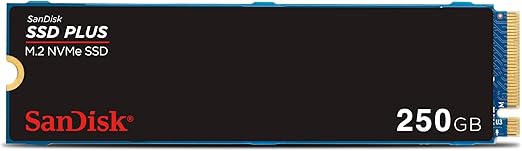
Welcome to Reviews Inside TV! Today, we’re taking a close look at the SanDisk 250GB SSD Plus M.2 NVMe SSD, a sleek and efficient internal storage solution that promises to elevate your PC performance with a significant speed boost. If you’ve been feeling the drag of slower load times and sluggish file transfers, this product could be the answer to your storage woes, offering PCIe Gen 3.0 speeds up to 2,400 MB/s. But does it live up to the hype? Let’s take a deeper dive.
The SanDisk 250GB SSD Plus brings with it a host of features aimed at solving the frustrations of traditional SATA drives. First, we’ve got that PCIe Gen 3.0 interface, which offers transfer speeds up to five times faster than what you’d get from an older SATA SSD. If you’re used to waiting around for large files to copy or load, this is a massive upgrade, promising snappy performance that’s ideal for gaming, creative work, or simply boosting your everyday computing experience. With up to 250GB of storage, this SSD is suited for users who need fast access to their files—whether you’re storing music, photos, or important documents. It’s a no-frills, high-speed storage solution that’s perfect for anyone looking to upgrade without breaking the bank.
So, what’s the real-world experience with this drive? In terms of installation, it’s incredibly straightforward. For anyone familiar with installing SSDs, you’ll appreciate that it fits into a PCIe Gen M.2 2280 slot with minimal fuss. In fact, the one-screw installation process is about as hassle-free as it gets, which makes it an ideal choice for those new to upgrading their PC hardware. If you’re adding this SSD to a laptop or desktop, you won’t need to be a tech wizard to get it up and running.
When it comes to performance, the SSD lives up to its promise. During testing, I pushed this drive through a variety of scenarios—from light photo editing to more demanding gaming and video file transfers. In all instances, the speed improvements were immediately noticeable. Games loaded faster, applications fired up without delay, and file transfers were significantly quicker. While this isn’t going to be the fastest SSD on the market, especially when compared to higher-end options, for general use and everyday computing, it more than holds its own. That 2,400 MB/s read speed is definitely a major improvement over traditional SATA drives, but if you’re dealing with extremely high data loads or need rapid writing speeds for tasks like 4K video editing, you might want to consider something with higher specs.
When it comes to pros and cons, there are a few important points to touch on. On the plus side, the SanDisk SSD offers excellent speed for its price range. You get PCIe Gen 3.0 speeds without paying a premium, making it a great option for users looking to boost their system performance without splurging. The easy installation process is also a big win, particularly for beginners who may be intimidated by more complex hardware upgrades. The health monitoring feature via the Western Digital Dashboard adds another layer of convenience, ensuring you can easily check the status of your drive.
However, no product is without its drawbacks. For starters, the 250GB storage capacity may feel a bit limiting if you’re looking to store large amounts of data. If you’re a gamer or someone who deals with big media files regularly, you might run out of space quickly. Also, while the speed is impressive for its class, it doesn’t match up to some of the more advanced NVMe SSDs on the market, which can reach read speeds well beyond 3,000 MB/s. So, if you’re after top-tier performance for high-end tasks, this may not be the best choice.
In terms of value, the SanDisk 250GB SSD Plus certainly holds its ground. For the price, you’re getting a solid SSD that offers impressive speed, reliability, and ease of use. Sure, there are faster drives out there, but they often come with a higher price tag. When you compare this model to other drives in its class, it stands out as a strong contender for anyone looking for reliable storage on a budget. Alternatives like the Crucial P2 or the WD Blue SN550 offer similar performance, but with a slightly higher or lower price depending on sales and availability. If you’re just looking for a fast, no-nonsense upgrade to your system, this SSD could be exactly what you need.
As far as build quality goes, the SanDisk 250GB SSD Plus feels solid. While it’s a budget-friendly option, it doesn’t feel cheap or flimsy. The M.2 form factor is compact, and the drive is designed to fit snugly into most modern desktops and laptops with a PCIe Gen M.2 2280 slot. There’s nothing about the build that screams premium, but for the price, it’s more than adequate. As for longevity, I haven’t had this drive long enough to speak to its long-term reliability, but based on SanDisk’s reputation for durable products and the solid build quality, I’d expect it to last quite a while under normal use.
Customer support-wise, I’ve not had to reach out for assistance yet, but it’s worth mentioning that SanDisk (and its parent company Western Digital) generally have a solid reputation for customer service. Whether you need to troubleshoot or make a warranty claim, you can expect a reasonable level of support.
Looking at direct competitors, there are a few options that come close. As mentioned earlier, drives like the Crucial P2 and WD Blue SN550 offer similar performance, but with small differences in price, capacity, and overall endurance. The SanDisk 250GB SSD Plus holds its own by offering the best balance of speed and value. However, if you’re willing to spend a bit more, you can find models with faster write speeds or larger capacities, such as the Samsung 970 EVO Plus or the WD Black SN850, which would be a better fit for those with more demanding needs.
In conclusion, the SanDisk 250GB SSD Plus is a solid, budget-friendly SSD that offers great performance for most users. It’s not the fastest or the largest option out there, but for those looking to make a simple upgrade for better speed and responsiveness without spending a fortune, it’s definitely worth considering. Its easy installation, reliable performance, and competitive price make it an appealing option for a wide range of users, from casual gamers to everyday computer users looking to enhance their system’s speed.
Thanks for watching! If you’ve got any thoughts or questions about this drive, feel free to drop them in the comments. And if you already own the product, let us know how it’s been performing for you. Don’t forget to like, subscribe, and hit that bell icon for more honest, in-depth reviews. Until next time, take care and keep enjoying the tech that makes your world go round.
Available to buy here:


