

Available to buy here:
Welcome to Reviews Inside TV, where we bring you the latest and greatest in tech and gadgetry! Today, we’re exploring the TP-Link Tri-Band BE9300 WiFi 7 Router, also known as the Archer BE550. This router promises lightning-fast speeds, a robust feature set, and an all-around stellar experience for users who demand the best in home networking. Let’s see if it lives up to the hype.
The TP-Link Archer BE550 is a powerhouse, designed to handle the most demanding online activities. It boasts Tri-Band WiFi 7 with speeds up to 5760 Mbps on the 6 GHz band, 2880 Mbps on the 5 GHz band, and 574 Mbps on the 2.4 GHz band. These specs are impressive, but let’s break down what that means in real-world use. Multi-Link Operation, Multi-RUs, 4K-QAM, and 320 MHz channels all combine to deliver a smoother, more reliable connection, especially in crowded networks. So whether you’re streaming in 4K, gaming, or downloading massive files, the Archer BE550 is built to keep up.
The first thing to note is its EasyMesh feature. For those unfamiliar, EasyMesh allows you to expand your Wi-Fi network seamlessly by adding compatible routers, range extenders, and powerline adapters. This is a game-changer for anyone with a larger home or those who experience dead zones. Gone are the days of slow speeds in certain corners of the house, or worse, a total lack of signal. Simply add another EasyMesh device, and you’re good to go. This is particularly useful for streaming 4K or 8K content or playing VR games where you need uninterrupted connectivity.
When it comes to performance, TP-Link has taken care to future-proof the Archer BE550. It features a 2.5G WAN port and four 2.5G LAN ports. This is a huge step up from the typical gigabit ports found in most routers, enabling ultra-fast speeds even when multiple devices are connected at once. The 2.5G ports are particularly useful for handling heavy tasks like gaming, video editing, or downloading large files without a hiccup. So, if you’re looking for a router that can handle a high-performance network and prepare your home for faster internet speeds, this one is a solid choice.
Setting up the Archer BE550 is a breeze. With TP-Link’s Tether app, the process takes just minutes. The app is available on both Android and iOS, and it guides you through the setup and management process. This makes it easy for both tech novices and enthusiasts to get up and running without any hassle. But setup is just the beginning—the Archer BE550 also offers smart control through Amazon Alexa or Google Assistant. Whether you’re toggling settings, checking the network status, or managing devices, you can do it all with your voice.
Now, let’s talk about the pros and cons. Starting with the good, the Archer BE550’s speed is definitely its standout feature. With those blistering-fast speeds and the ability to connect multiple devices simultaneously without a noticeable drop in performance, it’s perfect for large households or homes with multiple users. The range, thanks to the six internal antennas and Beamforming technology, is impressive too, reducing interference and delivering a strong signal even in tricky spots. And let’s not forget the added security features—TP-Link HomeShield gives you real-time IoT protection, robust parental controls, and even a private IoT network to keep your smart devices safe from cyber threats.
On the flip side, it’s not all perfect. The price of the Archer BE550 is on the higher end, so it may not be the best option for budget-conscious buyers. Additionally, while the EasyMesh feature is convenient, you’ll need to invest in additional TP-Link products to get the most out of it. Also, while the router has great overall compatibility, certain features, such as VPN support, might be overkill for users who just need a basic connection for everyday tasks like browsing and social media.
Speaking of VPN, the Archer BE550 supports both VPN client and server, meaning you can connect to remote servers securely without installing VPN software on each device. This is a significant advantage if you prioritize privacy and security but could be seen as excessive if you don’t plan to use a VPN regularly.
In terms of value for money, the Archer BE550 is certainly a high-end product. While it might be a bit pricier than some other routers on the market, the performance, advanced features, and future-proofing make it a worthwhile investment for serious users. When compared to other Wi-Fi 7 routers in the same price range, like the Asus RT-AX89X or the Netgear Nighthawk RAXE500, the Archer BE550 offers competitive specs and features, but it may lack some of the more specialized functions that others provide, like additional USB ports for storage or advanced customization options.
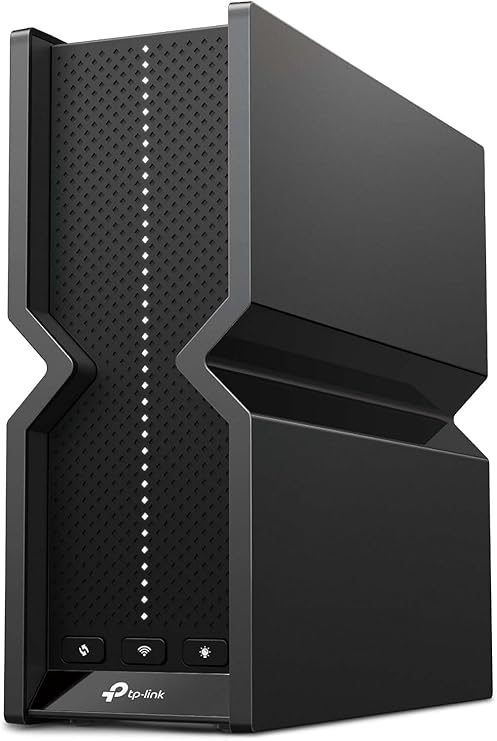
As for build quality, the TP-Link Archer BE550 feels solid and well-built. It’s compact enough to fit into most home setups but also durable, with sturdy antennas that won’t easily break or bend. While there’s no extensive long-term reliability data available yet, TP-Link has a strong reputation for creating durable networking products, so I’d expect this router to hold up well over time.
On the customer support side, TP-Link offers free expert support, which is always a bonus. While I didn’t personally need to contact support, TP-Link is known for providing helpful and responsive service. If you run into any issues or have questions, you can count on them to provide assistance, either through their website or via direct customer support.
To sum up, the TP-Link Archer BE550 WiFi 7 Router is a high-performance device packed with features that make it ideal for power users. With its incredible speed, range, security features, and future-proofing capabilities, it’s a router that can handle everything from 4K streaming to high-speed gaming. While it may be overkill for casual users or those on a tight budget, anyone who needs a robust, reliable home network will find plenty to love here. If you’re serious about your home network and want something that can handle anything you throw at it, this router is worth considering.
If you’ve enjoyed this review, don’t forget to hit the like button, subscribe, and tap the bell icon so you never miss out on more detailed tech reviews like this one. And as always, if you have any questions or thoughts about the TP-Link Archer BE550, drop them in the comments below. Thanks for watching, and good bye till next time. Keep your Wi-Fi fast and your connections secure—this is Reviews Inside TV!
Available to buy here:


