

Available to buy here:
Welcome to “Reviews inside tv,” your trusted space for in-depth tech insights. Today, we’re examining the TP-Link Archer GE400 Dual-Band WiFi 7 Gaming Router, designed specifically to elevate your gaming experience. Whether you’re a casual gamer or a competitive pro, this router promises to give you an edge with its multi-gigabit speeds, gaming-specific features, and cutting-edge WiFi technology. So, let’s see if it can really live up to the hype.
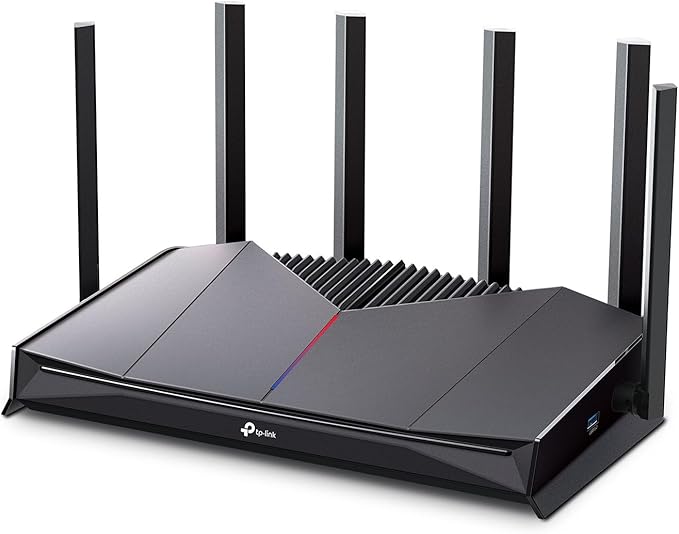
The Archer GE400 is a dual-band gaming router that supports WiFi 7 technology, offering blazing-fast speeds of up to 5765 Mega bits per second on the 5 GHz band and 688 Mega bits per second on the 2.4 GHz band. It comes with six high-performance antennas and utilizes Beamforming technology, which helps optimize signal strength by directing the WiFi signal to areas where it’s needed most. This router is designed to cover up to 2,600 square feet, making it ideal for large homes or multi-room gaming setups. It can handle up to 90 devices simultaneously, ensuring that even if your whole family is online, your gaming sessions won’t be interrupted.
In terms of wired connections, the Archer GE400 is equipped with a range of multi-gigabit ports, including two 2.5 Gbps ports and three 1 Gbps LAN ports, providing you with ultra-fast, stable connections for high-demand devices like gaming PCs or consoles. For the best experience, you’ll need a compatible multi-gig modem to fully take advantage of the router’s capabilities. The router also features a dedicated gaming port, which ensures that gaming traffic is prioritized, reducing latency and helping prevent lag during intense gaming sessions.
As for security, TP-Link has implemented its HomeShield service, which offers a suite of features such as network security, quality of service management, and basic parental controls. The Archer GE400 also integrates with TP-Link’s EasyMesh system, allowing you to expand your WiFi coverage with other compatible devices, ensuring a seamless connection throughout your home. However, it’s worth noting that this router is not compatible with TP-Link’s Deco mesh system.
Setting up the Archer GE400 is straightforward, thanks to the Tether app, available on both Android and iOS. The app allows you to manage your network settings, monitor your performance, and even control your RGB lighting to customize your gaming setup. The router’s intuitive dashboard provides a game panel where you can prioritize gaming traffic, see which devices are benefiting from accelerated performance, and tweak settings for optimal gameplay.
In terms of real-world testing, I found that the Archer GE400 performed exceptionally well, especially in reducing lag during multiplayer gaming sessions. The dedicated gaming port and game acceleration feature worked as advertised, with noticeable improvements in responsiveness. Streaming, browsing, and even large file transfers were smooth, with no noticeable drops in speed or performance. The coverage was solid throughout the house, even in areas that typically struggle with signal strength.
That being said, there are a couple of areas where the Archer GE400 could use some improvement. While the overall performance is top-notch, the lack of a 6 GHz band means that this router won’t support the full range of WiFi 7 capabilities that some other routers might offer. If you’re looking for the latest and greatest in terms of WiFi standards, this might be a limiting factor. Additionally, while the setup process is easy, the router’s reliance on the Tether app for full functionality may be a downside for users who prefer traditional web interfaces or want to avoid additional apps.
When we talk about value for money, it’s important to weigh the features against the price. The Archer GE400 sits in the premium segment, and while it offers great performance, it’s important to consider whether you really need all the gaming-focused features it offers. If you’re a serious gamer who spends hours in online matches or you have a household with multiple heavy internet users, the Archer GE400 is worth the investment. However, for those who primarily use their internet for casual browsing or streaming, there are more affordable options that might meet your needs without the additional gaming-specific features.
Comparing it to some direct competitors, you’ll find that many routers in this price range, like the ASUS ROG Rapture GT-AX6000 or the Netgear Nighthawk RAXE500, offer similar multi-gigabit speeds and gaming features. However, the Archer GE400 stands out with its dedicated game acceleration, prioritized traffic features, and the ability to handle up to 90 devices without breaking a sweat. On the downside, the absence of a 6 GHz band and some of the more advanced WiFi 7 capabilities could make competitors a better choice for those seeking the latest and most comprehensive features.
In terms of build quality, TP-Link has delivered a solid device with durable materials and a modern design. The six antennas and the overall form factor feel well-constructed, and the router doesn’t feel flimsy at all. While long-term data on the Archer GE400 is still limited, TP-Link’s reputation for reliability in the networking space gives confidence that this router will hold up over time.
As for customer support, TP-Link is known for offering solid customer service, though I didn’t have to interact with them directly during my testing. They do offer a range of resources online, including troubleshooting guides, FAQs, and a community forum, so you should be able to find help if needed.
Now, before I wrap up, don’t forget to like this video, subscribe to our channel, and hit the bell icon to stay updated on all our reviews. Your support helps us bring more detailed, honest reviews to the table.
So, what’s the final verdict on the TP-Link Archer GE400? Overall, it’s a high-performance router that’s perfect for gamers looking for low-latency, high-speed internet and extensive coverage. It’s packed with features like dedicated gaming ports, traffic prioritization, and robust security. However, its lack of a 6 GHz band and the reliance on the Tether app might not appeal to everyone. For the price, it offers good value, but it’s best suited for those who need dedicated gaming performance and have a multi-device home network.
Thanks for watching! If you have any questions or if you already own the Archer GE400, feel free to leave a comment down below. Don’t forget to check the comments box for the link to grab one for yourself. Goodbye until next time, and remember—stay connected with “Reviews inside tv,” where we always bring the latest tech straight to your screen!
Available to buy here:


