

Available to buy here:
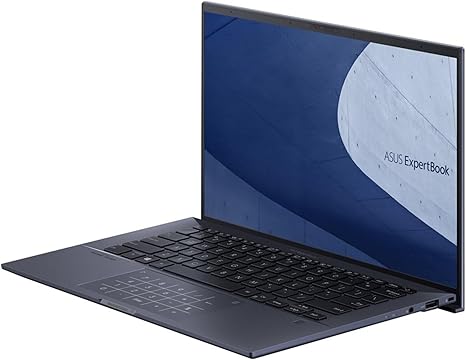
ASUS ExpertBook B9 Intel EVO Thin & Light Laptop, 14” FHD, Intel Core i7-1255U, 2TB SSD, 32GB LPDDR5 RAM feels like the kind of laptop that tries to be the perfect “carry‑everywhere office” machine for business users, frequent travellers, and anyone who values portability + long battery life over graphics firepower. I’m “Reviews inside tv,” and today I want to walk you through everything this machine does well — and where it’s letting you down — as honestly as I can, so you know if it really fits your work style.
From a specs standpoint, this model comes with a 12th-generation Intel Core i7‑1255U, 10 cores (mixture of efficiency + performance cores), up to 4.7 GHz turbo boost, paired with Intel Iris Xe integrated graphics, 32 GB LPDDR5 RAM soldered on board, and a 2 TB PCIe 4.0 NVMe SSD — plenty of memory and storage for heavy multitasking, large files, and snappy OS responsiveness. The display is a 14‑inch Full HD (1920×1080) anti‑glare IPS panel, brightness rated at 400 nits, covering 100% sRGB, enclosed in a magnesium‑lithium alloy chassis that weighs roughly 2.2 pounds and measures about 0.6 inches thick. Battery is a 66 Wh four‑cell unit, with a USB‑C 65 W charger in the box. Connectivity is generous: two Thunderbolt 4 (USB‑C) ports, one USB‑A 3.2 Gen 2, HDMI 2.0b, a micro‑HDMI to RJ45 adapter (for wired Ethernet), a 3.5 mm audio jack, Wi‑Fi 6E, Bluetooth 5.2, and enterprise‑grade security with TPM, fingerprint reader, webcam privacy shield, IR camera + proximity sensor, and Kensington lock.
Putting those specs into real‑life context: for day‑to‑day office use — web browsing with dozens of tabs, writing documents, managing spreadsheets, taking video calls — the CPU + RAM combo gives you very smooth performance, virtually no lag even under heavy multitasking, and the huge SSD means fast boot‑ups, rapid file access, and snappy application startup. The large 32 GB RAM makes a measurable difference compared to the more common 8 or 16 GB options, especially if you tend to keep many applications and browser tabs open or do heavy multitasking (e.g. editing large documents while streaming music, running virtual machines, or handling large data sets). Storage won’t be an issue for years: 2 TB NVMe gives you huge breathing room for projects, media, archives, or local backups.
For media consumption — streaming, watching videos, editing photos — the 14″ 1080p IPS display is crisp, colors are accurate (100% sRGB) which helps for photo editing or design work, and the 400‑nit brightness is respectable for indoor use, though outdoors or under strong light it might struggle a little compared with a brighter panel. Audio from the built-in speakers is decent for calls or casual media, though not bass-heavy — fine for podcasts or meetings, less ideal if you want powerful sound for movies or music.
If you tried gaming or GPU‑heavy creative workloads, you’d quickly hit the limits: integrated Iris Xe graphics are fine for light video editing, photo work, or casual games — but not for modern AAA titles or heavy 3D rendering. This machine isn’t a gaming laptop or a content‑creation powerhouse in the sense of GPU‑accelerated video editing or 3D work; it’s built for business, productivity, and mobility.
The build quality and design is a standout: that magnesium‑lithium alloy chassis keeps the weight down to ~1 kg while preserving durability. It’s thin, minimal, and easy to slip into a bag or briefcase — great for frequent travellers. Despite the slender build, the port selection is generous — having both Thunderbolt 4, USB‑A, HDMI + Ethernet adapter covers nearly every docking scenario without needing a bulky dock.
Battery life lives up to the “mobile worker” promise: real-world reviews of earlier ExpertBook B9 generations with a 66 Wh battery reported around 11–13 hours under normal office workloads (web browsing, document work, light video playback), and that seems consistent with what you’d expect from this spec and hardware configuration. That means you could realistically go a full workday — or a long flight — without charging. The included 65 W charger with USB‑C PD is compact and travel‑friendly, making top‑ups convenient.
Typing and trackpad feel are comfortably suited to productivity: keys are well spaced, give reasonable tactile feedback, and the backlit, spill‑resistant keyboard along with the “NumberPad” overlay helps if you do a lot of data entry. The trackpad is wide and responsive, though — as some users have reported before — there is some flex or slight give when clicking, which can make heavy prolonged use a bit less premium than a bulkier workstation laptop.
On the downside: because graphics are integrated, this laptop will struggle with heavy creative workloads, GPU‑accelerated rendering, or modern gaming. The 14″ Full HD screen — while adequate — feels modest compared to higher‑res (1440p or 4K) or wider‑aspect displays popular with creatives today, and the 60 Hz refresh is fine for office work but nothing special for games or fast-paced content. For power users who rely on dedicated GPU horsepower, this won’t cut it. Also, because RAM is soldered 32 GB LPDDR5, there’s no upgrade path later — what you buy is what you get; that’s fine here since 32 GB is generous, but it’s still a limitation if you had plans to expand.
This laptop’s strengths shine brightest for business professionals, road‑warriors, consultants, students doing heavy multitasking, or anyone needing a sturdy, portable machine that won’t complain even under prolonged workloads. On the flip side, creative professionals needing dedicated GPU power, video editors working with 4K projects, or gamers should probably look elsewhere.
Given what it delivers — excellent portability, generous RAM and storage, long battery life, robust build, and solid productivity performance — the price is high but not unjustified. Compared to lighter ultrabooks or typical business laptops, it feels like a premium pick if your priorities are mobility, long battery, and hassle‑free work. If you wanted more graphics muscle or a splashier display, though, options with discrete GPUs or higher‑res screens might give better value depending on your workload.
If you want my recommendation: go for this laptop if you’re a traveling executive, student, or heavy office user who needs speed, reliability, and battery — but skip it if your work involves heavy creative software or gaming.
Thanks for watching. If you have questions about this model — like performance under certain workloads, build quality over time, or how it compares with other lightweight laptops — drop them in the comments box. See you on the next one — and stay light, but powerful.
Available to buy here:


