

Available to buy here:
Welcome to “Reviews inside tv.” Today, we’re checking out the Apple 2023 MacBook Air with the M2 chip, a laptop that promises power, portability, and impressive display quality. With a 15.3-inch Liquid Retina display, 16GB of unified memory, and the new M2 chip, it’s clear that Apple is targeting users who want a device that’s as sleek as it is functional. But does it live up to the hype? Let’s take a closer look.
The MacBook Air features Apple’s M2 chip, which combines an 8-core CPU and a 10-core GPU. This combination is perfect for light to moderate productivity tasks like web browsing, word processing, and video calls, but it also packs a punch for creative workloads. Whether you’re editing photos in Adobe Photoshop, working with video in Final Cut Pro, or even gaming on the go, the M2 handles these tasks smoothly, making it a versatile choice. Paired with 16GB of unified memory, this laptop offers great multitasking potential, allowing you to run multiple apps at once without feeling the drag. In terms of storage, it comes with a 256GB SSD, which is fast and provides plenty of room for most users, but if you’re a heavy media creator, you may find yourself wanting more.
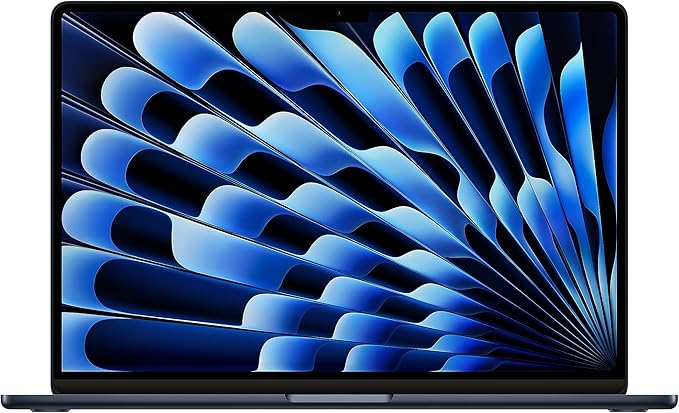
When it comes to display quality, the MacBook Air doesn’t disappoint. The 15.3-inch Liquid Retina screen offers a sharp resolution with 500 nits of brightness, ensuring vibrant and detailed visuals. The wide P3 color gamut and support for one billion colors make it an excellent option for creators who need accurate color reproduction. Whether you’re watching movies, editing photos, or working on presentations, the screen delivers a rich experience. But it’s not just the display that stands out—this MacBook Air also boasts impressive battery life. With up to 18 hours of use, it’s perfect for those long days at the office or in class. You can stream videos, work on documents, or browse the web without constantly needing to search for an outlet. And with the power-efficient M2 chip, even demanding tasks won’t drain the battery quickly.
Now, one of the standout features of this MacBook Air is its fanless design. That’s right, no fans, no noise. Whether you’re working on a spreadsheet or rendering a video, the MacBook Air stays completely silent, making it ideal for quiet environments like libraries or coffee shops. And because it runs without a fan, you’ll find that the MacBook Air remains cooler to the touch, even under load. This contributes to a more comfortable typing experience and allows you to use the laptop on your lap without discomfort.
As for ports and connectivity, the MacBook Air offers a MagSafe charging port, two Thunderbolt 3 ports, and a headphone jack. While this is sufficient for many, some users may miss the inclusion of additional ports, like USB-A or an SD card reader. But with Thunderbolt 3, you can easily connect to external monitors, docks, and other peripherals. Wi-Fi 6 ensures fast and stable internet connections, and Bluetooth 5.0 is perfect for wireless accessories.
Typing on the MacBook Air is a pleasant experience, thanks to its well-spaced keys and solid key travel. The keyboard is quiet but responsive, making it suitable for long typing sessions. The trackpad is large, accurate, and supports a wide range of gestures, enhancing productivity and ease of use. The only real downside to the keyboard is that, like many modern laptops, it doesn’t have a dedicated number pad, which might be inconvenient for users who do a lot of number-heavy work.
On the thermals front, the MacBook Air’s fanless design means it stays quiet, but it does get warm under heavy loads. While this doesn’t cause any thermal throttling or significant performance drops, you will notice the chassis heating up if you push the laptop hard with prolonged tasks like video editing or running multiple heavy apps. Fortunately, the MacBook Air still performs well enough in these scenarios to make it a solid choice for most users.
The MacBook Air’s build quality is top-notch, with its durable aluminum enclosure that’s made from 100 percent recycled material. The laptop is incredibly thin and lightweight, making it easy to carry around all day without feeling weighed down. At just 3 pounds, it’s perfect for students, office workers, or anyone who needs a portable device that can handle everyday tasks without compromising on performance.
Battery life is one of the MacBook Air’s strongest points. You can expect up to 18 hours of usage, depending on the tasks you’re doing. In light office work or media consumption, you can easily get through a full day without needing to plug in. For more intensive tasks like video editing, the battery life may decrease, but it’s still impressive considering the power it delivers.
In terms of real-world performance, this MacBook Air excels at productivity tasks. Whether you’re browsing the web, working on documents, or handling multiple spreadsheets, it’s quick and responsive. For media consumption, the high-resolution display, coupled with the six-speaker system and Spatial Audio, delivers a fantastic experience. Streaming movies, shows, or even music sounds great, and the visuals are crisp and vibrant.
For creators, the M2 chip’s GPU provides solid performance in video and photo editing apps like Final Cut Pro and Adobe Photoshop. While it’s not a dedicated gaming laptop, you can still play casual titles or older games on this machine at decent settings. Just don’t expect it to handle graphically demanding AAA games at high settings.
As far as portability goes, the MacBook Air is incredibly light and thin. It fits easily in most backpacks or bags, making it a great option for frequent travelers. And the silent design and long battery life mean you can work from virtually anywhere without disruption.
Now, if you’re looking for alternatives in this price range, you might consider the MacBook Pro 13-inch with the M2 chip, which offers slightly more power but is more expensive and comes with a fan that generates noise under load. Alternatively, Windows-based laptops like the Dell XPS 13 or HP Spectre x360 offer similar performance but lack the MacBook’s seamless integration with the Apple ecosystem.
In conclusion, the Apple 2023 MacBook Air with M2 chip is an impressive, well-rounded laptop. It’s perfect for students, office workers, and creators who need a powerful yet portable device. While it might not be ideal for hardcore gamers or users who need more ports, it’s a solid choice for most people. With its stellar battery life, stunning display, and fanless design, it provides great value for money. If you’re in the market for a lightweight, powerful laptop that can handle everyday tasks and more, the MacBook Air is worth considering.
Thanks for watching, and don’t forget to like, subscribe, and hit the bell icon for more reviews. If you’re interested in the MacBook Air, the link to grab it is in the comments below. Got questions or your own experience with the MacBook Air? Drop a comment, and let’s chat. Until next time, this is “Reviews inside tv,” where we keep it techy, but always friendly!
Available to buy here:


