

Available to buy here:
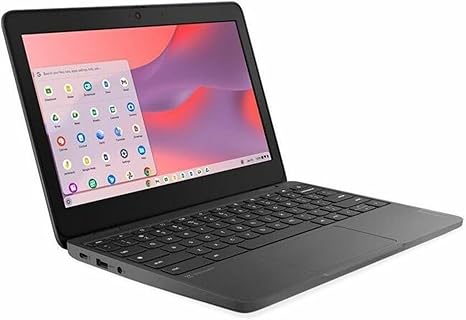
Welcome to “Reviews inside tv,” where we break down the latest tech and make sure you’re getting exactly what you’re looking for. Today, we’ve got a Chromebook that’s made to keep things simple, efficient, and reliable—the Lenovo 100e Chromebook Gen 4. With a compact 11.6-inch display, an Intel N-Series N100 processor, and a battery life that stretches up to 12 hours, this model seems perfect for those who need a lightweight, everyday device for school or light office work. But does it deliver on those promises? Let’s take a closer look.
Let’s start with the specs: The Lenovo 100e Chromebook Gen 4 packs 8 GB of RAM and 64 GB of flash storage. This setup should be enough for most daily tasks, like web browsing, document work, or watching videos. The Intel N100 processor, a low-power chip designed for efficiency, is paired with integrated graphics—so you won’t be running any high-end games, but it’ll do just fine for typical productivity work. The 11.6-inch HD display offers a resolution of 1366 x 768, which isn’t groundbreaking, but it’s perfectly fine for getting things done on the go. Color accuracy and brightness won’t blow you away, but the screen is vibrant enough for most daily use.
Now, what about battery life? At 12 hours, this Chromebook will easily get you through a full work or schoolday without needing to plug in. Whether you’re taking notes, answering emails, or watching videos during your breaks, you’re not likely to run out of power anytime soon. The lightweight build and compact size make it easy to throw in a bag, which is a huge plus for anyone on the go. You’ll barely notice it’s there.
But how does this device feel when you’re actually using it? For the basics, it handles web browsing with multiple tabs open, document editing, and light media consumption with ease. The keyboard feels decent for the price range, with good key travel and a layout that’s suitable for typing long essays or emails. The trackpad is responsive and accurate, though don’t expect the kind of smoothness you get on higher-end laptops. The fan is almost non-existent in regular use, which is great for a more peaceful work environment.
When it comes to performance, the Lenovo 100e doesn’t promise much in terms of heavy multitasking or creative workloads. The 8 GB of RAM is solid for standard tasks, but the limited storage and the Intel N100 CPU will definitely show their limits if you try to push the system too hard. For light photo editing, streaming, or simple spreadsheet work, you’ll be fine, but anything more intensive might cause some slowdowns.
As for the display, it’s a decent 1366 x 768 HD panel. The brightness levels are serviceable for indoor use, but don’t expect to use it in direct sunlight comfortably. The screen itself offers decent color reproduction for everyday tasks, but it’s not a powerhouse for watching movies or designing visuals. It’s built for productivity, not media consumption.
Thermals are another strong point for this Chromebook. The fan doesn’t kick on often, and the chassis stays cool under light use. You won’t feel the heat building up on your lap, which is a relief during longer typing sessions. Under more intensive tasks, like multiple tabs or video playback, the laptop remains mostly silent, and the cooling system keeps things at a comfortable level.
One area where this Chromebook truly shines is in its portability. Weighing in at just over 2.5 pounds, it’s easy to take anywhere without adding much bulk to your bag. The build quality reflects its price, with a plastic chassis that’s sturdy enough to survive the occasional bump or drop, but don’t expect the premium feel you get with higher-end devices. The 11.6-inch size makes it compact and easy to maneuver, which is perfect for students who need something light and functional for note-taking or schoolwork.
As far as connectivity goes, you’ve got the essentials covered: two USB-C ports, a USB-A port, an HDMI port for connecting to external displays, and a headphone jack. There’s no Thunderbolt or SD card reader, so you won’t be doing any heavy media transfers or hooking up external peripherals easily. The Wi-Fi and Bluetooth support here are good for most scenarios, with Wi-Fi 6 being the latest standard for smooth internet browsing.
Battery life, as mentioned earlier, is excellent, easily lasting through an entire workday. With 12 hours of runtime, you’ll find yourself needing to charge only once a day, even with moderate usage. When it comes time to plug in, the charging speed is quick enough to get you back to work without much delay, but don’t expect ultra-fast charging speeds.
The Lenovo 100e Chromebook Gen 4 is aimed squarely at the education and basic productivity market. For students or casual office users, it’s an affordable, reliable option that delivers exactly what it promises. You’re not getting high-end power or premium features, but for everyday tasks like note-taking, web browsing, and video conferencing, it’s more than capable.
That being said, there are some areas where it falls short. The screen resolution could be better, the storage space is on the lower end, and heavy multitasking can strain the system. But if your needs are modest, this Chromebook is a solid choice at a very reasonable price.
In terms of value for money, this Chromebook is a winner for those looking for a budget-friendly, portable device that gets the basics right. If you’re looking for something with a more powerful CPU or better screen for media consumption, you might want to look elsewhere, but for productivity-focused tasks, it does the job well.
For those considering alternatives in this price range, devices like the Acer Chromebook 11 or the HP Chromebook 11 might offer similar specs, but the Lenovo stands out for its long battery life and compact design.
The build quality is pretty standard for a budget Chromebook. The plastic body feels sturdy enough for everyday use, but it’s not going to give you that premium feel. Lenovo’s reputation for reliability is solid, and this model should hold up well over time for light use.
If you need something simple and reliable, the Lenovo 100e Chromebook Gen 4 is a great option. It’s not flashy, but it does what it’s supposed to do without breaking the bank. If you need a Chromebook for school, casual work, or just as a secondary device, it’s definitely worth considering.
Thanks for watching, and don’t forget to like, subscribe, and hit the bell icon to stay up to date with more reviews. The link to grab this Chromebook is in the comments below. Drop your questions or share your thoughts if you already own one. Until next time, keep it simple and stay productive with Reviews inside tv.
Available to buy here:


