

Available to buy here:
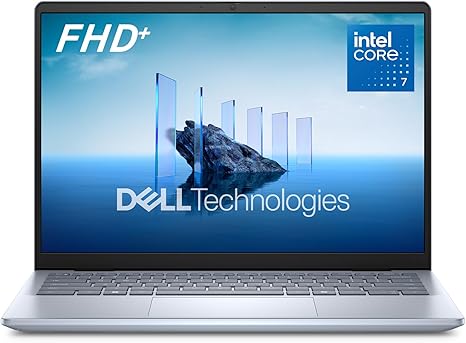
Welcome to “Reviews inside tv.” Today, we’re checking out the Dell Inspiron 5440 laptop, a sleek and portable 14-inch powerhouse that promises to handle your productivity needs on the go. Whether you’re working from home, attending virtual meetings, or tackling tasks at the office, the Inspiron 5440 aims to offer the perfect balance of portability and performance. Let’s dive in and see how it measures up.
The Inspiron 5440 comes packed with an Intel Core i7-1500U processor, giving you plenty of power for multitasking. The Intel Core lineup in this model provides a solid foundation for handling everyday tasks like document editing, web browsing, and video calls. For those moments when you need to get more creative, the 16GB of DDR5 RAM and the 1TB SSD come in handy, allowing quick access to files and rapid switching between programs. As for graphics, you’re looking at Intel UHD Graphics, which are more than adequate for basic media consumption, light photo editing, and some casual gaming, but it’s not designed for high-end 3D rendering or intensive gaming.
This laptop’s display is a standout feature, offering a 14-inch FHD+ resolution with a 16:10 aspect ratio. This taller screen gives you more vertical space compared to traditional 16:9 displays, which is great for productivity tasks like working in spreadsheets or web browsing with multiple tabs open. The Full HD+ resolution ensures that text and images appear sharp and crisp, but keep in mind, this isn’t an OLED or high-refresh display, so it’s not optimized for high-end gaming or professional video editing.
When it comes to real-world use, the Inspiron 5440 performs admirably for productivity. If you’re working in Microsoft Office, managing emails, or attending virtual meetings, this laptop will get the job done without breaking a sweat. It boots up quickly, and the SSD ensures fast load times for applications and files. The webcam, a full HD model, does a great job minimizing visual noise and providing clear images for video calls, even in less-than-ideal lighting. If you’re consuming media, the display holds up well for streaming videos or browsing through photos, though the lack of high dynamic range limits the overall visual experience compared to higher-end laptops with OLED screens.
One area where this laptop shines is its portability. Weighing in at just a bit over 3 pounds and with a compact 14-inch chassis, it’s easy to slip into a backpack or carry around all day without feeling weighed down. Plus, its adaptive thermals do a good job of keeping things cool, whether you’re working on a desk or using it on your lap. You won’t experience excessive heat buildup, which is a big plus if you’re working for extended periods.
The keyboard and trackpad are both comfortable to use for long typing sessions. The key travel is decent, and the feedback is just right for those who type frequently. The trackpad is responsive and accurate, making navigation smooth. I’d also like to highlight the wide range of ports available on the Inspiron 5440. With multiple USB-A and USB-C ports, an HDMI 2.0 output, and an SD card reader, you have plenty of connectivity options to hook up external monitors, docks, or accessories. It also features Wi-Fi 6 for fast, reliable internet, and Bluetooth 5.2 for connecting wireless peripherals like headphones or a mouse.
Battery life is solid, offering up to 8 hours of use under moderate tasks like office work or streaming video. It’s a bit of a mixed bag—if you’re doing more intensive tasks like photo editing or video conferencing, you’ll likely need to recharge sooner. But for light to moderate use, it’ll easily last you through a full workday. The 65W fast charger is efficient, so even if you need to top up, you won’t be waiting long.
When it comes to thermals, the Inspiron 5440 does a great job under light workloads, staying cool to the touch. During heavier tasks, like media editing or running multiple applications, it remains relatively quiet with only a slight increase in fan noise. There is no noticeable thermal throttling, even during extended use. For those who are sensitive to fan noise, it’s worth noting that this laptop runs fairly quietly compared to other models with similar specs.
In terms of build quality, the Dell Inspiron 5440 has a sturdy, well-constructed chassis that feels solid and durable. The Ice Blue color gives it a unique look without being overly flashy. It’s built to handle the wear and tear of daily life, and the military-grade testing ensures that it’s durable enough to withstand some bumps and knocks.
Now, let’s talk about value for money. At this price point, the Inspiron 5440 offers a solid package for those who need a reliable laptop for everyday productivity tasks, with just enough power for media consumption and light creative work. It might not be the most powerful laptop in its class, but it strikes a good balance between performance, portability, and affordability. If you’re looking for something that’s great for school, work, or casual use, this is a solid option. However, if you need more raw power for gaming or professional-level content creation, you might want to look at something with a more powerful GPU or a higher-end processor.
Looking at the competition, the Inspiron 5440 holds its ground against other ultrabooks like the HP Envy x360 or Lenovo ThinkPad L Series, but what sets it apart is its value proposition. It’s not the most feature-packed, but for those who need an all-around reliable laptop for office work, school, or casual use, it delivers the essentials with a solid build, good performance, and decent battery life.
To wrap up, the Dell Inspiron 5440 is a great choice for anyone who needs a well-rounded laptop for productivity. It’s ideal for students, office workers, and even creators who aren’t pushing their hardware to the limit. While it may not win any awards for gaming or creative heavy lifting, it gets the job done without breaking the bank. If you’re after something compact, reliable, and efficient, this laptop is a strong contender.
Thanks for watching, and don’t forget to check the comments for the link to grab this laptop for yourself. If you’ve used it, drop a comment below and let us know your experience. Until next time, keep those reviews inside, and happy tech hunting!
Available to buy here:


