

Available to buy here:
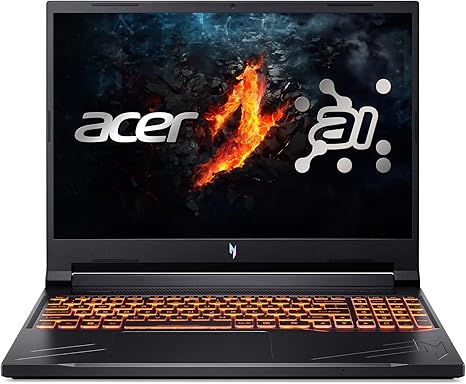
Welcome back to Reviews inside tv! Today, we’re looking at the Acer Nitro V gaming laptop, a powerhouse designed to meet the needs of gamers and creators alike. Whether you’re diving into AAA titles or working on intensive creative projects, this laptop promises high performance and impressive features. But does it live up to the hype? Let’s see if this is the right laptop for you.
The Acer Nitro V sports an Intel Core i7-14650HX processor, a beastly chip that’s optimized for both gaming and demanding workflows. With its hybrid architecture, it offers great multitasking performance. Whether you’re switching between web browsing, office apps, or media creation tools, this CPU handles it with ease. Combine this with the NVIDIA GeForce RTX 4060 GPU, and you’ve got AI-powered graphics that promise smooth performance and stunning visuals. This GPU isn’t just about gaming, either—it’s designed to accelerate tasks like video rendering and 3D modeling, thanks to its 233 AI TOPS (trillions of operations per second), which bring real-time AI enhancements like DLSS 3.5. For creative professionals and gamers, that means beautiful ray tracing and immersive experiences. But how does this translate into real-world use? Let’s break it down.
This model comes equipped with 16GB of DDR5 RAM, running at lightning-fast speeds, perfect for multitasking, gaming, or content creation. That’s paired with a 512GB PCIe Gen 4 SSD, ensuring ultra-fast read/write speeds. You’ll notice how snappy everything feels, whether you’re launching apps, saving large files, or booting up the system. The storage is upgradeable, with two M.2 slots available, allowing you to easily boost capacity if needed. The 16-inch WQXGA display with a 2560 x 1600 resolution offers a stunning visual experience with a 180Hz refresh rate. If you’re into competitive gaming, that’s a huge advantage—it’s one of the best displays you’ll find in a laptop at this price range, delivering smooth visuals even in fast-paced games. Plus, the MUX switch lets you toggle between integrated and discrete graphics, optimizing for performance or battery life depending on your needs. Whether you’re gaming, creating, or working, it’s a versatile feature.
Battery life is always a concern with powerful laptops, especially those with high-end components like this one. Acer’s managed to keep the battery size decent, but with all that power under the hood, don’t expect marathon battery sessions during heavy use. For lighter tasks, like web browsing or word processing, you can expect around 6 to 7 hours of battery life. But, if you’re gaming or doing video editing, that will drop significantly, possibly down to 2-3 hours. The good news? It charges quickly, so you won’t have to wait long between sessions. And at 5.51 pounds, the Nitro V is relatively portable for a 16-inch laptop, though it might be a bit heavy if you’re carrying it around all day for work or school.
As for the keyboard and trackpad, Acer’s made sure they’re comfortable for long typing sessions. The backlit keyboard is solid with good key travel, making it easy to type without feeling like your fingers are bouncing off the keys. The trackpad is smooth and responsive, with good palm rejection, making it reliable for day-to-day tasks. Of course, gaming can also benefit from the customizable NitroSense software, allowing you to fine-tune fan speeds and monitor your system’s performance.
Now, let’s talk about thermals. Acer has incorporated a dual-fan cooling system with a quad-intake and quad-exhaust design, helping to prevent overheating and throttling. This means better sustained performance, especially when you’re gaming or rendering. Under load, the laptop remains fairly cool, though you might hear the fans spin up, especially during extended gaming sessions. In terms of noise, the fans are noticeable but not distracting, unless you’re pushing the system to its limits. In everyday tasks, they’re almost silent.
In terms of ports and connectivity, the Nitro V doesn’t hold back. You get a USB Type-C 3.2 Gen 2 port with Thunderbolt 4 support, making it easy to connect external monitors, high-speed storage, or docks. It also includes a USB 3.2 Gen 2 port with power-off charging, USB 3.2 Gen 1, HDMI 2.1, Ethernet, and an audio jack—enough to connect all your peripherals and accessories. Wi-Fi 6 support ensures fast and reliable wireless connections, while Bluetooth 5.2 takes care of your wireless audio and peripheral needs. If you need to upgrade RAM or storage down the line, you’ll be happy to know that it’s possible, which adds to the Nitro V’s future-proofing potential.
So, how does this all stack up in terms of real-world performance? Office tasks like web browsing, video calls, and working in spreadsheets are effortless. The laptop handles multiple tabs and heavy document work without breaking a sweat. For media consumption, the display shines, delivering rich, vibrant colors that make watching movies or streaming content an immersive experience. Creators will appreciate the powerful GPU for photo and video editing, and you’ll notice faster export times and smoother rendering compared to mid-range laptops.
When it comes to gaming, the Nitro V is no slouch. With the RTX 4060, you can run most modern games at high settings with solid frame rates. Games like Cyberpunk 2077, Call of Duty: Warzone, and Alan Wake 2 will run smoothly on medium to high settings, and the 180Hz display ensures a fluid gaming experience. Keep in mind that frame rates will drop in more demanding titles, especially at higher resolutions, but overall, it’s a great laptop for gamers who want solid performance without breaking the bank.
Now, let’s talk about the value for money. The Acer Nitro V sits in the mid-to-high range of gaming laptops, but its specs justify the price. When compared to similar models, it holds its own with the powerful i7 processor and RTX 4060 GPU. If you’re eyeing an alternative, the ASUS ROG Strix G15 or the MSI Pulse GL66 might come to mind. While both are solid options, they tend to come in at a similar price point, but the Nitro V offers a slightly better display with its 180Hz refresh rate and WQXGA resolution, making it a standout for content creators and gamers alike.
In terms of build quality, Acer has done well. The chassis is mostly plastic, but it feels solid and durable. The hinge is sturdy, and the overall feel is premium for a gaming laptop. The keyboard is responsive and built for extended use, making it ideal for both gaming and productivity tasks.
For customer support, Acer offers a standard warranty and service options, and while there’s no standout reputation for exceptional support, you can expect decent service should you need it.
To wrap it up, the Acer Nitro V is a well-rounded gaming and content creation laptop that offers great performance, a beautiful display, and solid build quality. Its cooling system and thermals are among the best in this class, ensuring smooth performance under load. While the battery life could be better for more intensive tasks, and the weight may make it less portable for some, it’s an excellent choice for gamers, creators, and anyone looking for a versatile laptop. Thanks for watching, and remember, the link to get your hands on the Acer Nitro V can be found in the comments box. If you’ve used it already or have any questions, feel free to drop a comment below. See you next time on Reviews inside tv, where we bring you the best insights on tech gear.
Available to buy here:


