

Available to buy here:
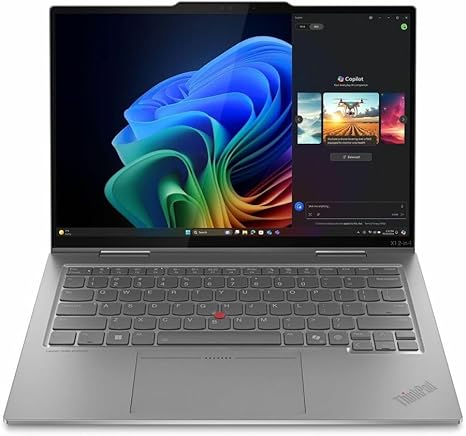
Welcome to “Reviews inside tv,” where we dive into the world of technology with a focus on the laptops that truly matter to you. Today, we’re taking a look at the Lenovo ThinkPad X1 Gen 10, a 14-inch convertible 2-in-1 that’s packed with power and designed for those who need both performance and versatility. Whether you’re a business professional, student, or someone who appreciates a premium laptop experience, this one claims to deliver it all. But does it really? Let’s take a closer look.
At its heart, this ThinkPad X1 Gen 10 comes with Intel’s Core Ultra 7 268V processor, part of the Evo platform, delivering solid performance for everything from office tasks to more demanding workloads. If you’re wondering what this means in real life, it’s capable of handling a heavy load of multitasking, be it web browsing with dozens of tabs open, simultaneous video calls, or light photo editing. This CPU is designed for efficiency and power, letting you run multiple apps without noticeable lag.
Coupled with 32 GB of RAM, this laptop can juggle tasks like a pro. Whether you’re working on large spreadsheets, editing documents, or switching between apps, it ensures smooth multitasking. Now, with 32 GB, there’s really no worry about running out of memory anytime soon—this is more than enough for business professionals and creatives who need to keep many programs open at once. For the average user, this is overkill, but it definitely means longevity and reliability if your needs grow over time.
When it comes to storage, the Lenovo ThinkPad X1 Gen 10 has a 512 GB SSD. While this isn’t the largest capacity out there, it’s a good balance of space and speed. The SSD gives you quick boot times, fast file transfers, and an overall snappy experience. Whether you’re storing your work files or keeping your personal media close by, this is enough for most users, though some might consider upgrading to a larger drive if they handle large video files or game installs.
Let’s talk about the screen. This ThinkPad X1 features a 14-inch WUXGA display (1920 x 1200), which offers a good balance of sharpness and detail. While it’s not quite 4K, it still delivers a crisp picture that’s great for movie watching, productivity tasks, and casual gaming. If you’re someone who does a lot of media consumption, the brightness levels are solid, and you won’t have trouble viewing it in a well-lit room. The touchscreen functionality adds a level of flexibility for those who prefer interacting with their laptop directly. The screen is bright enough for most settings but might fall short in direct sunlight. However, for indoor use, it shines.
Moving on to thermals and performance during heavy workloads, the laptop generally stays cool, but like most thin ultrabooks, it can get warm when pushed. If you’re running heavy apps like video editors or doing extended gaming sessions (though the integrated GPU limits gaming performance), expect some heat under the keyboard and palm rest. The fan does its job of cooling things down but can get a bit noisy when under load, which is typical for laptops in this category. For most office work or browsing, the fans stay quiet, but long export times or heavy multitasking can introduce a noticeable hum.
Battery life is always an important factor, and the Lenovo ThinkPad X1 doesn’t disappoint. With a battery size that balances efficiency and longevity, you can expect anywhere from 7 to 9 hours on a full charge under normal usage—light web browsing, watching videos, and working in productivity apps. If you’re pushing the system with demanding tasks, expect that to drop, but you’ll still get through a good portion of the day before needing to plug in. The charger is lightweight, making it a travel-friendly option for those on the go.
The keyboard is another highlight here. Lenovo has long been known for its comfortable typing experience, and this ThinkPad X1 continues that tradition. The key travel is just right, providing enough feedback for long typing sessions without being too shallow. It’s a full-size layout with no compromises, making it great for those who need to type a lot. The trackpad is also well-sized and responsive, with good palm rejection, so you won’t accidentally move your cursor while typing. If you prefer using a stylus or need more touch-based control, the touchscreen adds a nice level of versatility to the device.
When it comes to ports and connectivity, this laptop is pretty well-equipped. You get two USB-A ports, two Thunderbolt 4 USB-C ports (which also handle charging), an HDMI port for external monitors, a microSD card reader, and the traditional headphone jack. This makes it easy to connect to a wide variety of peripherals, whether it’s an external monitor for work or a projector for presentations. Wi-Fi 6 and Bluetooth 5.2 provide fast and reliable connections, ensuring that you stay connected to the internet and other devices without issues.
One thing to note: while the ThinkPad X1 is excellent for connectivity, you can’t upgrade the RAM, as it’s soldered to the motherboard. This means you’re stuck with the 32 GB configuration, which is powerful but limits future upgrades. The SSD is upgradable, however, which provides some future-proofing in terms of storage expansion.
Now, let’s weigh the pros and cons of the Lenovo ThinkPad X1 Gen 10. On the positive side, it delivers exceptional performance with the Intel Core Ultra 7 268V processor and 32 GB of RAM. The build quality is fantastic—it’s light, portable, and feels premium in the hand. The keyboard and trackpad are top-notch, making it a joy to use for extended periods. The battery life is solid, and the 512 GB SSD offers quick access to your files and programs.
On the downside, the display, while good, isn’t quite as bright as some competitors, and the lack of a dedicated GPU limits its ability to handle demanding games or creative tasks like 3D rendering. The fans, while quiet for light tasks, can get noisy under load. Finally, while the 32 GB of RAM is great for most users, the inability to upgrade it in the future may be a deal-breaker for some.
Is this laptop worth the price? If you’re a business professional, student, or creator who needs a powerful, portable laptop for office work, media consumption, or light creative tasks, the ThinkPad X1 Gen 10 is a solid choice. Its performance, build quality, and overall user experience make it a great value in the premium laptop market. However, if you need something with better gaming or creative capabilities, you might want to look elsewhere.
For those wondering how it stacks up against competitors, the HP Spectre x360 14 or the Dell XPS 13 2-in-1 offer similar features at a comparable price, but the Lenovo ThinkPad X1 Gen 10’s superior keyboard, robust connectivity, and business-oriented design give it a slight edge for professional users.
In terms of build quality, Lenovo has done a great job here. The chassis feels solid, and the hinge mechanism is sturdy, ensuring durability over the long haul. Lenovo is known for making durable laptops, and this model is no exception.
Customer support, as always with Lenovo, is reliable, with good warranty options and repair services available, but they’re not necessarily known for the quickest turnaround times compared to some other brands.
So, who is this laptop for? If you need something that balances performance, portability, and business features, and you’re willing to invest in a premium laptop, the Lenovo ThinkPad X1 Gen 10 is a great choice. However, if gaming or intensive creative work is at the top of your list, you might be better off with a more specialized laptop.
Thanks for watching! Be sure to hit that like button, subscribe to the channel, and ring the bell to stay updated on our latest reviews. If you’ve got any questions or thoughts on the Lenovo ThinkPad X1 Gen 10, feel free to leave a comment below. We’d love to hear your experiences. Until next time, stay tuned for more reviews, and as always, keep it inside the tech world!
Available to buy here:


