Available to buy here:
Welcome back to “Reviews inside tv,” where we break down the latest tech so you can make the most informed decisions. Today, we’re taking a deep look at the HP ZBook Fury G11, a powerful mobile workstation that packs some serious specs into a 16-inch chassis. Whether you’re a professional creator, engineer, or designer, this laptop is built for demanding workflows. But does it live up to the hype? Let’s get into the details.
First, let’s start with the specs. The HP ZBook Fury G11 is powered by Intel’s 14th Gen Core i7-14700HX processor. This 20-core beast promises smooth multitasking and can handle both heavy office workloads and more demanding creative applications like 3D rendering, video editing, and complex simulations. With 32GB of RAM, the laptop ensures that you can run multiple applications, virtual machines, or hefty files without slowing down. The RAM is fast enough to keep up with most professional applications, meaning lag should be a rare occurrence, even when pushing this laptop to its limits.
Storage is handled by a 1TB SSD, which delivers fast read and write speeds, making large file transfers and program load times feel snappy. Whether you’re working with large datasets or opening massive project files, the SSD ensures you’re never left waiting too long for things to load. In terms of display, you’ve got a 16-inch WUXGA screen with a resolution of 1920 x 1200. It’s not 4K, but for most professional workflows, it strikes a good balance between sharpness and performance, offering plenty of space for multitasking while not overloading the GPU.
The laptop also features Intel UHD Graphics with 8 execution units. While this won’t be handling AAA gaming or intensive 3D rendering, it’s sufficient for basic visual tasks and allows for smooth everyday use. If your work involves more advanced graphics, you’ll probably want to look at a version with a dedicated GPU, but for general business or creative work, the UHD Graphics should be enough.
Battery life is always a key concern with mobile workstations, and the ZBook Fury G11 packs a substantial battery that can handle long hours of work. In lighter tasks like web browsing or document editing, expect around 6 to 8 hours of use. Under more intensive workloads, like rendering or video editing, expect that to drop, but it still holds up fairly well considering the power inside. When it’s time to recharge, the laptop supports fast charging, so you won’t be tethered to the wall for long.
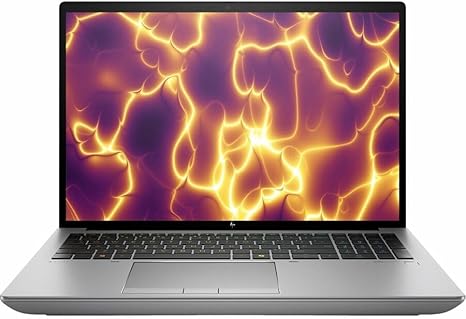
Now, let’s talk about comfort. The HP ZBook Fury G11 features a full-size keyboard with decent key travel and feedback, making it comfortable for long typing sessions. The layout is spacious, with well-sized arrow keys, a number pad, and a dedicated power button that’s easy to find. The trackpad is responsive, with excellent palm rejection, making it great for navigating through documents or spreadsheets. If you’re more of a touchscreen user, you’ll be disappointed as this model doesn’t offer that, but the keyboard and trackpad should cover most needs.
Connectivity is one of the ZBook Fury G11’s strong suits. It comes equipped with multiple USB-A and USB-C ports, including Thunderbolt 4 support, which is ideal for connecting to high-speed external drives, docks, or displays. There’s also HDMI, so connecting to external monitors or projectors for presentations is straightforward. If you need an SD card reader or Ethernet, those are included as well, which is a nice touch for users who need those additional options for their work.
In terms of portability, the HP ZBook Fury G11 weighs around 5.5 pounds, so it’s not the lightest laptop around, but it’s definitely within the range of what you can carry around all day in a backpack. The thickness is also manageable for a workstation of this caliber, and while it’s not ultra-slim, the trade-off is the powerhouse of performance you get in return.
Let’s discuss thermals. As expected with a high-performance CPU, the ZBook Fury G11 runs hot under load. However, HP’s cooling system does a good job of keeping things in check. The fan noise isn’t overly distracting during normal use, but under heavy workloads, the fans do ramp up. This won’t be the quietest machine, but it’s manageable if you’re in a quieter environment. On the underside and keyboard deck, you’ll feel some heat during extended use, but nothing unbearable.
When it comes to performance in real-world tasks, the HP ZBook Fury G11 is a workhorse. For office tasks like web browsing, document editing, and video calls, it feels incredibly responsive. With 32GB of RAM and that powerful 20-core processor, switching between apps, working with large spreadsheets, or editing documents feels seamless. When it comes to content creation, whether you’re working with high-res photos, editing video, or doing 3D modeling, the ZBook Fury G11 shines. It might not be the absolute top-tier machine for heavy 3D rendering, but it handles the vast majority of creative workloads with ease, offering great stability during prolonged work sessions.
Gaming is not this laptop’s forte. While you can play some older or less demanding games, it won’t deliver smooth performance for modern titles at high settings. If you’re looking for a gaming laptop, there are better options out there. However, if gaming is not a priority for you, the UHD Graphics are sufficient for general multimedia consumption. Watching HD or even 4K content is smooth, and the display quality, while not the most vibrant compared to OLED or high-end IPS panels, is perfectly suitable for professional tasks and casual media consumption.
The overall build quality of the HP ZBook Fury G11 is solid, with a mix of metal and durable plastic that feels premium but not fragile. The hinges are sturdy, and the chassis has a firm, reliable feel. As for long-term reliability, HP has a strong reputation for business and professional laptops, so this should hold up well over time. There’s no noticeable flex in the screen, and the keyboard feels stable during typing, which bodes well for its longevity.
As for customer support, HP offers solid warranty options and has a global service network, making it a good choice for those who need peace of mind regarding repair or support issues.
To wrap up, the HP ZBook Fury G11 is a robust and reliable workstation for professionals who need serious power on the go. It excels in multitasking, content creation, and professional applications, while offering a solid, well-built design. However, if you’re a gamer or looking for an ultra-portable machine, this might not be the right fit. The price is justified for the power and features it offers, but you’ll be paying a premium for this level of performance.
If you’re someone who needs a mobile workstation with the horsepower to handle demanding software, the HP ZBook Fury G11 will serve you well. But if portability or gaming is your primary focus, you might want to consider other options. Either way, it’s a powerhouse that should meet the demands of most professional users.
Thanks for watching! If you’re thinking about picking up the HP ZBook Fury G11, check out the link in the comments. Got any questions or thoughts? Drop them below—I’d love to hear about your experience. Until next time, keep your laptops sharp, and your reviews sharper!
Available to buy here: