Available to buy here:
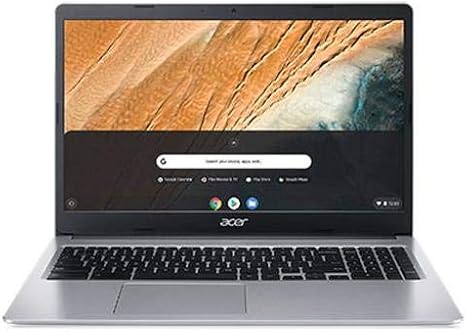
Welcome back to Reviews inside tv! Today, we’re taking a closer look at the Acer CB315-3H-C5JS, a 15.6″ Chromebook powered by an Intel Celeron N4020 processor. If you’ve been searching for a Chromebook that can handle your daily tasks without breaking the bank, this might just be the one. But, does it live up to the hype? Let’s see what it’s really like to use.
This model, designed primarily for casual users and students, offers a simple, budget-friendly experience, ideal for browsing the web, light document work, and media consumption. On the surface, it seems like a solid choice for everyday tasks, but we’ll dive into how it actually performs.
The Acer CB315-3H-C5JS comes equipped with an Intel Celeron N4020, a dual-core processor with a base clock of 1.1 GHz and a burst frequency of 2.8 GHz. Now, don’t expect this to be a powerhouse—it’s really designed for light workloads. If you’re handling simple web browsing, checking emails, or watching videos, it’ll be more than adequate. But for anything more demanding, like heavy multitasking or running resource-heavy apps, it may struggle.
The 4GB of LPDDR4 RAM isn’t a lot by today’s standards, especially if you tend to have several tabs open at once. In real-world use, you’ll find that the system can handle basic tasks fine, but you may run into lag when trying to juggle too many browser tabs or use heavier applications. If you’re a student or someone who primarily uses cloud-based apps, it’s manageable, but for anyone looking to do more than the basics, the limited RAM could be a bottleneck.
For storage, you get a 32GB eMMC drive. It’s pretty common in budget Chromebooks but keep in mind, it’s not the fastest or the most spacious option available. While it’s fine for storing a few documents and your basic apps, you’ll likely need to rely on cloud storage for anything beyond that. The eMMC drive provides decent read and write speeds compared to older storage types, but it can’t compete with SSDs when it comes to overall speed or capacity.
The 15.6″ display on this Chromebook is a standard Full HD screen with a resolution of 1920×1080. It’s an IPS panel, so viewing angles are decent, and color reproduction is reasonable for a budget laptop. Don’t expect the deep blacks or vibrant colors you’d get from an OLED screen, but for everyday tasks like browsing and watching videos, it’s more than adequate. The 250 nits of brightness means it’s okay for indoor use, but you might struggle to see clearly in direct sunlight.
Battery life is one of the highlights here. With a 42Wh battery, the Acer CB315-3H-C5JS offers around 8-10 hours of use, depending on your usage. It’s a good option for people who need to stay productive throughout the day without constantly searching for an outlet. Whether you’re in class, working from a café, or lounging on the couch, the battery should last you through a full workday with light usage.
When it comes to ports and connectivity, the Acer CB315-3H-C5JS keeps things fairly basic. You get two USB-A ports, one USB-C port, a full-sized HDMI port, and a microSD card reader. That USB-C port could be useful for fast charging or connecting a second display. Unfortunately, it doesn’t come with any Thunderbolt support, so don’t expect high-speed data transfers or a bunch of external monitor options. As for wireless connectivity, it supports Wi-Fi 5 and Bluetooth 4.2, which should be fine for most users, but Wi-Fi 6 and newer Bluetooth versions would have been more future-proof.
One area where this Chromebook excels is in its keyboard and trackpad. The keyboard has a nice feel for typing, with decent key travel and spacing, making it comfortable for long typing sessions. The trackpad is responsive, accurate, and supports multitouch gestures well. It’s nothing extraordinary, but for a budget laptop, it performs just fine for everyday navigation and productivity.
Thermals and noise are another area to consider. The Acer CB315-3H-C5JS doesn’t exactly push the limits of performance, so it generally stays cool during light use. The fan is quite quiet, only kicking in when the laptop is under load, which is rare in most everyday tasks. When you do push it hard with multiple tabs or apps, it may warm up slightly, but overall, it’s pretty stable temperature-wise. For people using it on your lap or in quiet environments, this will be a welcome feature.
In terms of build quality, the Acer CB315-3H-C5JS feels like most budget Chromebooks. It’s mostly plastic, and while it doesn’t feel particularly premium, it’s not flimsy either. The 2.58 kg weight is a little heavier than some ultraportables, but still manageable for carrying around in a backpack or briefcase. The overall design is simple and functional, making it easy to slip into your day-to-day routine.
As for value, the Acer CB315-3H-C5JS is certainly affordable, but it comes with trade-offs. For basic tasks like browsing the web, streaming, and light productivity, it’s a solid choice. But for anything more demanding, you’ll need to look at a more powerful machine. It’s a great option for students, casual users, or anyone who needs a laptop for basic tasks on the go. But, if you’re looking for higher performance or more storage, you might need to consider stepping up to a slightly more expensive model.
When comparing it to some direct competitors, the Acer CB315-3H-C5JS is fairly typical in the budget Chromebook space. Laptops like the Lenovo Chromebook Flex 5 or the HP Chromebook 14 might offer slightly better performance or build quality at a similar price, but it depends on your specific needs. The Flex 5, for example, offers a 2-in-1 design and a better keyboard, while the HP Chromebook 14 might offer a more premium feel and slightly better battery life.
To wrap things up, the Acer CB315-3H-C5JS delivers a solid Chromebook experience at a very affordable price. It’s perfect for anyone who needs a no-frills laptop for basic tasks like web browsing, emails, and streaming. If you’re a student or just need something for light everyday use, this could be a great fit. However, if you need something with more power or storage for heavier workloads, you might want to explore other options.
Thanks for watching! If you have any questions or if you already own this Chromebook, drop a comment below. Don’t forget to hit like, subscribe, and tap the bell icon so you never miss a review from Reviews inside tv. Catch you in the next one!
Available to buy here: