Available to buy here:
Welcome to “Reviews inside tv”! Today, we’re checking out the Acer Chromebook 15, a 15.6-inch touch-screen device designed to handle all your day-to-day tasks, from web browsing to productivity, without breaking the bank. With a lightweight design and a long battery life, it’s positioned as a solid option for those looking for an affordable, simple Chromebook for school, work, or casual use. But does it really hold up in real-world use? Let’s find out.
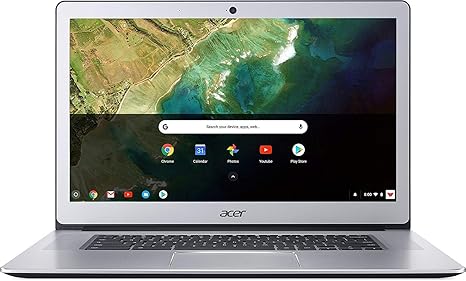
The Acer Chromebook 15 sports a 15.6-inch Full HD touchscreen display. This gives you ample screen real estate for multitasking and consuming content. The Full HD resolution ensures your web browsing, video streaming, and general tasks look sharp and clear. Of course, it’s not going to rival more premium displays like OLED or mini-LED, but for its price, it holds up quite well. The touchscreen adds a layer of convenience, especially for navigation or interactive tasks. While it’s not the brightest screen out there, it still delivers decent brightness for indoor use, which is a plus.
Under the hood, the Chromebook is powered by the Intel Celeron N3350 processor. This is an entry-level chip, so don’t expect it to handle anything too demanding. For basic tasks like web browsing, checking emails, or working on Google Docs, the N3350 should be more than sufficient. However, if you plan on running more intensive applications or multitasking with many tabs open, you might start to notice some lag. It’s definitely not designed for gaming or video editing, so keep that in mind.
You’ll find 4GB of LPDDR4 RAM here, which is on the lower side, but for light productivity and media consumption, it should suffice. If you’re a casual user who primarily uses cloud-based apps and services, this will work fine. That said, having 8GB of RAM would offer a smoother experience if you tend to have a lot of tabs or apps running simultaneously. The 32GB of eMMC storage is also on the smaller side, but remember, this is a Chromebook, which is designed around cloud storage. The 100GB of Google Drive storage that comes included should help you back up your files and keep things running smoothly in terms of file access.
Battery life is where this Chromebook shines. Acer claims up to 12 hours of usage, and in real-world scenarios, you can expect around 8 to 10 hours of light use. Whether you’re working on documents, streaming videos, or browsing the web, this Chromebook will keep going throughout the day without needing to plug in. That’s perfect for students or anyone on the move who needs a device that can last through long work or study sessions. It’s also lightweight, making it easy to carry around in a bag without feeling weighed down.
The keyboard on the Acer Chromebook 15 is comfortable for typing, though it might feel a little shallow compared to more premium laptops. The key travel isn’t the deepest, but for typing up emails, reports, or essays, it gets the job done. The trackpad is smooth and responsive, though you may want to avoid heavy gestures as the palm rejection can sometimes miss the mark. If you like extra features, you won’t find a backlit keyboard here, but for the price, that’s not a deal-breaker.
In terms of connectivity, the Acer Chromebook 15 offers a decent range of ports: two USB-A 3.0 ports, one USB-C port for fast data transfer or charging, an HDMI port for external displays, and a microSD card slot for expandable storage. It’s great for connecting to external monitors or devices like a mouse or keyboard. The Wi-Fi and Bluetooth performance is solid, though don’t expect high-end speeds for large file transfers or online gaming.
Now, let’s talk about performance under load. Since the Acer Chromebook 15 isn’t a gaming laptop, it’s not going to break any records when it comes to running heavy applications or AAA games. But for light tasks, it holds up well. You’ll see solid performance for basic tasks like word processing, web browsing, and streaming. In terms of gaming, it won’t run anything demanding, but lighter games should be playable at lower settings. Just don’t expect smooth performance with modern 3D games or anything requiring serious graphical power.
Thermals are pretty decent on this Chromebook. Under light use, the keyboard deck and underside stay cool to the touch, making it comfortable to use in your lap for extended periods. When the system is under load, like during video streaming or heavy web browsing, the fan will kick in, but it stays relatively quiet. You won’t find it disruptive for typical use, though it can get louder under intense activity. That’s something to keep in mind if you’re using it for long periods of time in quiet environments.
When it comes to real-world use, the Acer Chromebook 15 shines in terms of battery life and ease of use. The Chrome OS is designed for simplicity, booting up quickly, and staying fast over time without any major slowdowns. It’s a great option for those who just need a straightforward, reliable laptop that can get through the basics.
In terms of build quality, the Acer Chromebook 15 uses an aluminum cover, which gives it a more premium feel compared to plastic-bodied Chromebooks. It’s still fairly light, though at 3.75 pounds, it’s a bit heavier than some ultraportables, so if portability is a top priority, keep that in mind. The hinge design allows the display to lie flat, which is useful if you’re collaborating with others or want to use the touchscreen in a more flexible way.
Now, let’s break down the pros and cons of this laptop. On the plus side, you’re getting great battery life, a decent Full HD touchscreen, and a solid keyboard and trackpad for everyday use. It’s also relatively affordable, which makes it a great choice for students or anyone who needs a simple, reliable laptop for basic tasks. On the downside, the performance is limited by the Celeron processor, 4GB of RAM, and the small 32GB storage. If you’re planning to run multiple apps or store a lot of files locally, you might run into limitations. The display is fine for indoor use but lacks the brightness and color vibrancy of more expensive models.
In terms of value for money, the Acer Chromebook 15 offers a solid package for those who need a reliable, no-frills laptop for everyday tasks. It’s priced fairly for its performance and features, though if you need more power or storage, you might want to look at alternatives in the same price range, such as the Lenovo Chromebook Flex or a higher-end model from HP or ASUS.
When comparing it to other devices in the same range, the Acer Chromebook 15 stands out for its screen size and battery life. However, some competitors might offer better performance with slightly more RAM or storage, so if your tasks require more power, you might want to step up to a mid-range Chromebook.
Overall, the Acer Chromebook 15 is a solid choice for light productivity, streaming, and web browsing. It’s perfect for students, casual users, or anyone on a budget who needs an affordable, reliable laptop. If you’re looking for something that can handle heavier workloads or multitasking, you may want to consider other options in a higher price bracket.
Thank you for watching! The link to get the Acer Chromebook 15 can be found in the comments box. If you’ve already used this Chromebook, let us know your experience or if you have any questions. See you in the next review – happy computing!
Available to buy here: