

Available to buy here:
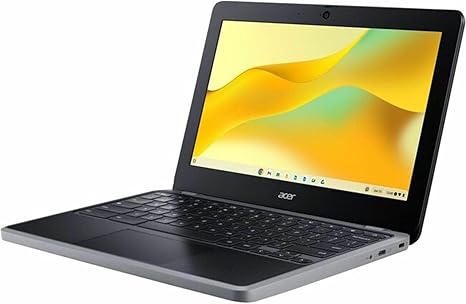
Welcome to “Reviews inside tv,” where we dive into the details that matter most to you. Today, we’re taking a close look at the Acer Chromebook 311 C723-K1JM, a lightweight, budget-friendly device that promises solid performance for everyday tasks. Whether you’re a student, someone who just needs a simple office machine, or a casual user, this Chromebook might be worth considering—but does it live up to the hype?
Let’s start with the basics. The Acer Chromebook 311 features an 11.6-inch display with a resolution of 1366 x 768. While this isn’t the sharpest screen out there, the smaller size does make it feel quite compact, and for many tasks like browsing or watching videos, it does the job. The display itself isn’t the brightest, but for an affordable Chromebook, it gets the job done. Colors aren’t as vivid as you might find on higher-end models, but for everyday use, it’s a fair compromise.
Powering this Chromebook is an octa-core ARM Cortex-A76 processor, which is a combination of dual-core 2.20 GHz Cortex-A76 and hexacore 2.0 GHz Cortex-A55 cores. This setup offers solid performance for tasks like web browsing, document editing, and streaming. It’s not a powerhouse, so you won’t be running complex software or multitasking with dozens of applications open at once, but for light users, it’s responsive. The 8 GB of RAM ensures smooth transitions between apps, and it helps with light multitasking, even if it’s not going to handle heavy lifting like gaming or video editing.
As for storage, the Acer Chromebook 311 comes with a 32 GB SSD. It’s a bit on the low end, but that’s typical for Chromebooks at this price point. You’re not going to store a massive media library or large files here, but it’s enough for typical web-based work. If you rely on cloud storage, the storage capacity will be sufficient for most everyday needs. The SSD also offers a noticeable speed improvement over traditional hard drives, helping things like boot-up times and app loading to feel snappy.
Now, let’s talk about battery life, a big selling point for many Chromebook users. With up to 15 hours of battery life, you’re likely to get through an entire day of use, and then some. Whether you’re in class, at the coffee shop, or working on the go, this Chromebook can handle light work without needing to be plugged in. That said, if you’re running more demanding tasks, battery life might drop a bit faster, but for most users, the 15 hours is a generous estimate.
In terms of build, this Chromebook feels light and portable. Weighing just about 2.3 pounds, it’s easy to carry around in a backpack or bag. While it’s made of plastic, it doesn’t feel too flimsy, and the design is simple but functional. The 11.6-inch screen keeps things compact, which is great for portability, especially if you’re looking for something that’s easy to pull out and use while traveling or commuting.
Speaking of travel, the ports are quite limited, as you’d expect on a Chromebook in this price range. There’s a pair of USB-A ports, a USB-C port, and a microSD card reader, so you’ve got some basic options for connecting peripherals and expanding storage. The lack of HDMI means you’ll need to rely on USB-C or wireless for any external monitors. Wi-Fi 5 is the wireless standard here, so while it’s fine for everyday browsing, it won’t support the fastest speeds of more recent Wi-Fi standards. Bluetooth is available, but again, this is more for basic connectivity than high-performance devices.
Now, let’s talk performance. In real-world use, the Acer Chromebook 311 handles web browsing, watching videos, and working on documents with ease. The octa-core processor provides decent responsiveness for these tasks, and you’ll get a good experience for typical Chromebook use. However, if you start pushing it with too many open tabs or larger tasks, the Chromebook may start to slow down. For light work like writing papers, checking email, or streaming media, this Chromebook is up to the task. It’s not designed for heavy lifting, so don’t expect it to compete with laptops that have more powerful processors.
When it comes to thermals and noise, the Acer Chromebook 311 runs relatively cool and quiet. With its lightweight design and efficient processor, it doesn’t produce much heat under normal use. The fans are generally silent unless you’re pushing the device with heavier tasks, but even then, the noise is minimal compared to higher-end machines. The keyboard is comfortable for typing, though it does lack the travel and responsiveness of some higher-end devices. The trackpad is functional, with good palm rejection and a smooth glide for basic navigation.
In terms of value, the Acer Chromebook 311 C723-K1JM offers an affordable option for users who need a simple, portable device for everyday use. If you’re looking for a laptop that can handle tasks like web browsing, light office work, and streaming, this Chromebook is a solid choice. However, if you’re looking for something that can handle more intensive tasks like photo editing, video production, or gaming, you might want to look at other options.
Compared to other Chromebooks in this price range, the Acer Chromebook 311 stands out for its battery life, portability, and overall simplicity. It’s a great option for students, casual users, or anyone who needs a reliable secondary device for basic tasks. It may not have the bells and whistles of more expensive models, but for its price, it does a respectable job. Competitors like the Lenovo Chromebook Duet or the HP Chromebook 11 also offer similar performance but vary in design, display quality, and port availability.
So, is this the right Chromebook for you? If you’re on the hunt for a budget-friendly, highly portable device for basic tasks, the Acer Chromebook 311 is definitely worth considering. It excels at long battery life, decent performance for day-to-day use, and portability, making it a solid choice for students, casual users, and light office workers. On the other hand, if you’re after more power or a higher-resolution display, you may want to consider stepping up to a more premium model.
Thanks for tuning into “Reviews inside tv.” If you’re interested in getting your hands on the Acer Chromebook 311, check the comments for the link. If you’ve already used it, drop us a line in the comments and let us know what you think. Don’t forget to like, subscribe, and hit the bell icon to stay updated on more in-depth reviews. See you next time!
Available to buy here:


