

Available to buy here:
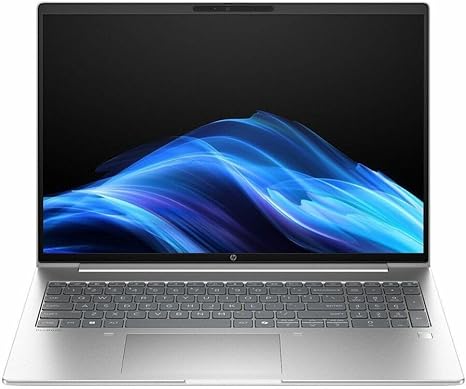
Welcome to Reviews inside tv! Today we’re taking a close look at the HP ProBook 4 G1i, a 16-inch notebook designed for professionals and power users. With a robust 12-core Intel Core Ultra 7 255U processor, it promises a blend of performance and portability that can handle everyday office tasks, multitasking, and beyond. But does it live up to the hype? Let’s find out.
The HP ProBook 4 G1i comes equipped with the Intel Core Ultra 7 255U, a powerful 12-core processor that promises a significant leap in performance, especially for tasks like document editing, web browsing, and even some content creation. Paired with 16GB of RAM, it can comfortably handle multi-tab browsing and heavier applications without a hitch. The 512GB SSD storage ensures quick load times, fast file transfers, and plenty of space for documents, media, and software, though the lack of additional storage options may be limiting for some users who need more space for large files.
The display is a standout feature—featuring a 16-inch WUXGA IPS panel. This offers a 1920×1200 resolution, which gives you more screen real estate than a typical Full HD display. IPS technology provides solid color accuracy and wide viewing angles, making it ideal for everything from business presentations to watching media. However, it’s not quite as vibrant as higher-end OLED panels, so if you’re expecting the deep blacks and bright colors typical of OLED displays, you may feel a bit let down. The refresh rate is standard, so gaming on this display is not its strong suit, but for productivity and content consumption, it performs admirably.
As for real-world use, the HP ProBook 4 G1i shines in office and productivity tasks. Multitasking across several applications, including word processing, spreadsheets, and video calls, feels smooth. The processor’s 12 cores are put to good use, and you’ll notice very little slowdown when juggling multiple windows. Media consumption, like streaming shows or browsing through images, is pleasant on the sharp WUXGA display, though, again, it’s not going to compete with higher-end screens for vibrancy.
When it comes to content creation, especially photo or video editing, this machine holds its ground, but you won’t get the same fluid performance as you would with a dedicated graphics card or a workstation-class CPU. For lighter tasks like editing photos in Photoshop or videos in Premiere Pro, the ProBook does a solid job, but don’t expect lightning-fast export times or a lag-free experience with heavy projects.
Now, for gaming, don’t expect to run graphically intensive titles like Cyberpunk 2077 or Call of Duty on this machine. It’s more suited to lighter gaming, casual titles, or older games that don’t require top-tier graphics. If you’re looking to game on this device, aim for low to medium settings on older titles, and you’ll be fine. However, for AAA games and higher graphics settings, this laptop will struggle.
Thermals are where the ProBook starts to show some weaknesses. Under heavy load, like during video editing or gaming, the device gets noticeably warm, especially on the keyboard deck and the underside. The fan noise is relatively low during light tasks, but it can become more audible when the system is pushed, especially during extended workloads. This could make long typing or gaming sessions a bit uncomfortable if you’re using the laptop on your lap.
Battery life is where the HP ProBook 4 G1i manages to deliver decent performance. With a 16-inch display and a 512GB SSD, it’s not the lightest in terms of power consumption, but it’s still a solid performer for a full workday. Expect around 6 to 8 hours of usage, depending on your tasks. If you’re doing light web browsing and word processing, you could see even more. For heavier workloads, such as media consumption or content creation, the battery will drain faster. The charging speed is pretty standard, and while the charger isn’t the most compact, it’s still travel-friendly.
The keyboard offers decent key travel and feedback, though it’s not quite as comfortable for long typing sessions as higher-end business laptops. It’s definitely serviceable for daily work, but if you’re typing for hours, it might start to feel a bit flat. The trackpad is responsive with good palm rejection, though the size may feel cramped for some users, especially those who are used to larger trackpads. There’s also no dedicated number pad, which might be a downside for some who regularly work with numbers.
On the connectivity front, the HP ProBook 4 G1i has everything you need for a modern office setup. It comes with a solid selection of USB-A and USB-C ports, as well as an HDMI output for connecting to external displays. You also get Wi-Fi 6 support, which offers faster internet speeds and better overall network stability, though Bluetooth support is not as robust as some newer machines, so you may experience occasional connectivity hiccups with Bluetooth peripherals.
When it comes to portability, this laptop is a bit on the heavier side, especially with its 16-inch display. It’s not the lightest device if you’re looking to carry it around all day, but it’s still manageable for most users who don’t need to lug it around constantly. The build quality is solid, with an aluminum chassis that feels durable, though it does lack the premium feel of more expensive ultrabooks.
Now, let’s talk about the value for money. With the HP ProBook 4 G1i, you’re getting solid performance in a business-class laptop that’s well-suited to office tasks, media consumption, and light content creation. For the price, it offers a good balance of performance, display quality, and battery life. However, there are alternatives out there, such as the Dell Latitude 5000 series or Lenovo ThinkPad E series, that might offer better performance or a more premium feel at a similar price point. The ProBook stands out with its solid build, but some users may find it lacking in terms of cutting-edge performance or design.
In terms of reliability, HP’s ProBook series is generally known for its solid build and longevity, though it’s always important to keep in mind that long-term reliability can vary. While the materials feel sturdy, you won’t get the same level of refinement or premium build quality as you would with a more expensive business laptop, like the HP Elite Dragonfly or Lenovo ThinkPad X1 Carbon.
For those who need a reliable workhorse that handles office tasks, multitasking, and some content creation, the HP ProBook 4 G1i is a solid choice. If you’re a gamer or someone who needs top-tier performance for creative work, you’ll probably want to look elsewhere. Ultimately, the ProBook strikes a good balance for students, office workers, and casual creators, making it a solid option at its price point.
Thanks for watching! Remember, if you’re interested in the HP ProBook 4 G1i, you’ll find the link in the comments below. Don’t forget to like, subscribe, and hit the bell icon for more reviews like this one. If you already own this laptop, feel free to drop a comment and share your experience. Until next time, keep your tech game strong, and as always, stay tuned to Reviews inside tv!
Available to buy here:


