Available to buy here:
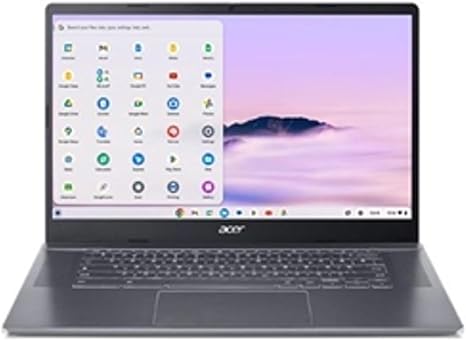
The Acer Chromebook Plus 515 is a laptop that’s clearly built with one goal in mind: to keep things simple, fast, and secure, all while offering solid performance for users who need a reliable device for everyday tasks. If you’re someone who does most of your work on the web, streams media, or needs an affordable, no-fuss device for getting things done, this Chromebook might just be what you’re looking for.
Let’s start with the basics. The Acer Chromebook Plus 515 comes with a 15.6-inch Full HD display, making it perfect for those who want a bit more screen real estate. The narrow bezels around the screen keep things feeling modern and spacious, while the anti-glare coating helps keep the display clear, even in bright conditions. Whether you’re working outside, near a window, or under harsh lighting, you won’t have to struggle with reflections or washed-out visuals. For most users, this is more than enough for office work, web browsing, and media consumption.
Under the hood, the Chromebook is powered by an Intel i3-1215U processor. This is a low-power CPU that handles everyday tasks like web browsing, document editing, and video calls without breaking a sweat. While it’s not a powerhouse for gaming or heavy workloads, it offers smooth and snappy performance for light productivity. It’s paired with 8GB of LPDDR5X RAM, which is more than enough for a Chrome OS device. In practice, this means the laptop can juggle several browser tabs and apps without noticeable slowdowns. For typical office use or students working on assignments, it’s a solid choice.
Storage is handled by a 128GB UFS drive. Now, UFS (Universal Flash Storage) is a step up from traditional eMMC storage, offering faster read and write speeds, which translates to quicker boot times and faster app loading. While 128GB might feel a bit limiting if you like to store large media files locally, it’s more than enough for cloud-based workflows, which Chrome OS is designed around. Plus, the device integrates seamlessly with Google’s cloud ecosystem, so you’re always just a click away from your documents, photos, and files. For many users, this storage setup won’t be an issue, as cloud storage offers endless space for documents and media.
When it comes to connectivity, this Chromebook offers WiFi 6E, which ensures you get the fastest possible wireless speeds on compatible networks. This is ideal for anyone who works from home, streams content, or needs stable connectivity for video calls. You also get the standard USB-A and USB-C ports, which should cover most of your peripheral needs, whether it’s an external mouse, keyboard, or flash drive. As for charging, the laptop supports USB-C charging, making it easy to top up with just about any USB-C charger you might already own.
Battery life is another strong suit of the Acer Chromebook Plus 515. With Chrome OS being light and efficient, combined with the low-power Intel i3 processor, you can expect all-day battery life for typical tasks. For light office work or media streaming, you’ll comfortably get around 8 to 10 hours of use, which is great for anyone who needs a laptop for work or school but doesn’t want to be tethered to an outlet all day. Of course, battery life can vary depending on how intensively you’re using the device, but for most users, it should be more than sufficient.
Now, let’s talk about the keyboard and trackpad. The keyboard on this Chromebook feels comfortable for long typing sessions. The key travel is decent, and the layout is straightforward, which is great for those who do a lot of typing. You won’t feel cramped, even on the full-sized 15.6-inch chassis. The trackpad is responsive, with good palm rejection, so you won’t have to worry about accidental touches while typing. Overall, this is a laptop that’s easy to work on for extended periods.
One thing you might notice is that, as a Chromebook, this device doesn’t come with the vast array of ports that you might find on a traditional Windows laptop. But for most users, the selection of USB-A and USB-C ports, along with an HDMI output and an SD card reader, should suffice. The lack of an Ethernet port is something to keep in mind if you need a wired connection, but for most, the fast Wi-Fi 6E should more than make up for it.
In terms of performance, the Acer Chromebook Plus 515 is not meant for heavy multitasking or demanding tasks like video editing, gaming, or 3D modeling. It will struggle with high-end applications or rendering workloads, but for what it’s built for—light productivity, media consumption, and cloud-based tasks—it excels. The Intel i3 CPU handles web browsing, email, office work, and streaming with ease, and the 8GB of RAM ensures you can keep multiple tabs and apps open at once without a hitch.
Now, a quick word on thermals and noise: the Chromebook doesn’t get too hot during light use, and the fan remains pretty quiet, which is a plus if you’re working in a quiet environment. Under heavier loads, such as streaming 4K video or having several apps running, the fan might kick in, but it doesn’t get obnoxiously loud. The build quality feels solid, though it’s not as premium as some higher-end laptops. The plastic body is durable enough, but don’t expect the feel of a metal unibody design. That said, it’s still lightweight and portable, making it a good choice for anyone who needs a laptop to toss in a bag and take on the go.
As for the display, the Full HD resolution is more than enough for everyday tasks. You won’t get the color vibrancy of an OLED panel, but for most use cases—like working on documents, browsing the web, or watching shows—it’s perfectly serviceable. The anti-glare coating helps keep things legible even in bright environments, and the display quality is good enough for general use.
In terms of value for money, the Acer Chromebook Plus 515 is priced competitively for what it offers. It’s not a powerhouse, but it doesn’t need to be. For students, office workers, or anyone who needs a reliable, everyday laptop for web-based tasks, it’s a solid investment. While it might not match the performance or features of some higher-end Windows laptops or premium Chromebooks, it offers excellent battery life, good build quality, and fast connectivity—everything you need for basic computing tasks.
If you’re comparing it to some of its competitors, it holds its ground pretty well. Laptops like the Lenovo Chromebook Duet or the HP Chromebook 15 offer similar performance, but the Acer Chromebook Plus 515 stands out with its larger screen size and full HD resolution, making it a better choice for anyone who needs more screen space for multitasking. It also offers better storage performance thanks to the UFS drive, which makes it snappier than many other budget-friendly Chromebooks.
Overall, the Acer Chromebook Plus 515 is an excellent choice for anyone who needs a laptop for basic tasks like web browsing, document editing, and streaming media. It’s not a machine for heavy workloads or gaming, but for what it is, it delivers solid performance, a great display, and long-lasting battery life at an affordable price.
Thank you for watching, and if you want to grab the Acer Chromebook Plus 515, you can find the link in the comments below. Feel free to share your thoughts if you’ve used this laptop already, or ask any questions you might have. See you in the next review, and remember—there’s always more inside with “Reviews inside tv.”
Available to buy here: