

Available to buy here:
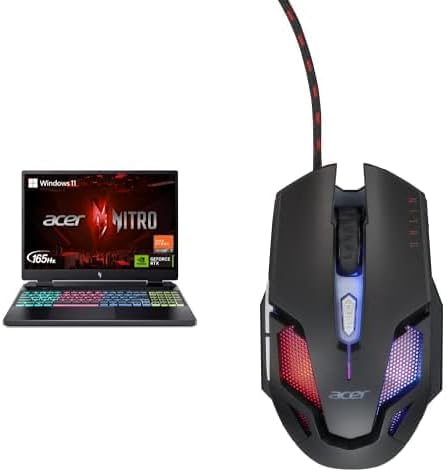
Welcome back to “Reviews inside tv,” where we bring you the latest insights on the hottest tech. Today, we’re looking at the Acer Nitro 16 gaming laptop, a machine designed to balance power with performance. Equipped with AMD’s Ryzen 7 7840HS processor and NVIDIA’s RTX 4060 GPU, this laptop promises to handle everything from intensive gaming to content creation with ease. But does it really deliver, or is it just another flashy gaming rig? Let’s see what it’s made of.
The Acer Nitro 16 boasts some serious hardware under the hood. The heart of the system is the Ryzen 7 7840HS, an octa-core processor from AMD’s Ryzen 7000 series. Clocked at a max boost of 5.1 GHz, this chip is built for high-demand tasks. It’s not just about the raw speed though – AMD’s Precision Boost tech ensures it’s efficient in pushing performance when you need it most. For gaming, multitasking, or even video editing, this CPU has the chops to keep up with the demand.
Coupled with that is the NVIDIA GeForce RTX 4060 GPU. Powered by the Ada Lovelace architecture, this graphics card brings a significant leap in performance over previous-gen models, offering support for AI-powered graphics and NVIDIA’s DLSS 3 technology. Whether you’re gaming or creating, it’s going to give you that extra bit of headroom you need for smoother performance. The RTX 4060 can handle modern AAA titles with ease, but it’s also an excellent option for creators looking to edit 4K video or render complex 3D models.
The laptop comes with 16GB of DDR5 RAM, which is perfect for today’s demands. DDR5 is faster and more power-efficient than its predecessor, DDR4, so you’re looking at quicker load times, smoother multitasking, and less lag during intensive tasks. It’s paired with a 1TB Gen 4 SSD, giving you ample space and incredible read/write speeds for faster boot times and loading of large files.
As for the display, the Acer Nitro 16 packs a 16-inch WUXGA screen with a 165Hz refresh rate. The 1920 x 1200 resolution offers extra vertical real estate compared to traditional Full HD displays, making it perfect for gaming and productivity tasks. The 165Hz refresh rate is a game-changer, especially for fast-paced action games where every frame counts. Whether you’re in the middle of a high-stakes gaming session or watching movies, the screen’s clarity and smoothness will definitely catch your eye. The IPS panel ensures good color accuracy, while the screen’s brightness is decent for most indoor environments, though outdoor use might be a bit challenging in direct sunlight.
Now, let’s talk about how this thing handles real-world performance. For general office tasks – web browsing, document editing, and video calls – the Nitro 16 breezes through with little effort. You won’t see any slowdowns even with multiple tabs open or when working in Microsoft Excel with heavy spreadsheets. For media consumption, streaming video looks sharp, and the sound is clear enough for casual listening, though like many laptops, it’s best to pair it with headphones for a fuller experience.
If you’re into content creation, this machine handles photo and video editing with ease. Export times are quick, and the smoothness during editing is a joy, thanks to the combination of the powerful Ryzen processor and the RTX 4060 GPU. While it’s not a workstation for the most intensive video rendering, it’s still more than capable of handling moderate video editing workflows.
Gaming performance is where the Acer Nitro 16 really shines. Let’s talk FPS. In real-world benchmarks for graphically demanding games like Cyberpunk 2077 and Call of Duty: Warzone, the Nitro 16 performs admirably at 1080p with high settings. In Cyberpunk 2077, for instance, you can expect an average of 70-80 FPS with ray tracing turned off, and Warzone runs comfortably at around 100 FPS with medium settings. The 165Hz refresh rate is a perfect match for these frame rates, offering smooth gameplay with minimal stuttering or tearing. It’s also worth noting that the laptop maintains solid performance throughout extended sessions, with no significant thermal throttling – though, like any gaming machine, it can get a little warm under load.
Speaking of temperature, the Nitro 16 uses next-gen cooling to ensure the system stays cool under pressure. The fans do get noticeable during heavy gaming sessions, but they’re not unbearable. You won’t hear the fans ramping up too often during lighter use, but under sustained loads like gaming or video exporting, the fans do kick in and might get a bit louder, though they’re still relatively quiet compared to some gaming laptops out there. The chassis stays warm, but it’s not uncomfortable, and the keyboard deck remains cool enough for long typing sessions.
Battery life is always a crucial consideration. With a 90Wh battery, the Nitro 16 is built for power, but keep in mind that gaming laptops tend to draw a lot of juice. During light office work and web browsing, you can expect around 6 to 7 hours of battery life. Heavy gaming will drain it much quicker, bringing you closer to 2 to 3 hours on a full charge. The charging speed is decent, with the laptop reaching 50% charge in around 30 minutes, but you’ll want to keep the charger nearby if you’re gaming for extended periods.
As for the keyboard, it’s a full-sized 4-zone RGB setup that provides good key travel and tactile feedback. It’s comfortable enough for long typing sessions, though the RGB lighting can be a bit much for some. The trackpad is responsive, and palm rejection works well for those moments when you’re not using an external mouse. The layout is standard, and the arrow keys are full-sized, so no complaints there.
When it comes to connectivity, the Nitro 16 offers a solid selection of ports. You get a couple of USB-A ports, a USB-C port, and Thunderbolt 4, which is great for docking stations and connecting to external displays. There’s also HDMI 2.1 for 4K external monitor support, a full-size SD card reader for content creators, and a headphone jack. It’s got Wi-Fi 6E for fast wireless speeds, and Bluetooth 5.2 for connecting peripherals. The one thing to note is that RAM and storage are soldered, so there’s no room for future upgrades unless you’re comfortable disassembling the laptop.
As for build quality, the Nitro 16 feels solid, though it’s not quite as premium as some of its competitors. The plastic chassis is sturdy, but it lacks the ultra-premium feel of an all-metal design. It’s still a durable machine, though, and it’s not excessively heavy at 2.5 kg, making it fairly portable for a gaming laptop.
So, who is this laptop for? The Acer Nitro 16 is a solid choice for gamers who want performance without spending a fortune. It’s also great for creators who need a balanced laptop that can handle both demanding creative tasks and gaming on the side. However, if you’re just looking for a lightweight laptop for everyday use or you need an ultra-portable work machine, you might want to look elsewhere.
When it comes to value for money, the Nitro 16 holds its own. It offers strong gaming performance, a solid display, and a good selection of ports. However, it’s worth considering how it compares to similar models. If you’re willing to spend a bit more, you could get an even more premium machine with better build quality, but the Nitro 16 delivers great performance for the price.
To wrap it up, the Acer Nitro 16 is an excellent choice for gamers and creators looking for a powerful, well-rounded machine. Its performance, cooling, and display are impressive, but if you’re looking for a sleek, ultra-portable machine, this might not be the one for you. But for those who need raw power, this laptop is a solid contender.
Thanks for watching, and don’t forget to check out the link in the comments box to grab your own Nitro 16. Let us know your thoughts in the comments, or share your experience if you already own one. See you next time, and remember: the best reviews are always inside!
Available to buy here:


