
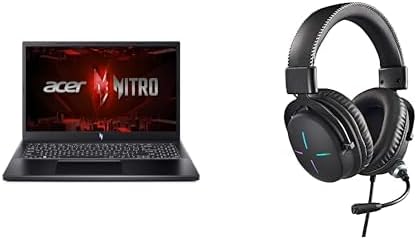

Available to buy here:
Welcome to Reviews inside tv, where today we’re exploring the Acer Nitro V Gaming Laptop. With a sleek, gamer-friendly design, this laptop promises to bring fast-paced gaming and creative performance to your fingertips. The Nitro V combines a powerful 13th Gen Intel Core i5-13420H processor with the NVIDIA GeForce RTX 4050 GPU, creating a compelling option for gamers and creators alike. But does it live up to the hype? Let’s find out.
First, let’s go over the specs. The Intel Core i5-13420H is a solid mid-range processor that balances performance and power efficiency. With its 12 threads and a base clock speed of 2.5GHz, the i5-13420H can handle everyday tasks like web browsing and multitasking without breaking a sweat. For more intensive workloads, like gaming or creative applications, its turbo boost up to 4.6GHz ensures you have the power when you need it. Paired with the NVIDIA GeForce RTX 4050, a solid mid-range GPU, the Nitro V promises smooth gaming at 1080p in most modern titles. Whether you’re pushing through the latest AAA games or diving into creative software, this combo delivers impressive performance.
The laptop comes with 8GB of DDR5 RAM, which is a solid amount for gaming and general productivity. While 8GB is fine for many users, heavy multitaskers or those doing memory-intensive work might want to upgrade to 16GB in the future. Storage is handled by a 512GB Gen 4 SSD, which offers quick boot times and fast data transfer speeds, meaning you won’t be waiting long to load your favorite games or media files. As for the display, the 15.6-inch FHD IPS panel with a 144Hz refresh rate offers a fluid, responsive experience for gaming, with vibrant colors and sharp details that make games and media pop. It’s a solid choice for gamers who need fast refresh rates without sacrificing visual quality.
Now, let’s talk real-world usage. For day-to-day productivity tasks like browsing the web with multiple tabs open, handling documents, or attending video calls, the Nitro V handles it effortlessly. The i5 processor paired with 8GB of RAM ensures smooth performance for typical office tasks. Streaming movies or shows on the FHD display is a treat, with the 144Hz refresh rate giving you smooth motion and vibrant colors. It’s not OLED, but for most users, this IPS panel offers a satisfying level of clarity and contrast.
When it comes to gaming, the Nitro V really starts to show its strengths. With the RTX 4050, you can expect solid 1080p performance in titles like Cyberpunk 2077, Call of Duty: Warzone, and Assassin’s Creed Valhalla. In these games, you’ll enjoy smooth frame rates, typically around 60 FPS on high settings, though more demanding titles might need to be dialed back a bit for the best experience. The real-world performance here, especially when combined with the 144Hz refresh rate, makes gaming enjoyable, with minimal stutter and high responsiveness.
For creative tasks like photo and video editing, the Nitro V can handle moderately demanding workloads. While it may not be a dedicated workstation, the combination of the i5 processor and RTX 4050 GPU makes it a solid choice for mid-level creators who need to work on 1080p video edits or moderate photo manipulations. Export times are reasonable, but if you’re working with large 4K files regularly, you might feel the need for more power or RAM.
One area where the Nitro V excels is thermals. Even under load, the laptop remains relatively cool, with the keyboard deck staying comfortable during long sessions. The fans, while audible under stress, don’t get obnoxiously loud, maintaining a balanced performance-to-noise ratio. There’s no major thermal throttling here, and the laptop holds up well during extended gaming or video rendering sessions, though, like any gaming laptop, it does get warm to the touch during intense gaming.
Battery life is another strong point. With a 50Wh battery, you can expect around 5-6 hours of lighter tasks like web browsing or video streaming. If you’re gaming or doing more demanding work, expect that to drop to around 2-3 hours. It’s not the longest battery life, but it’s pretty standard for a laptop with this level of performance and power. Charging is quick, and the power brick isn’t overly bulky, so it won’t be a hassle to take on the go.
Now, let’s talk about the keyboard and trackpad. The Nitro V features a full-sized keyboard with decent key travel and feedback, making long typing sessions comfortable. The layout is well thought out, with the arrow keys in their usual place, and the power button is conveniently located at the top-right corner. The trackpad is smooth and responsive, with good palm rejection, though, for gamers, you’ll probably want to use an external mouse for the best experience.
When it comes to connectivity, the Nitro V doesn’t disappoint. You get a solid selection of ports, including USB-A and USB-C, as well as HDMI and an SD card reader. This gives you plenty of options for docking, connecting external monitors, and attaching peripherals. Wi-Fi 6 ensures you’ll have fast and stable internet, whether you’re gaming online or working remotely, and Bluetooth lets you connect to wireless accessories without issues.
For ports, the Nitro V comes well-equipped. You’ll find three USB-A 3.2 ports for peripherals, a USB-C port, HDMI 2.1 for external displays, and an Ethernet port for stable wired internet when you need it. It’s also got a headphone jack, making it easy to plug in a headset or speakers. One thing to note is that RAM and storage are not upgradable, so you’ll need to choose your configuration wisely when purchasing.
As for build quality, the Nitro V is solid. The plastic chassis feels sturdy, though not as premium as some metal-bodied gaming laptops. Still, it’s well-built and the hinge is reliable, allowing the screen to tilt back easily without wobble. It’s on the heavier side, weighing in around 5 pounds, so it’s not the most portable laptop out there, but it’s still manageable if you’re carrying it in a bag.
Now, let’s address the elephant in the room: value for money. At its price point, the Nitro V is a solid performer for both gaming and general productivity. It strikes a balance between performance and affordability, offering good specs for the price. Compared to its competitors in the same range, it holds its own, especially with the RTX 4050 GPU and 144Hz display, which are hard to beat at this price.
When we compare it to similar models, it competes well with laptops like the ASUS TUF Gaming F15 or the Lenovo Legion 5, offering a similar performance at a comparable price. Where the Nitro V stands out is in its design and solid cooling, though some competitors may offer slightly better battery life or build quality.
In terms of reliability, Acer has a reputation for delivering solid, long-lasting devices. While there’s always the potential for issues down the line with any laptop, Acer generally offers decent customer support, and the Nitro V feels like a machine that can take a few years of heavy use without falling apart.
So, who is the Acer Nitro V for? If you’re a gamer looking for a reliable 1080p gaming laptop that won’t break the bank, this is a solid choice. Creators who need a machine for mid-level tasks will also find this laptop more than capable. It’s not the lightest or the longest-lasting, but it’s a great performer for those who want a good balance of power and price.
And with that, thank you for watching! If you’ve got any questions or thoughts on the Acer Nitro V, feel free to leave a comment below. You can find the link to grab one in the comments box as well. Don’t forget to like, subscribe, and hit the bell icon for more honest, in-depth reviews. Catch you in the next one!
Available to buy here:


