
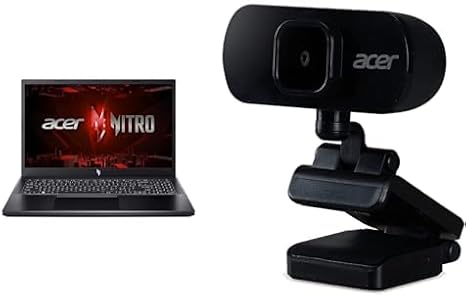

Available to buy here:
Welcome to “Reviews inside tv,” your go-to destination for everything tech. Today, we’re taking a close look at the Acer Nitro V Gaming Laptop, a machine that promises to blend power, performance, and portability for gamers and creators alike. Whether you’re streaming, gaming, or editing, this laptop could be a solid contender for your next purchase. Let’s break down what it offers and see if it really lives up to the hype.
The Acer Nitro V features a 13th Gen Intel Core i5-13420H processor, paired with an NVIDIA GeForce RTX 4050 GPU. These components suggest that this is a laptop capable of handling demanding tasks, from gaming to creative workflows, without breaking a sweat. The i5-13420H is a mid-range CPU, with 8 cores and 12 threads, which means it’s great for multitasking and can handle productivity tasks, like browsing, document editing, and video calls, with ease. When it comes to gaming, the RTX 4050 should provide a solid experience, supporting modern titles at 1080p with high settings and smooth frame rates. It’s not quite a top-tier gaming laptop, but for the price, it’s a well-balanced option for both casual and semi-competitive gamers.
This laptop is equipped with 8GB of DDR5 RAM, which should be plenty for most users. DDR5 is faster than DDR4, and while 8GB is the base amount, it may start feeling a bit limiting if you’re into heavy multitasking or content creation. For gaming and everyday tasks, it’ll work fine, but creative professionals might want to upgrade to 16GB to ensure smooth performance during more intensive tasks like video editing or 3D rendering. On the storage side, the Nitro V packs a 512GB Gen 4 SSD. SSDs are a significant upgrade over traditional hard drives, and the Gen 4 version offers even faster read and write speeds. This means quicker boot times, faster loading of large files, and generally snappier performance, which is something you’ll notice immediately when starting up or switching between apps.
The 15.6-inch Full HD IPS display is one of the standout features of the Acer Nitro V. With a 144Hz refresh rate, this screen is geared toward gamers who want smooth, tear-free visuals during fast-paced action sequences. If you’re someone who values fluidity in gaming, this refresh rate will make a noticeable difference. The IPS technology ensures decent color accuracy and wide viewing angles, so whether you’re gaming, streaming, or working, the visuals will look great from almost any angle. However, keep in mind that it’s not OLED, so while colors will be vibrant, they won’t be as punchy or deep as those found on higher-end displays. Brightness levels are solid, but don’t expect anything extreme in terms of outdoor visibility.
Battery life is always a concern with gaming laptops, and here, the Acer Nitro V doesn’t disappoint. The 4-cell, 57.5Wh battery provides a decent run-time for light tasks. Under typical office work scenarios like web browsing or document editing, you can expect around 6 to 8 hours, but if you’re gaming or using creative apps, that time will significantly drop to about 2 to 3 hours. It’s not the best in class for battery life, but it’s typical for a gaming laptop with powerful hardware. Charging speed is quick, and it uses USB-C charging, which is convenient if you’re traveling with other devices that use the same standard.
Now, let’s talk about the keyboard and trackpad. The Nitro V features a full-sized keyboard with a numeric keypad, making it practical for both gaming and productivity. The key travel is comfortable, and the feedback is solid, so typing for long sessions should be no problem. However, the key spacing could feel a little cramped for users with larger hands, especially around the arrow keys. The trackpad, while functional, is somewhat smaller than what you might find on premium laptops, and it lacks the precision of some higher-end models. Still, it’s accurate enough for casual use, but gamers and heavy multitaskers might prefer a mouse for more precision.
Connectivity is where the Nitro V shines. It offers Wi-Fi 6 for fast and stable wireless connections, whether you’re gaming online or just browsing. It also includes Gigabit Ethernet, which is a nice touch for anyone who prefers a wired connection for lower latency. Ports-wise, you’re getting a good selection: USB-A, USB-C, HDMI, and an SD card reader, which is handy for content creators. There’s no Thunderbolt 4 here, but that’s not a dealbreaker for most gamers or everyday users. It’s good to see that Acer has kept the essential ports intact, without overcrowding the chassis with unnecessary additions.
Thermals and noise are always a concern with gaming laptops, especially when they’re pushing demanding workloads. The Nitro V’s cooling system does an okay job, but expect some heat buildup, especially when gaming or running intensive applications. The keyboard area doesn’t get uncomfortably hot, but the underside can get warm. The fans are mostly silent during light tasks, but they can become somewhat noticeable during heavy gaming sessions or video editing. It’s not the quietest laptop, but it’s manageable. As for long-term performance, there doesn’t seem to be any major throttling issues in normal use, but during extended gaming or heavy multitasking, you might see some performance dips as the system heats up.
When it comes to build quality, the Acer Nitro V feels sturdy without being overly heavy. It weighs around 2.4kg (5.3 lbs), which is on the heavier side for a 15.6-inch laptop, but that’s standard for a gaming machine with a dedicated GPU. The materials feel durable, but it’s not as premium as some of the aluminum-clad models in this price range. Still, it’s built well enough to withstand the rigors of daily use. As for portability, the Nitro V is a bit on the bulky side, but it’s manageable for occasional travel. It’s not the kind of laptop you’ll want to carry around all day, but it’ll fit comfortably in most backpacks.
So, who is the Acer Nitro V really for? It’s an excellent choice for gamers who are looking for smooth performance on a budget. The RTX 4050 and 144Hz display strike a great balance between price and performance, offering solid gaming capabilities at 1080p. It’s also a good pick for creators who need a machine capable of photo editing, light video editing, and general content creation. The 8GB of RAM may be a limiting factor for more demanding creative work, but for everyday use and moderate multitasking, it does the job well. If you’re someone who needs ultra portability or a super long battery life, you might want to look elsewhere, but for most users, it’s a solid all-around performer.
Now, let’s take a quick look at how the Acer Nitro V stacks up against its competition. If you’re considering a similar price range, options like the Lenovo Legion 5 or HP Omen 15 might come to mind. The Acer Nitro V is a bit more affordable and still offers solid performance, but if you’re after a higher refresh rate or more premium build, those alternatives might be a better fit. The key difference here is that the Nitro V leans heavily into gaming, with that 144Hz screen, while the others might offer slightly better portability or battery life.
Overall, the Acer Nitro V delivers a lot of performance for its price. It’s a solid choice for gamers and casual creators, offering great value with its powerful CPU and GPU combination, solid display, and good connectivity. If you’re in the market for a gaming laptop that won’t break the bank, this one should be on your radar.
Thanks for watching! The link to grab the Acer Nitro V is in the comments box. Feel free to ask any questions or share your own experience with this laptop if you already own it. Until next time, keep your tech sharp, and I’ll catch you in the next review!
Available to buy here:


