
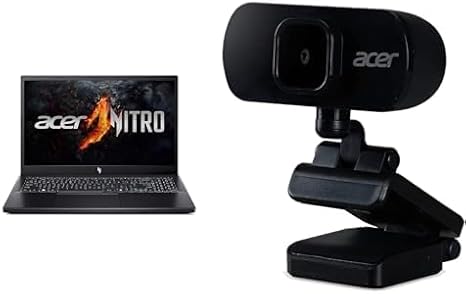

Available to buy here:
Welcome to Reviews Inside TV! Today, we’re taking a closer look at the Acer Nitro V Gaming Laptop, a device that promises AI-powered performance for gaming and creative work alike. It brings together a solid mix of modern components aimed at gamers and creators who want great performance without breaking the bank. But does it deliver? Let’s find out.
The Acer Nitro V sports an AMD Ryzen 5 7535HS processor paired with an NVIDIA GeForce RTX 4050 GPU. This combination is designed to tackle both intensive gaming sessions and creative tasks with ease. You’re getting eight cores and sixteen threads with the Ryzen 5, which is more than enough for multitasking and handling modern games or software that demands a bit of extra power. And with the RTX 4050, you’ve got a capable mid-range GPU that promises great performance for current games at medium to high settings, as well as acceleration for tasks like video rendering or 3D modeling.
The laptop is equipped with 8GB of DDR5 RAM, which is the latest standard in memory, providing faster speeds and better efficiency compared to the older DDR4. This is a solid starting point for most users, but if you find yourself running multiple heavy applications at once, upgrading to 16GB or even 32GB could give you more flexibility for the future. Storage-wise, you’ve got a 512GB PCIe Gen 4 SSD, which ensures fast load times for games and applications, as well as quick access to large files. And if that’s not enough, the laptop comes with two M.2 slots, meaning you can expand the storage down the line if needed.
Now, let’s talk about the display. The 15.6-inch screen offers Full HD resolution with a 144Hz refresh rate. For gamers, this is a real perk—especially if you’re playing fast-paced titles like Call of Duty or Apex Legends, where every frame counts. The 144Hz refresh rate ensures smoother visuals and a more responsive gaming experience, reducing motion blur and screen tearing. In terms of color, you’re looking at decent sRGB coverage, so the colors pop without being overly vibrant or washed out. The screen is also IPS, meaning it offers wide viewing angles and consistent brightness, perfect for gaming or watching media on the go.
Speaking of brightness, this display hits around 300 nits, which is more than enough for indoor use and general gaming. However, if you’re gaming outdoors or in bright environments, you might struggle with glare or reflections, but in most indoor settings, this display will serve you just fine.
Battery life is always a concern with gaming laptops, and the Nitro V isn’t exactly a marathon runner in this department. With a 50Wh battery, you can expect around 4-6 hours of light use, such as web browsing or video streaming. For heavier workloads, like gaming or creative tasks, you’ll likely need to keep it plugged in to get the most out of your experience. The good news is, the charging is pretty fast, and with the laptop weighing around 2.3 kg (5.07 lbs), it’s portable enough to carry around for short trips. It’s not the lightest, but it strikes a good balance between portability and performance.
The keyboard is comfortable for typing and gaming, with a satisfying amount of key travel and tactile feedback. It’s a full-sized keyboard, which includes a number pad, something that’s a big plus for productivity users or gamers who need quick access to certain numbers. The layout is clean, and the key spacing is ideal for both long typing sessions and rapid gaming inputs. The trackpad, while accurate, is on the smaller side, but it’s responsive enough for casual tasks. For hardcore gamers, a mouse is obviously recommended, but for general use, the trackpad does the job.
Now, let’s talk ports. The Nitro V includes USB-A ports, USB-C, and HDMI, giving you ample options for connecting accessories, external monitors, or even docks. You’ve also got Wi-Fi 6 for fast and stable wireless connections, as well as Bluetooth, which makes pairing with wireless peripherals a breeze. However, some users might miss an Ethernet port, especially if they’re looking for the most stable gaming connection. But the Wi-Fi 6 should compensate for most needs, delivering good performance and low latency for online gaming.
When it comes to thermals, the Nitro V does a solid job keeping things cool under load, although, like most gaming laptops, it can get warm during extended gaming or creative sessions. The fans do ramp up when the system is stressed, but they’re not overly loud or distracting. The laptop does get a bit warm on the keyboard deck and underside, but it never reaches uncomfortable levels. There’s no significant thermal throttling to note, meaning performance should remain stable over time, even during longer gaming sessions.
In terms of performance, we’ve seen solid results across a range of modern titles. For instance, in Cyberpunk 2077, you can expect around 60 FPS at medium settings, which is more than enough for a smooth experience. Call of Duty: Warzone runs similarly, with the Nitro V pushing around 70 FPS at high settings, while Alan Wake 2 fares slightly better with around 75 FPS on medium. These are great figures for a mid-range gaming laptop, and the performance remains relatively stable even during extended play sessions.
Let’s now talk about the real-world user experience. The Nitro V excels when it comes to performance for the price. For the target audience—gamers, creators, and students—it offers solid value. The display is great for gaming and content creation, the performance is more than capable for multitasking and heavy workloads, and the overall design is sturdy enough for daily use. That said, if you’re looking for something that offers mind-blowing battery life or an ultra-thin design, this may not be the laptop for you.
So, who’s this laptop best suited for? The Acer Nitro V is perfect for gamers who want solid performance at a reasonable price, especially if you’re not looking to break the bank for the latest-gen graphics. It’s also great for creators who need fast performance for photo or video editing on the go, though the 8GB of RAM might be a limitation if you plan on working with larger files or heavy editing projects. Casual users who enjoy media consumption and productivity tasks will also appreciate the Nitro V’s performance, but if you need something ultrathin for portability, you might want to look elsewhere.
At the end of the day, the Nitro V offers a great mix of performance, display quality, and build at a price that’s competitive in the mid-range gaming laptop market. If you’re looking for an all-around laptop that balances gaming, work, and media consumption, this one is definitely worth considering.
If you’re interested in picking up the Acer Nitro V, you’ll find the link in the comments below. Feel free to ask questions or share your experience if you already own one of these. Thanks for watching, and remember—stay tuned for more reviews here on Reviews Inside TV. Catch you in the next one!
Available to buy here:


