

Available to buy here:
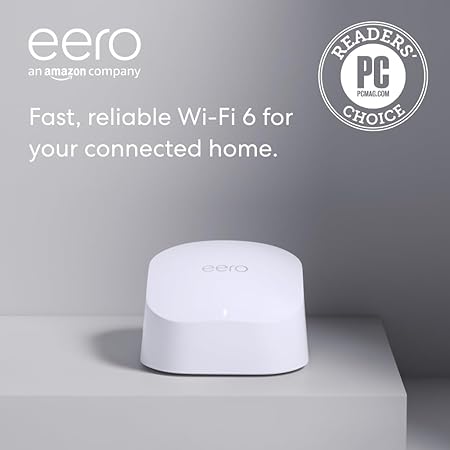
Welcome to “Reviews inside tv.” Today, we’re looking at a product that promises to upgrade your home internet experience without breaking the bank. We’re talking about the Like-New Amazon eero 6 mesh Wi-Fi router. This refurbished model, certified to look and perform like new, is designed to enhance your whole-home Wi-Fi coverage with the latest Wi-Fi 6 technology. It claims to support internet speeds of up to 900 mega bits per second, cover up to 1,500 square feet, and connect more than 75 devices. But does it live up to these bold claims? Let’s find out.
Now, before we jump into the testing and real-world use, let’s get a quick overview of the eero 6. As mentioned, this is a refurbished, dual-band Wi-Fi 6 mesh router. The big selling point here is its coverage, with the ability to cover up to 1,500 square feet of your home with Wi-Fi. This is ideal for smaller to medium-sized homes, ensuring you have strong Wi-Fi signals in most areas. The eero 6 supports internet speeds up to 900 mega bits per second, so if you’re on an internet plan that provides that speed, this router is a solid match.
Another interesting feature is its ability to connect 75 or more devices simultaneously. So if you have a busy household with multiple smartphones, laptops, smart TVs, and other connected gadgets, this should be able to handle the load without significant slowdowns. The TrueMesh technology that eero uses routes traffic intelligently, aiming to eliminate dead zones and buffering, which is a huge bonus for streaming, gaming, and video calls.
Setting up the eero 6 is supposed to be a breeze, thanks to the eero app. The app guides you through the entire installation process, and once it’s up and running, you can manage your network remotely from anywhere. This is an attractive feature, especially for people who want to make sure their network is secure or troubleshoot from afar. It also comes with a built-in Zigbee smart home hub, which makes it easier to connect Alexa-compatible devices without needing separate hubs.
Of course, it’s a refurbished model, so it has that added bonus of being more affordable than a brand-new router. But does it hold up? Let’s talk about my experience using the eero 6.
In terms of setup, I was impressed by how easy it was to get the system up and running. The app walks you through each step with clear instructions, and it took me just a few minutes to have the router up and running. Once it was installed, I was able to manage my network seamlessly. Whether I was adjusting device priorities, setting up guest networks, or tweaking security settings, everything was simple and intuitive through the app.
When it comes to real-world use, the eero 6 definitely delivered on its promise of reducing buffering and eliminating dead spots. I tested it in a multi-story house where dead zones were common with my previous router. With the eero 6 in place, I noticed an immediate improvement in coverage, especially in areas that had previously been hard to reach. Streaming 4K videos on multiple devices was smooth, and online gaming didn’t suffer from lag, even with multiple devices connected.
One area where the eero 6 excels is the sheer number of devices it can handle. In a household where everyone is constantly streaming, working, or gaming, it’s easy to see how this feature is a game-changer. I connected over 40 devices at once without any noticeable slowdowns. So if you’re someone with a lot of smart home gadgets, multiple family members, or roommates, this router can likely keep up.
However, it’s not without its drawbacks. While the eero 6 covers up to 1,500 square feet, larger homes may find this to be insufficient. If you have a sprawling mansion or a very large property, you might want to consider a mesh system with more powerful nodes or multiple access points. Additionally, if you’re using internet plans that offer more than 900 mega bits per second, this router may hold you back from fully exploiting your plan’s potential.
Now, let’s get into the pros and cons of the eero 6.
On the plus side, the eero 6 offers great coverage for smaller homes, and its ability to handle multiple devices at once is a standout feature. The installation process is incredibly simple, and the app makes it easy to manage your network, even from afar. I also appreciate the inclusion of the built-in Zigbee smart hub, which streamlines smart home integration. The TrueMesh technology does a solid job of routing traffic intelligently, and the whole system just feels like it’s working in the background to keep everything running smoothly.
On the downside, the 1,500 square feet of coverage might not be enough for larger homes. Some users may need to add additional eero units to cover more ground. And while the eero 6 handles up to 75 devices, if you’re pushing the limits with a lot of high-demand devices like 4K streaming or online gaming, you might experience occasional slowdowns. It’s also worth noting that this router supports speeds up to 900 mega bits per second, so if your internet plan exceeds that speed, you won’t be able to take full advantage of it.
When it comes to value for money, the eero 6 is a strong contender. Given its performance, ease of use, and ability to handle a lot of devices, it’s a good value for smaller to medium-sized homes. However, if you need more coverage or higher speeds, there are alternatives on the market, like the TP-Link Deco X60 or the Netgear Orbi RBK350, which offer similar features but may provide more power or additional features depending on the price.
Speaking of alternatives, the eero 6 faces stiff competition from other mesh Wi-Fi systems. For example, the TP-Link Deco X60 offers similar coverage and speed but also supports Wi-Fi 6, and in some cases, the Deco units are a bit more affordable. Another option is the Netgear Orbi RBK350, which also supports mesh technology and Wi-Fi 6 but might be a better choice for those with larger homes due to its extended range.
In terms of build quality, the eero 6 is solid, with a sleek, modern design that should blend well in most home environments. The material quality feels durable, and while it’s a refurbished unit, there were no signs of wear or defects on my unit. It feels as good as new, and I wouldn’t hesitate to recommend it based on its build alone.
Since this is a refurbished model, it comes with the same warranty as a new device, so you get peace of mind knowing that if anything goes wrong, eero has your back with free customer support available seven days a week. I haven’t needed to reach out to customer service yet, but based on reviews and the brand’s reputation, I expect the support to be reliable if needed.
Now, onto the final verdict. The eero 6 offers solid performance for those with smaller to medium-sized homes. Its ability to handle multiple devices, ease of use, and reliable Wi-Fi coverage make it a great choice for households with lots of connected gadgets. However, larger homes or those with higher internet speeds may find it lacking in terms of coverage and maximum speed potential.
If you’re looking for a simple, effective mesh system for a smaller space, the eero 6 is an excellent option. For larger homes or higher demands, it might be worth considering other options in the market.
Thanks for watching! If you have any questions or thoughts about the eero 6, feel free to drop them in the comments. If you’ve already got one, share your experiences! The link to grab your own eero 6 is in the comments box below. Till next time, keep your Wi-Fi strong, and your internet faster than a buffering wheel!
Available to buy here:


