

Available to buy here:
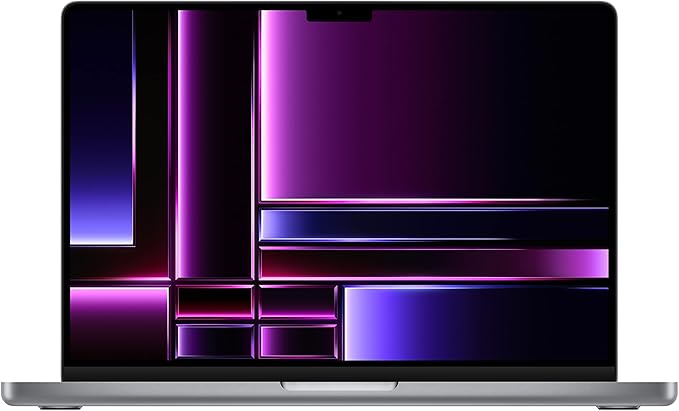
Welcome to “Reviews inside tv.” Today, we have something really exciting—a laptop that’s built for professionals and creators alike. The Apple 2023 MacBook Pro, powered by the M2 Max chip, with its 12-core CPU, 30-core GPU, and 14.2-inch Liquid Retina XDR display. But what does this really mean in practice? Let’s take a closer look at how this machine holds up in real-world use.
The MacBook Pro 2023 comes with some pretty impressive specs. At its heart is the M2 Max chip, featuring a 12-core CPU and a 30-core GPU. But this isn’t just a raw numbers game. What this setup delivers is real-world power. Whether you’re multitasking through demanding workloads or tackling heavy creative projects, you’re going to notice the difference. The M2 Max offers enough raw power for professional video editing, 3D rendering, and even gaming at mid-to-high settings. What’s more, the 30-core GPU ensures that GPU-heavy tasks—like graphics design, gaming, or machine learning—are handled with ease.
With up to 32GB of unified memory in this configuration, the MacBook Pro can handle intensive apps like Adobe Creative Cloud, Xcode, and others without breaking a sweat. Unified memory means that both the CPU and GPU share the same memory pool, so the laptop can switch between tasks without the usual bottlenecks. The 1TB SSD storage also ensures that boot times are near-instantaneous, and apps load up quickly.
Speaking of storage, the SSD is fast. Really fast. Whether you’re working with large files, like high-res images or video footage, you’ll notice that the data transfers are snappy and responsive. No more waiting for files to load or export. And with 18 hours of battery life, you can work all day without constantly worrying about the charger. This is largely due to the power-efficient M2 Max chip. On lighter tasks, such as web browsing or word processing, you can easily stretch it beyond 18 hours.
Now, let’s talk display. The 14.2-inch Liquid Retina XDR display is one of the standout features. It boasts extreme dynamic range (XDR), with over 1000 nits of brightness, making it perfect for editing HDR content. Whether you’re creating professional-grade visuals or simply enjoying some streaming, the colors pop and details are sharp. And with Apple’s pro reference modes, the display is highly accurate, making it ideal for any creative work that requires precise color grading.
What about the performance when you’re not on battery? Well, the MacBook Pro continues to shine. It doesn’t throttle under load, and the fan noise is generally pretty quiet. It can still get warm, though, especially during long video editing or rendering sessions. The cooling system does its job, but it’s something to keep in mind if you’re using this on your lap for extended periods.
Now, for the keyboard and trackpad. The Magic Keyboard is comfortable to type on, and the key travel is just right for long typing sessions. The full-height function key row is a nice touch for quick access to shortcuts. The trackpad, as expected from Apple, is spacious and incredibly responsive. There’s excellent palm rejection, so you won’t have to worry about unintentional touches while typing. Plus, with Touch ID, logging into your MacBook is quick and secure.
Connectivity is a big plus with this MacBook Pro. It features three Thunderbolt 4 ports, a MagSafe charging port, an HDMI port, an SDXC card slot, and a headphone jack. Whether you’re docking it to an external monitor, connecting peripherals, or transferring large files via SD card, you have the ports to make it happen. On top of that, you’ve got Wi-Fi 6E and Bluetooth 5.3 for fast and reliable wireless connectivity.
Let’s be real for a second. When it comes to gaming, this laptop isn’t going to replace a dedicated gaming rig, but it can still hold its own. Using benchmarks from sources like Laptop Mag, we know the M2 Max chip delivers impressive FPS on titles like “Cyberpunk 2077,” “Call of Duty: Warzone,” and “Alan Wake 2.” The GPU performs well at 1440p resolution on high settings, but don’t expect to hit 4K with smooth frame rates unless you’re dialing down some settings. The MacBook Pro shines most in its ability to handle work and creative tasks, rather than being a dedicated gaming machine.
In terms of thermals, you’re not likely to experience major throttling in most tasks. Under intense use, the laptop gets warm, but Apple’s efficient cooling keeps the performance steady. Fan noise is noticeable when running heavy applications but isn’t distracting.
Let’s touch on battery life. Apple promises up to 18 hours, and in light tasks, it delivers—no issue there. But if you’re into heavy-duty work like 4K video editing, you’ll probably be looking at more like 10-12 hours of real-world use. But it’s impressive nonetheless for such a powerful machine.
Portability-wise, the MacBook Pro doesn’t disappoint. It weighs just 3.5 pounds, making it easy enough to carry around all day. It’s slim and feels premium, thanks to the all-aluminum unibody construction. Even with its power-packed internals, it’s not too heavy for long hours of portability.
In terms of build quality, Apple’s reputation for solid craftsmanship shines through. The aluminum chassis feels sturdy, and the hinge is smooth with no wobble. While it’s not a completely “flawless” design—some might wish for a bit more diversity in color options—the overall build is durable and feels like it’s made to last.
When it comes to value for money, the MacBook Pro is not cheap. But when you consider its power, portability, and display, it’s hard to deny that this is a solid investment for pros in creative fields, developers, or anyone who demands the best performance and reliability from their device. It competes well with other premium ultraportables, but at a higher price point, so it’s really about whether you need that top-tier performance and Apple ecosystem integration.
So, who is this laptop for? If you’re a creative professional, developer, or anyone who needs raw power and seamless integration with the Apple ecosystem, this MacBook Pro is a fantastic choice. It offers a superb display, excellent battery life, and enough processing power to handle just about anything. But if you’re on a budget or don’t need all that power, you might want to consider other, more affordable options.
Before we wrap up, make sure you hit the like button if you found this review helpful, and don’t forget to subscribe to “Reviews inside tv” for more detailed laptop reviews like this one.
Thanks for watching! If you’ve got any questions or you’re already using this MacBook Pro, drop a comment below—I’d love to hear your thoughts. Until next time, keep your tech fresh and your performance sharp.
Available to buy here:


