

Available to buy here:
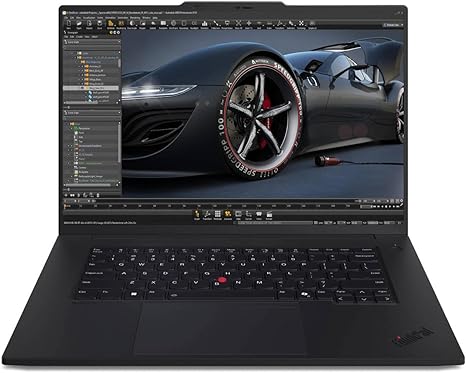
Welcome to Reviews inside tv, where we give you the details you really care about when choosing your next laptop. Today, we’re taking a look at the Lenovo ThinkPad P1 Gen 7, a powerhouse of a machine that aims to serve creative professionals, designers, and anyone in need of serious computing power. With its premium design and loaded specs, let’s see if it lives up to its promises.
The ThinkPad P1 Gen 7 packs some serious specs that suggest it’s built for heavy-duty work. Powered by the Intel Core Ultra 7 155H processor, which is part of Intel’s latest Evo platform, it promises smooth performance for multitasking and demanding applications. Whether you’re editing 4K video, running multiple VMs, or tackling data-heavy projects, this CPU should handle it with ease. Accompanying the CPU is the NVIDIA RTX 2000 Ada Generation GPU with 8GB of dedicated graphics memory. While this GPU isn’t the latest in NVIDIA’s lineup, it still offers plenty of power for tasks like 3D rendering, CAD work, and even gaming at decent settings.
Under the hood, this mobile workstation comes with 32GB of LPDDR5X RAM, which is excellent for anyone who needs to run multiple apps simultaneously. Whether you’re juggling Chrome tabs, heavy spreadsheets, or large media files, the RAM here should prevent any slowdowns. This is paired with a 1TB SSD, ensuring fast boot times and quick access to your data. It’s great for storing large media files, including high-res videos and photos, as well as handling intensive workloads without skipping a beat.
The standout feature of the ThinkPad P1 Gen 7 is its 16-inch display. With a WQUXGA resolution of 3840 x 2400, this screen offers crisp visuals with plenty of detail, making it ideal for creators who need precise color accuracy and clarity. Whether you’re editing photos, designing graphics, or streaming high-definition video, this screen will impress. The touchscreen functionality adds extra versatility, allowing you to interact directly with apps and software, but it’s worth noting that the glossy finish can be prone to reflections in bright environments.
Now, let’s get into how this laptop actually performs in real-world use. For office tasks like document editing, email, and web browsing, the ThinkPad P1 Gen 7 is a breeze. With its powerful CPU and plenty of RAM, everything runs smoothly, even with dozens of tabs open. The keyboard, typical of ThinkPads, offers a satisfying typing experience, with good key travel and solid feedback—perfect for long hours of writing. The trackpad is responsive, though like many larger laptops, you might find it takes a moment to adjust to the sheer size of the device.
When it comes to media consumption, this laptop excels. The 16-inch WQUXGA screen delivers vibrant colors and sharp images, perfect for watching movies or reviewing high-res content. The speakers, while not groundbreaking, get the job done for casual viewing, though you’d likely want to pair this with external audio for a better experience.
For creative work, whether it’s photo or video editing, the ThinkPad P1 Gen 7 holds up well. With the NVIDIA RTX 2000 GPU and the 32GB of RAM, you’ll experience smooth timelines and quick render times. 4K video editing? No problem. Photo editing in Lightroom? Seamless. Even gaming, while not its primary purpose, is definitely possible. Titles like Shadow of the Tomb Raider and Fortnite can run at high settings, though you might want to adjust settings for more graphically demanding games like Cyberpunk 2077.
Speaking of performance under load, this laptop has a lot to offer, but with great power comes great heat. During extended tasks like gaming or video rendering, the ThinkPad P1 Gen 7 can get quite warm. The keyboard deck can reach noticeable temperatures, but it never gets uncomfortably hot. Fan noise is moderate, so while it’s audible, it’s not overwhelming, especially when working in a quiet environment. However, if you plan to use this for long gaming sessions or heavy creative workloads, be prepared for some noise and warmth, though thermal throttling doesn’t seem to be an issue in normal use.
Battery life on the ThinkPad P1 Gen 7 is good but not groundbreaking. With a battery of this caliber, you can expect around 7 to 8 hours of light office work, and possibly a bit less under more demanding tasks like video editing or gaming. It’s definitely a machine that’s best used plugged in during heavy use, but for day-to-day tasks, it holds up well. Charging is relatively quick, so you won’t be tied to an outlet for too long if you need to top up.
When it comes to build quality, the ThinkPad P1 Gen 7 is robust but not overly heavy. Weighing in at around 3.9 pounds, it’s not the lightest laptop, but it strikes a good balance between portability and durability. The chassis is made from a combination of magnesium alloy and plastic, which gives it a premium feel, though it’s not as solid as some all-aluminum competitors. Still, it’s sturdy enough to survive daily travel, and the hinge feels tight and reliable.
Ports and connectivity are solid. You get two Thunderbolt 4 ports, a USB-A, HDMI, an SD card reader, and a headphone jack. Wi-Fi 6 and Bluetooth 5.2 are onboard for fast wireless connectivity. There’s no Ethernet port, which could be a dealbreaker for some, but the wireless options are fast enough for most users. The RAM is soldered onto the motherboard, so if you want to upgrade in the future, you’re limited to external storage and peripherals.
For those concerned with long-term value, this laptop is definitely built to last. It’s backed by Lenovo’s solid warranty and support, and the ThinkPad series in general has a reputation for reliability. However, at its current price point, it’s in a competitive market, so it’s essential to evaluate whether you’re really going to take full advantage of all its features.
Now, if you’re wondering how the ThinkPad P1 Gen 7 stacks up against its competition, let’s take a quick look. Compared to something like the Dell XPS 15, which offers similar specs, the ThinkPad leans more heavily into workstations with better thermal management and reliability. On the flip side, the XPS is a bit lighter and more streamlined for casual users. If you’re after serious power for professional work, the ThinkPad P1 Gen 7 edges out in terms of performance, though it might not be the best fit for anyone who values absolute portability over raw power.
In conclusion, the Lenovo ThinkPad P1 Gen 7 is a top-tier workstation for professionals in need of power, performance, and a reliable build. It’s perfect for content creators, engineers, and anyone who demands a lot from their laptop. However, if you’re more of a casual user or need something lighter, you might want to explore other options. Overall, it’s a solid choice for power users, but not necessarily for everyone.
Thank you for watching! If you want to learn more about this laptop, the link is in the comments box below. Be sure to like, subscribe, and hit that bell icon so you never miss an in-depth review. If you own this laptop, we’d love to hear your thoughts—drop your comments below! Until next time, keep exploring, and remember: the right laptop makes all the difference!
Available to buy here:


