
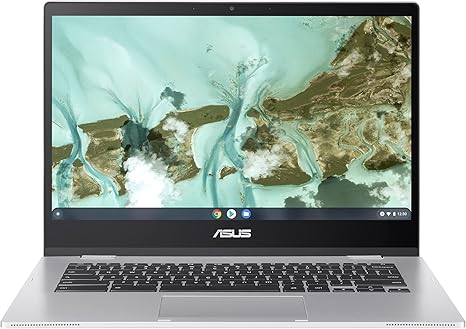

Available to buy here:
Welcome to “Reviews inside tv,” where we break down the best laptops out there to help you make the right choice. Today, we’re looking at the ASUS Chromebook CX1, a sleek and lightweight option that’s designed with simplicity and durability in mind. Whether you’re a student, a professional on the go, or just looking for a reliable everyday device, this Chromebook might be the one for you. Let’s see if it lives up to the hype.
The ASUS Chromebook CX1 comes equipped with the Intel Celeron N4500 Processor, a dual-core chip designed for light productivity tasks like web browsing, email, and document editing. You’re not going to be running demanding software like video editing programs on this machine, but for its intended purpose, which is basic computing, it holds up well. It’s paired with 4GB of RAM and 64GB of eMMC storage, offering enough power for everyday tasks and decent file storage, though you might feel the pinch if you plan to store a lot of media or large files locally. Thankfully, the 64GB of storage is supplemented with cloud storage, which is a nice bonus for those who use Google services regularly.
Now, let’s talk about the display. The 14-inch NanoEdge screen boasts a Full HD resolution of 1920×1080, which is pretty solid for a Chromebook in this price range. The thin bezels give it a modern feel, and while it’s not the brightest screen you’ll ever see, it’s certainly good enough for indoor use, streaming videos, or working on documents. If you’re using it outside, though, you might struggle to see it clearly in direct sunlight. The screen’s color accuracy isn’t mind-blowing, but it will get the job done for everyday tasks like browsing and word processing.
In terms of portability, the ASUS Chromebook CX1 is a real winner. It weighs just 3.59 pounds, which is light enough to carry around without any strain. Its compact design and thin profile make it easy to slip into a bag, making it a great choice for students or professionals who need a laptop that can travel with them. With a full 180-degree hinge, you can lay the screen flat, which is a nice touch if you want to share your screen with someone else or adjust your working angle.
Battery life is another area where this Chromebook shines. With up to 12 hours of use on a single charge, it’s perfect for a full day of work or school without needing to plug in. The eMMC storage and the power-efficient Celeron processor contribute to this impressive battery life, ensuring that you can keep going even during long sessions of browsing or typing without constantly searching for an outlet.
The keyboard here is another strength. With 1.4mm key travel, typing feels comfortable, and the keys are spaced out well enough for long typing sessions. The trackpad, while not the largest, is responsive and accurate, and it supports multi-touch gestures without any issues. If you’re doing a lot of typing, this keyboard layout and feel should serve you well for day-to-day tasks.
In terms of connectivity, this Chromebook is equipped with the essentials. You’ve got Wi-Fi 6, Bluetooth 5.2, and a decent selection of ports, including USB-A and USB-C, which means you’ll have no trouble connecting peripherals, external monitors, or even a mouse. Unfortunately, there’s no HDMI port, so you might need an adapter if you want to hook up to a larger display. Still, for a budget-friendly device, this port selection is solid.
Now, let’s talk about the overall performance. This Chromebook is designed for light to moderate use, so tasks like browsing the web with multiple tabs open, sending emails, and working on documents will run smoothly. You’ll even be able to stream videos without any issues. When it comes to media consumption, the speakers are fairly average—don’t expect booming sound, but for casual listening, they’re fine. However, if you’re doing any kind of content creation, like editing photos or videos, you’ll want to look elsewhere, as this Chromebook isn’t built for those kinds of heavy workloads.
Thermals and noise are where this Chromebook does well. Under normal use, it remains cool and quiet. Even when you push it with multiple tabs or video calls, the fan doesn’t kick in aggressively. For light tasks, you won’t even notice it running. As for comfort, it doesn’t get too hot on the underside or around the keyboard, so it’s fine for lap use during longer sessions.
One downside, however, is the performance in more demanding scenarios. The Celeron N4500 is just not powerful enough to handle intensive tasks or games. You won’t be running any modern titles or high-end applications here. But for the price and the intended use—light work, web browsing, and media consumption—it’s still a capable performer.
In terms of value, the ASUS Chromebook CX1 is an excellent option for people who need a reliable, no-fuss laptop for everyday tasks. The cloud storage, solid battery life, and portability make it ideal for students, professionals, and casual users who don’t need all the bells and whistles. However, if you need a laptop that can handle more demanding workloads, you’ll want to look elsewhere.
As for competitors, the HP Chromebook 14 and the Lenovo Chromebook Duet 5 are worth considering. Both offer similar features, but the CX1 stands out for its lightweight design and 12-hour battery life. However, if you’re looking for a better display or a more powerful processor, those models might edge it out in certain areas.
In terms of build quality, the ASUS Chromebook CX1 feels pretty solid for a budget device. It meets military-grade MIL-STD 810H durability standards, so it’s a lot more resilient than you might expect. It’s not a metal body like more premium models, but it’s sturdy enough for everyday handling and travel.
If you need long-term reliability, ASUS has a strong reputation for creating durable devices. However, don’t expect premium build quality at this price point—it’s a functional, reliable laptop built to get the job done, and that’s exactly what it does.
All in all, the ASUS Chromebook CX1 is a fantastic choice if you’re looking for an affordable, portable laptop that delivers great battery life and solid performance for everyday tasks. Whether you’re a student, someone who works remotely, or just need a dependable device for browsing and streaming, this Chromebook checks all the right boxes. Just keep in mind that it’s not designed for high-end gaming or intensive creative work. If that’s what you need, you may need to spend a little more for a more powerful laptop.
Thanks for watching! If you’ve already used the ASUS Chromebook CX1, drop your thoughts in the comments. If you’re still unsure, make sure to check the link in the description box for more details. Don’t forget to like, subscribe, and hit the bell icon so you never miss an update from “Reviews inside tv.” Until next time, happy computing!
Available to buy here:


