

Available to buy here:
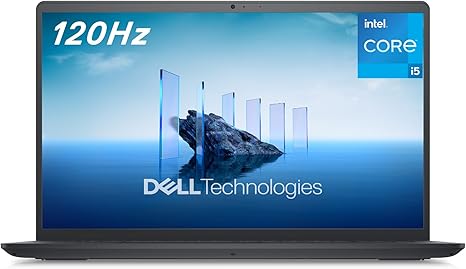
The Dell Inspiron 3520 laptop comes with a sleek, carbon black design that catches the eye while offering an impressive set of features for the everyday user. Whether you’re a student, a professional working from home, or someone who just needs a reliable device for daily tasks, this laptop aims to offer a solid balance between performance, comfort, and environmental responsibility. But does it deliver on these promises? Let’s find out.
At the heart of the Dell Inspiron 3520 is the Intel Core i5-1235U processor. This is a 10-core, 12-thread chip built on Intel’s Alder Lake architecture. It offers solid performance for most daily computing needs, including web browsing with multiple tabs, office applications, and video calls. The Core i5-1235U isn’t a powerhouse for intensive tasks like high-end gaming or complex video editing, but it handles office work and media consumption with ease. For most users, the performance here will be more than sufficient.
Backing up that processor is 8GB of DDR4 RAM. While this amount of memory is standard for mid-range laptops, it provides enough headroom for multitasking—whether you’re juggling a few browser tabs, documents, or even streaming media. If you’re a heavy multitasker, you might notice some lag if you push the system too hard, but for everyday work, it’s more than enough. For those looking for even better performance, the RAM is upgradeable, which is a nice touch for future-proofing.
On the storage side, the Inspiron 3520 comes equipped with a 512GB SSD. This is a big upgrade over older laptops with traditional hard drives, as the SSD dramatically speeds up boot times and file transfers. While 512GB is great for most users, keep in mind that if you’re working with large media files like videos, you may run out of space quicker than you’d like. Still, for light to moderate use, this storage size should be more than adequate.
The display is a 15.6-inch Full HD panel with a 120Hz refresh rate. This is a nice perk, especially for users who enjoy smooth scrolling and a more responsive screen experience. However, the 120Hz display isn’t going to make a massive difference for office work or casual browsing. But for those who watch movies or occasionally play games, the higher refresh rate can make a noticeable difference. The panel is also equipped with ComfortView, a low blue light solution designed to reduce strain during extended screen time. This is especially helpful for users who spend long hours in front of the laptop, such as students and remote workers.
Now, let’s talk about real-world performance. For basic office tasks, media consumption, and light multitasking, the Inspiron 3520 does a great job. It runs Windows 11 in S Mode, which restricts app installations to the Microsoft Store, enhancing security and speed, but it can be switched to regular Windows 11 Home for those who need more flexibility. The laptop is responsive when waking from sleep, and the keyboard feels comfortable for typing—thanks in part to its enlarged keys and lift hinge design, which raises the laptop to a more ergonomic angle. This design feature helps reduce strain on the wrists during longer typing sessions.
On the performance side, while the laptop is perfectly capable of handling most tasks, you won’t want to push it too far. For example, running demanding software like video editing suites or modern games will lead to noticeable slowdowns. However, for everyday work like browsing the web, working with documents, and streaming media, the Inspiron 3520 provides a smooth experience.
The thermals are another key area where this laptop shines. Under light loads, such as browsing or working with documents, the Inspiron 3520 remains relatively cool and quiet. When under heavier tasks, like streaming or multitasking, the fan kicks in but remains fairly quiet, keeping the laptop usable without becoming annoying. The underside does get warmer under heavy use, but it’s not uncomfortable, making this a suitable laptop for working on your lap.
Battery life is another strength of the Inspiron 3520. With a 42Wh battery, it should last between 6 to 8 hours under typical usage, like browsing the web or watching videos. If you’re working on more intensive tasks, such as media editing or gaming, expect shorter runtimes, but for most users, this battery life should be more than adequate. Charging speeds are decent, but not exceptionally fast—getting from 0 to 50% takes around an hour. The charger itself is compact and easily portable, which is ideal if you’re taking the laptop on the go.
In terms of connectivity, the Inspiron 3520 is equipped with a decent selection of ports. It includes a USB 3.2 Type-A, two USB 2.0 ports, an HDMI 1.4b, and an SD card reader, making it suitable for connecting external monitors, storage devices, and other peripherals. However, it’s worth noting that this laptop doesn’t feature Thunderbolt 4 or USB-C, which might be a dealbreaker for users who require faster data transfer speeds or want to connect to a wider range of modern peripherals. Wi-Fi 5 and Bluetooth 4.2 are also onboard, which should work fine for general internet browsing and wireless accessories, but if you need cutting-edge connectivity, you’ll find it lacking.
As far as build quality goes, the Inspiron 3520 has a plastic chassis that feels solid enough for its price point. It’s lightweight and easy to carry, tipping the scales at around 1.8kg. The overall look is clean, and the carbon black finish gives it a sleek, professional appearance. While it’s not a premium laptop in terms of materials, it doesn’t feel cheap either.
Let’s quickly go over some pros and cons. On the plus side, the Inspiron 3520 delivers good performance for everyday tasks, a comfortable keyboard, a decent display with a 120Hz refresh rate, and a battery life that’ll get you through most of the day. However, the lack of Thunderbolt support, limited ports, and weaker gaming performance may be limitations for certain users.
For those considering alternatives, laptops like the Acer Aspire 5 or HP Pavilion 15 may offer better performance for similar or slightly higher prices, especially in areas like gaming or overall CPU power. The Inspiron 3520, however, stands out in its focus on ergonomics, comfort, and a smooth experience for regular productivity tasks.
In conclusion, the Dell Inspiron 3520 is a solid choice for students, office workers, and casual users who need a reliable, well-built laptop for everyday tasks. It’s not the fastest laptop out there, but for its price range, it offers a comfortable typing experience, decent performance for light to moderate workloads, and an environmentally conscious design. If you’re looking for something to handle gaming or high-end content creation, you might want to look elsewhere, but if you just need a laptop to get things done, this one is hard to beat at its price point.
Thanks for watching! If you’re interested, the link to get the Dell Inspiron 3520 is in the comments box below. If you’ve got questions or already own this laptop, feel free to share your thoughts. Until next time, keep those tech decisions smart, and we’ll see you in the next review!
Available to buy here:


