

Available to buy here:
Welcome to Reviews inside tv! Today, we’re checking out the ASUS NUC 15 Pro+, a compact but powerhouse mini PC that’s designed to cater to both your high-performance needs and space-saving desires. With an Intel Core Ultra 9 285H processor, 32GB of DDR5 RAM, and a 1TB NVMe SSD, it promises a performance boost in almost any task. Let’s break down the specs and see if this mini PC lives up to its promises.
The ASUS NUC 15 Pro+ is all about power in a small package. At the heart of it, you’ve got the Intel Core Ultra 9 285H processor. This Series 2 chip is built for performance, handling multitasking, demanding workloads, and even some light gaming without breaking a sweat. Paired with 32GB of DDR5 RAM, you’re looking at smooth performance whether you’re running multiple apps or working with large files. If you’re someone who juggles a lot—whether in a professional setting or at home—this machine gives you all the multitasking power you’ll need. The 1TB NVMe SSD ensures you’ve got plenty of space for your files, and with blazing-fast read/write speeds, your system will boot up in seconds, and loading apps and files will be near-instant.
When it comes to graphics, the Intel Arc 140T integrated GPU is no slouch either. While not a dedicated gaming card, it provides solid graphics performance for general media consumption and light gaming. You can stream 4K videos, edit photos, or even run some casual games with ease. However, if you’re looking for heavy gaming performance or high-end content creation, this might not be the choice for you—but it’s more than enough for the average user.
In terms of connectivity, the NUC 15 Pro+ shines. With Thunderbolt 4 and Intel’s Wi-Fi 7, you’re set up for ultra-fast data transfer and seamless connectivity with other devices. Thunderbolt 4 is a game-changer, allowing you to connect multiple high-speed peripherals, external storage, or even 4K displays. Speaking of displays, the NUC 15 Pro+ supports up to four 4K monitors through its dual HDMI 2.1 and Thunderbolt ports. If you’re someone who needs to expand their workspace across multiple screens, this mini PC has you covered.
Now, let’s talk about how it feels to use in day-to-day tasks. For office productivity, the NUC 15 Pro+ handles everything from web browsing with dozens of tabs open to video calls and document work without breaking a sweat. The thermal engineering here is impressive too; ASUS has ensured that this system runs quietly. The sophisticated cooling setup keeps fan noise to a minimum, even when you’re putting the system through its paces. This is crucial if you’re working in a quiet environment where loud fans can be distracting.
Media consumption is another area where this mini PC excels. The 4K display support is fantastic for streaming, giving you an immersive viewing experience without lag. Whether you’re watching movies, editing videos, or simply browsing the web, the performance stays smooth, and you won’t experience any stuttering or slowdown.
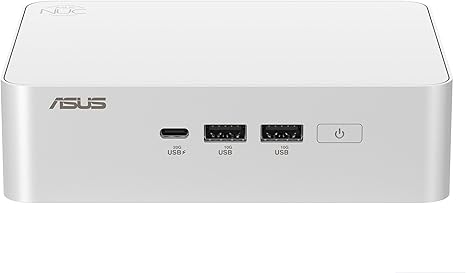
When it comes to the actual user experience, it’s all about the design. The NUC 15 Pro+ has a sleek, minimalist look with a toolless upgrade system, making it easy to swap out components if you ever need more storage or want to upgrade your RAM. The silver aluminum chassis not only gives it a premium feel but also contributes to its lightweight design, weighing just 0.7L. This makes it easy to tuck away in tight spaces, while still being sturdy enough to handle daily use.
In terms of thermals, the NUC 15 Pro+ is engineered for low noise and effective heat dissipation. It performs well under load without turning into a jet engine, even during longer sessions. This is a relief for anyone who’s had to deal with noisy PCs that heat up quickly, making it less comfortable to use for extended periods. The cooling system here ensures that the system stays cooler and quieter, which makes for a more pleasant working environment.
Battery life can be tricky to gauge with mini PCs since most are designed to stay plugged in. However, the NUC 15 Pro+ is a great choice if you need a stationary system with low energy consumption, especially with the new sync power-off feature that shuts off the screen for better energy efficiency when not in use. Though the mini PC doesn’t have a traditional battery like laptops, its energy-efficient design is worth noting.
When it comes to the keyboard and trackpad, this system doesn’t include either, since it’s a mini PC. However, this is where the connectivity options really shine. With multiple USB ports and Thunderbolt 4, you can easily attach a full-sized keyboard and mouse, or use wireless peripherals that you prefer. The port selection also includes HDMI 2.1, which makes connecting to external monitors or TVs super easy, and there’s an SD card reader to accommodate photography or media-related work.
The build quality is top-notch, with a sleek aluminum chassis that feels sturdy and well-crafted. You’re getting something that looks and feels premium for its size, without any of the flimsy, cheap materials that some mini PCs tend to use. This NUC’s design is compact yet solid enough to withstand years of use.
Now, let’s talk about its value. Priced higher than many entry-level mini PCs, the NUC 15 Pro+ is a premium choice. However, the combination of top-tier performance, ultra-fast connectivity, and the ability to drive multiple 4K displays makes it a great option for those looking for power and efficiency in a compact form. If you’re looking for a budget option, this may not be the best fit. But for those who need performance and reliability in a small package, it delivers.
Comparing it to other similar mini PCs on the market, the NUC 15 Pro+ holds its own. It’s a little more expensive than some alternatives, but it’s well worth it for those who want Intel’s latest technology, including Wi-Fi 7 and Thunderbolt 4. This system also excels in cooling and thermal management compared to other mini PCs, which can often suffer from overheating and noisy fans.
The NUC 15 Pro+ is designed for power users who need a compact, yet powerful PC for a variety of tasks. If you’re into multitasking, video editing, or just want a sleek, space-saving system for productivity, this machine can handle it. It’s a great fit for students, office workers, creators, and even some light gamers who value performance over portability. However, if you’re a hardcore gamer or need a system for heavy-duty content creation, you may want to look elsewhere for more powerful graphics and performance.
Thanks for watching, and don’t forget to check out the link to grab this mini PC in the comments box below. Let us know if you have any questions or thoughts on the NUC 15 Pro+. Until next time, stay tuned for more in-depth reviews here on Reviews inside tv!
Available to buy here:


