Available to buy here:
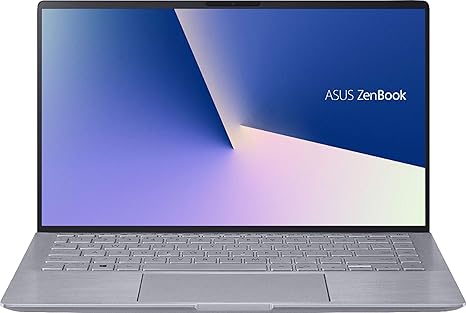
Welcome to “Reviews inside tv”! Today, we’re looking at the ASUS Zenbook 14, a laptop that combines sleek design with decent performance. With its AMD Ryzen 5, 8GB of RAM, and a GeForce MX350, it targets users who need a reliable machine for productivity, light gaming, and media consumption. If you’re looking for something that’s portable without compromising on everyday performance, stick around to see if the Zenbook 14 delivers.
The Zenbook 14 features a solid mix of specs. The AMD Ryzen 5 processor runs at a base clock of 1.8 GHz, which can turbo boost up to 4.0 GHz when things get heavy. It’s paired with 8GB of RAM, which is on the lower end for multitasking-heavy tasks but should be enough for everyday use like web browsing, office work, and light media creation. Storage comes in the form of a 256GB SSD—decent for the price, offering fast boot times and quicker file access compared to traditional HDDs. If you’re planning on handling larger files or keeping lots of programs open, the SSD will definitely help speed things up.
When it comes to the display, the 14-inch screen might seem a bit compact if you’re used to bigger laptops, but it’s a solid choice for portability. The resolution is Full HD, meaning you get 1920 by 1080 pixels of sharpness, good for streaming and general work tasks. The colors look decent, though this isn’t an OLED or high-refresh display, so you’re not going to get that extra pop or smoothness for gaming or high-end creative tasks. That said, the screen is perfectly fine for most uses, offering clear and vibrant visuals without being overwhelming on the eyes.
For performance, the Zenbook 14 does a solid job with general office tasks, web browsing, and media consumption. With the Ryzen 5 processor, you won’t see any significant lag when handling multiple tabs in a browser or running office applications like Word or Excel. You can also stream Netflix or YouTube in high definition without any issues. However, if you’re planning on heavy content creation like video editing or 3D rendering, the Ryzen 5 may struggle to keep up—especially with just 8GB of RAM. For that type of work, you’d likely want more memory and a more powerful GPU.
When it comes to gaming, the GeForce MX350 GPU offers a bit of extra horsepower over integrated graphics, allowing for decent performance in light gaming scenarios. Games like “Fortnite” or “League of Legends” should run well at medium settings, but don’t expect ultra settings or a competitive edge in more graphically demanding titles like “Cyberpunk 2077.” The MX350 is still an entry-level GPU, so while you can play some games, expect to make some adjustments in settings for smoother gameplay.
In terms of everyday use, the laptop wakes from sleep quickly, and the trackpad is responsive, though not the largest you’ll find. The keyboard, with its reasonable key travel, is comfortable for longer typing sessions. It’s not a full-size keyboard, though, so the layout might feel a bit cramped for some, particularly if you’re used to a number pad or larger keys.
Now, let’s talk thermals and noise. The Zenbook 14 doesn’t overheat under light use, and the fan noise is minimal during everyday tasks. However, under load, such as gaming or running intensive applications, the fan can get a bit louder. The keyboard deck stays reasonably cool, but the underside can warm up during longer tasks, which might make it uncomfortable for lap use. It’s nothing extreme, but it’s worth noting if you tend to work in warmer environments.
Battery life is one of the Zenbook 14’s strengths. Thanks to a 50Wh battery, it can easily last through a full day of work or media consumption. On light usage like web browsing and document work, you can expect around 8–9 hours of battery life, which should get most users through the day. If you’re gaming or running heavy workloads, expect closer to 4–5 hours. The charging speed is decent too, with a quick charge getting you back up to 50% in about 40 minutes.
Portability is another highlight. At just 1.3kg, the Zenbook 14 is light and easy to carry around, making it an ideal option for students or professionals who need a device they can take with them throughout the day. It’s thin and compact, so it’ll slide easily into most bags without taking up much space.
In terms of connectivity, the laptop features a decent selection of ports. You get USB-A and USB-C ports, an HDMI 2.0 port, and a microSD card reader. It’s not the most extensive port selection, but it covers the basics well. For wireless connectivity, the Zenbook 14 supports Wi-Fi 6, which ensures faster internet speeds and more reliable connections, especially in crowded networks. Bluetooth 5.0 is also supported for easy pairing with wireless accessories.
So, what about the overall experience? Well, it’s a solid all-rounder. For the price, it offers great performance for general tasks, decent battery life, and a sleek, portable design. The build quality feels solid with its aluminum chassis, though it does show some fingerprints. The screen is fine for casual work and media consumption but doesn’t have the color accuracy or high refresh rates of more premium options. The biggest downside, however, is its performance limitations when it comes to more demanding tasks like content creation and high-end gaming.
When it comes to value for money, the Zenbook 14 is definitely worth considering if you’re looking for a lightweight laptop for office work, media consumption, and some light gaming. There are competitors in this price range, like the Dell XPS 13 or HP Envy, which offer similar performance but might have slightly better displays or more premium features. The Zenbook 14 has a slight edge in battery life and portability, making it ideal for users on the go.
As for build quality, the Zenbook 14 feels durable. While it’s not built like a tank, the aluminum body gives it a premium feel without the added weight. The hinge is solid, and there are no significant signs of creaking or flexing under pressure, which is reassuring for long-term use. ASUS has a good reputation for reliability, and although this is a newer model, there’s no reason to expect any long-term reliability issues based on the overall design and build quality.
In conclusion, the ASUS Zenbook 14 is a solid laptop for students, office workers, or anyone who needs a lightweight, portable machine that handles everyday tasks with ease. If you’re looking for something to do heavy content creation or serious gaming, you may want to look at a more powerful model, but for those who need a balanced mix of performance, portability, and battery life, this laptop certainly delivers.
Thank you for watching! If you’re interested in the ASUS Zenbook 14, check the comments box for the link to get it. Feel free to ask any questions or share your experiences if you already own this laptop. See you in the next video, and remember—stay powered up!
Available to buy here: