

Available to buy here:
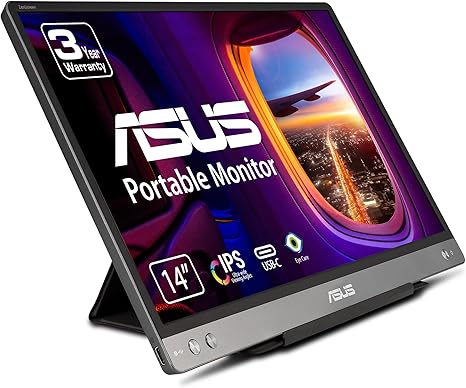
Welcome to “Reviews inside tv,” where we get into the nitty-gritty of tech to help you make informed decisions. Today, we’re checking out the ASUS ZenScreen MB14AC 14-inch portable monitor, a sleek, portable display that promises to enhance your productivity on the go. Let’s see how it holds up in real-world use.
The ZenScreen MB14AC is a 14-inch portable USB monitor that delivers Full HD 1080p resolution, which should make everything from office work to entertainment look sharp. With its anti-glare IPS display, it’s designed to keep things clear even in bright environments—important if you’re working outside or in a well-lit room. The 16:9 aspect ratio gives you the classic widescreen experience, perfect for multitasking with multiple windows or enjoying content in full screen.
What makes this monitor stand out is its hybrid-signal solution, which lets you connect it to any laptop with either a USB Type-C or Type-A port. This makes setup incredibly simple—just plug it in, and you’re good to go. No need for bulky adapters or additional cables. This feature should appeal to people who are always on the move and want a hassle-free setup for their second screen. It also features automatic screen orientation detection, so you can switch between landscape and portrait modes with ease, adapting to whatever task you’re working on.
As for the display quality, the 250cd/㎡ brightness is on par for a portable monitor, meaning it should perform well in most environments. The wide 178° viewing angles mean you’ll have no trouble seeing the screen from different positions, whether you’re sitting side by side with someone or presenting to a group. The IPS panel also ensures that the colors stay true, making it a solid choice for work that demands color accuracy, like photo or video editing on the go.
When it comes to real-world performance, this monitor is great for typical productivity tasks. If you’re a student or office worker, you’ll appreciate the additional screen real estate it provides for browsing, writing, or working in spreadsheets. The clarity of Full HD is perfect for these tasks, providing crisp text and sharp images without overloading your laptop’s GPU.
For creators, it’s not quite the replacement for a high-end studio monitor, but it certainly makes a good portable companion for tasks that don’t require professional-level color accuracy. The extra screen space is ideal for reviewing files or running multiple programs simultaneously. If you’re editing photos or videos on the go, it can serve as an extra tool to manage your workflow.
For gaming or media consumption, while it offers a solid 1080p experience, it’s more geared toward productivity rather than gaming immersion. Watching videos or streaming your favorite shows will look good on this monitor, but if you’re a gamer, you might find the lack of higher refresh rates or deeper contrast a bit limiting. That being said, for casual users or those looking to add a second screen for movies, this works just fine.
On the portability front, the ZenScreen MB14AC is impressively slim and lightweight, making it easy to carry around in a bag without adding much bulk. This is a big win for travelers or anyone who needs a mobile solution for dual displays. The screen is just 0.3 inches thick and weighs under 1.8 pounds, so you can take it anywhere without it becoming a burden.
Battery life isn’t a concern with this model because it draws power directly from your laptop, meaning you don’t need to worry about charging it separately. However, this also means that you’ll rely on your laptop’s battery, so if you’re running low on power, both devices may need to be plugged in. It charges quickly through USB Type-C, which is great if you’re in a pinch and need to top up your laptop or monitor while working.
As far as connectivity goes, you’ve got the flexibility of USB Type-C or Type-A ports, which are standard on most modern laptops. This allows you to easily connect it to a range of devices, from laptops to smartphones, giving you the ability to work, stream, or play on a larger screen with minimal effort. The monitor also features an auto-rotate function, which, when paired with its slim design, makes it easy to use whether you’re working on a presentation or scrolling through social media.
The ZenScreen MB14AC isn’t without its drawbacks, though. While the 250cd/㎡ brightness is decent, it could be too low if you plan on using the monitor in direct sunlight for extended periods. The screen also lacks a high refresh rate, so if you’re into competitive gaming, this might not be the best choice for you. The build, while light and slim, is also entirely plastic, so it may not feel as premium as some of its competitors in the portable monitor space.
In terms of value, the ZenScreen MB14AC comes at a reasonable price considering the features it offers. With its hybrid-signal solution, ease of use, and decent display quality, it provides solid performance for students, professionals, and travelers who need a second screen but don’t want to haul around a bulky monitor. It won’t replace your primary workstation monitor, but it’s a great companion for anyone who needs extra screen space without the extra weight.
When comparing this to other portable monitors in the same price range, it holds its own, particularly for users looking for a balance between portability and functionality. Alternatives like the Lenovo ThinkVision M14 or the AOC I1659FWUX offer similar features, but the ASUS has an edge with its simple plug-and-play functionality and automatic rotation, which some others lack.
As for build quality, while it’s not premium, it’s still sturdy enough for everyday use. The monitor’s plastic body feels durable, and the hinge mechanism for rotation is solid, providing a reliable experience over time. If you’re using it in different environments or need it to withstand some occasional bumps, it should hold up just fine.
In terms of support, ASUS provides a 3-year warranty with this product, which is a nice reassurance for buyers. They also offer customer service options if you need assistance, although the general feedback around ASUS support tends to be mixed—quick responses but not always the most thorough.
So, who is this monitor best for? If you’re someone who frequently travels or needs a second screen for productivity on the go, the ZenScreen MB14AC will serve you well. It’s ideal for students, office workers, and casual creators. If you need a high-refresh-rate screen for gaming or professional color work, you might want to look elsewhere.
Thanks for watching! If you’re interested in the ASUS ZenScreen MB14AC, the link to purchase is in the comments below. Feel free to ask any questions or share your experience if you already own one. And don’t forget to like, subscribe, and hit that bell icon so you don’t miss out on more in-depth reviews. See you next time, and happy screen hunting!
Available to buy here:


