

Available to buy here:
Welcome to Reviews Inside TV, where we break down the latest and greatest in tech, gadgets, and gear. Today, we’re looking at the Cooler Master Mechanical Gaming PC Keyboard, a product that promises to bring precision and style to your gaming setup. With so many options out there, it’s easy to get overwhelmed. But does this keyboard really live up to the hype? Let’s see what it’s all about.
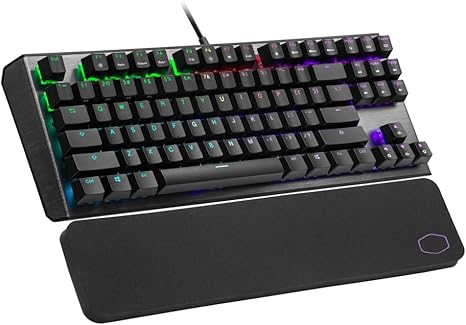
The Cooler Master Mechanical Gaming Keyboard is designed with gamers in mind, featuring a sleek brushed aluminum top plate, floating keycaps, and a minimalist aesthetic that’s both functional and stylish. This keyboard doesn’t just look good; it’s built for performance. The mechanical switches are rated for 50 million keypresses, offering durability for even the most intense gaming sessions. The per-key RGB backlighting is customizable, allowing you to light up your keyboard in a way that matches your gaming style, with 16.7 million colors and a variety of lighting modes and effects to choose from. And with a low-friction cloth wrist rest, long gaming sessions are made more comfortable, reducing strain on your wrists. But how does it actually perform when you put it to the test?
Setting up the Cooler Master keyboard was straightforward. The plug-and-play design means you don’t have to waste time fiddling with complex software, but if you want to get more granular with customization, you can use the Cooler Master software to fine-tune macros, adjust lighting, and create unique profiles for different games or tasks. Personally, I tested this keyboard during some intense gaming sessions and found that the mechanical switches offered a satisfying, tactile feedback with each press. The sound was a bit louder than I expected, but that’s typical with mechanical switches, and many gamers actually prefer that audible click for better feedback. I also used it for regular tasks, like typing up some emails, and while it’s not the most silent option, it definitely feels like it can handle both work and play.
But when it came to gaming, this keyboard really shined. The RGB lighting is not just for show; it adds a lot of personality to the gaming experience. You can assign different colors to individual keys, which can be especially helpful in games where you want to quickly spot critical keys in a complex keybind setup. The on-the-fly function combos were super handy as well, allowing me to adjust settings without needing to minimize my game. Whether you’re playing an FPS or an RPG, the responsiveness of the keys gives you that edge, and the wrist rest keeps you comfortable for those extended sessions.
Now, let’s talk about the pros and cons. On the plus side, this keyboard has a lot going for it. The build quality is excellent, especially with the brushed aluminum design that gives it a premium feel. The mechanical switches are responsive and durable, and the RGB lighting is a highlight. It’s not just about aesthetics; it’s about customization, too. Being able to map 16.7 million colors and adjust macros through the software means you have total control over your setup. And the wrist rest? A small addition, but it makes a real difference when you’re gaming for hours.
On the flip side, there are a couple of things to keep in mind. First, the keyboard is a bit noisy—something to consider if you’re in a shared space or prefer a quieter typing experience. It’s also not the most compact design, so if you’re short on desk space, it might feel a little bulky. And while the software is powerful, it’s not as intuitive as some may like, so there could be a learning curve if you’re new to customizations.
When it comes to value for money, the Cooler Master Mechanical Gaming Keyboard hits the mark. It’s priced competitively in the mid-range for mechanical keyboards, and given the build quality, performance, and customization options, it feels like you’re getting your money’s worth. Sure, there are cheaper options out there, but the Cooler Master keyboard offers features that many budget keyboards don’t, like customizable RGB lighting and the durable mechanical switches. It’s not the cheapest, but considering the quality and features, it’s a solid investment for gamers who want reliability and style.
Comparing it to some of its competitors, like the Logitech G Pro X or the Corsair K95 RGB, you’ll find that the Cooler Master keyboard offers a similar set of features at a slightly lower price point. However, those other brands might offer more advanced switches or additional keys for even more control. But when you consider the performance you’re getting at this price, the Cooler Master keyboard holds its own against the competition, especially for those who want a straightforward, no-frills gaming keyboard that doesn’t skimp on quality.
As for build quality, the Cooler Master keyboard is well-constructed with high-quality materials. The brushed aluminum top plate adds durability and a premium look, and the floating keycaps provide a clean and modern aesthetic. While I don’t have data on long-term reliability, Cooler Master is a reputable brand known for producing sturdy and dependable products. Based on industry trends, I expect this keyboard to hold up well over time, though, of course, how long it lasts will depend on your usage habits.
I didn’t have to reach out to customer support for this product, so I can’t speak to that experience directly. However, Cooler Master is generally well-regarded for its customer service, and there are plenty of online resources available to help troubleshoot any issues you might run into. The product comes with a standard warranty, which should offer peace of mind for most buyers.
In terms of updates, since this is a mechanical keyboard with RGB lighting and customization features, it does come with software updates from time to time to improve functionality and add features. If you plan on using the software to its full potential, make sure to check for updates to ensure you’re getting the latest features and improvements.
To wrap it up, the Cooler Master Mechanical Gaming Keyboard is a solid choice for gamers looking for a customizable, high-quality keyboard that won’t break the bank. It offers strong performance, excellent build quality, and impressive features like per-key RGB lighting, mechanical switches, and a comfortable wrist rest. The few drawbacks—like the noise level and the slightly bulky design—are relatively minor, especially for those who prioritize performance over quiet typing. If you’re in the market for a reliable gaming keyboard with a great balance of features and value, this one is definitely worth considering.
Thanks for watching, and if you’re interested in picking up the Cooler Master Mechanical Gaming Keyboard, you can find the link in the comments box. If you already own one, I’d love to hear your thoughts in the comments below—does it live up to your expectations? Don’t forget to like, subscribe, and hit the bell icon for more reviews. Until next time, stay comfortable and game on—this is Reviews Inside TV, signing off!
Available to buy here:


