

Available to buy here:
Welcome to Reviews Inside TV, the channel that gives you the inside scoop on the best products in tech, gaming, and more. Today, we’re looking at the Das Keyboard X50Q, a mechanical keyboard that bridges the gap between work and play. If you’re someone who values productivity and gaming equally, you’re going to want to hear this review. It promises to be a productivity powerhouse while still packing the punch of a gaming keyboard, all in one sleek package. But does it live up to the hype? Let’s find out.
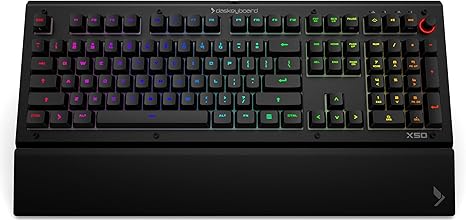
The Das Keyboard X50Q is a mechanical keyboard designed with professionals and gamers in mind. With its programmable RGB keys, the X50Q isn’t just about aesthetics—it’s about efficiency. The keyboard features 104 keys, a brushed aluminum top, and Gamma Zulu soft tactile switches that promise up to 100 million keystrokes. Its standout feature is its fully programmable RGB lighting, which can be customized to provide real-time notifications directly on the keys. Whether it’s a notification about a failed software build, a new task, or even a Twitch streamer going live, the X50Q will alert you using its vibrant, customizable lighting. The keyboard also boasts a full N-key rollover over USB, meaning every key press is registered, no matter how fast or simultaneous your typing might be. And for those long work or gaming sessions, it’s equipped with an ergonomic detachable wrist rest that promises comfort. Plus, the added WASD keycap upgrade kit brings extra tactility and style to your most important keys. But let’s get into the nitty-gritty and see how this keyboard really performs.
In terms of real-world usage, the Das Keyboard X50Q really shines in its versatility. Whether you’re working on a high-stakes project, deep into a gaming session, or just browsing, the custom RGB keys deliver a unique and practical experience. Setting it up was a breeze, as the software for programming the keys and managing the RGB settings is intuitive and easy to navigate. The tactile feel of the Gamma Zulu switches offers a satisfying experience, whether you’re typing long reports or executing rapid keystrokes in games. The full N-key rollover is perfect for fast typists, allowing multiple key presses to register simultaneously without issue. The wrist rest, while comfortable, does add a bit of bulk to the keyboard, so it’s something to consider if you have limited desk space.
Now, let’s talk about the strengths and weaknesses. On the plus side, the X50Q’s key customizability is a game-changer for professionals and gamers alike. The RGB lighting is intensely bright, with 16.8 million colors to choose from, making it not only a functional tool but also an eye-catching centerpiece. The Gamma Zulu switches offer a satisfying tactile feedback that strikes a great balance between quietness and responsiveness. Its ergonomic wrist rest and build quality, with the aluminum top, are solid and built to last. However, the keyboard isn’t without its drawbacks. The wrist rest, while comfortable, can make the keyboard feel a bit too bulky for some users. And while the RGB lighting is great, some users may find the brightness and intensity a bit overkill if they prefer a more subdued setup. Additionally, while the applets for notifications are useful, the practicality of using these for day-to-day office work might vary depending on the individual’s workflow.
In terms of value for money, the Das Keyboard X50Q is priced at a premium. Considering the build quality, RGB customization, and durable switches, it’s not a cheap investment. However, it does offer good value if you’re looking for a keyboard that can easily transition from professional work to gaming. If you’re someone who types a lot, games intensely, or needs a keyboard that delivers both form and function, this could be a solid purchase. If you’re looking for a budget option, though, there are similar mechanical keyboards that offer a similar experience without the flashy RGB or customizable applets for a lower price.
When comparing it to alternatives, a direct competitor would be something like the Razer Huntsman Elite or the Logitech G Pro X. Both of these keyboards offer solid mechanical switches and RGB customization, but they each have their own unique selling points. The Razer Huntsman Elite offers a slightly more refined build with its opto-mechanical switches, which some gamers might prefer for speed. The Logitech G Pro X, on the other hand, has hot-swappable switches, allowing you to customize the feel of your keyboard even further. That said, the Das Keyboard X50Q stands out with its unique integration of real-time notifications, something that’s not available on many other keyboards. Its bright, customizable RGB lighting and pre-built Q applets are a huge draw for anyone who needs a truly versatile keyboard.
The build quality of the X50Q is top-notch, with its brushed aluminum top giving it a premium, sturdy feel. The keys themselves feel solid and responsive, offering great tactile feedback with each press. As for longevity, Das Keyboard is known for producing durable products, and the X50Q’s promise of 100 million keystrokes is a testament to its reliability. While long-term reviews of this model are still being accumulated, Das Keyboard has a strong reputation for producing high-quality, long-lasting keyboards, and this one doesn’t appear to be an exception.
Regarding customer support, while I haven’t had to directly interact with Das Keyboard’s support team, the brand has garnered a solid reputation in the keyboard market. Their customer service tends to be responsive and helpful, with many users praising their ability to resolve issues quickly.
If you’re someone who loves a customizable, feature-packed keyboard that’s built for both work and play, the Das Keyboard X50Q is definitely worth considering. It provides a solid typing experience, vibrant RGB lighting that can serve a functional purpose, and the overall build quality is top-tier. While it’s a bit more expensive than other mechanical keyboards on the market, its versatility and durable design could justify the higher price tag. Whether you’re a pro gamer or a professional looking for a more efficient and ergonomic tool, the X50Q delivers a solid all-around performance.
Thanks for watching! If you’re considering picking up the Das Keyboard X50Q, check the comments box for more details on where you can get it. Feel free to drop a question or share your thoughts if you’ve already used this keyboard—we love hearing from you! Until next time, thanks for tuning into Reviews Inside TV, where we bring you the most honest and in-depth reviews. Keep typing away and stay productive!
Available to buy here:


