

Available to buy here:
Welcome to “Reviews inside tv”! Today, we’re taking a closer look at the Dell Inspiron 15 3520 laptop. Whether you’re in the market for a budget-friendly productivity machine, or just need a solid device for work, this laptop offers a blend of features that might catch your attention. Let’s break it down and see if it can handle your daily tasks with ease.
First, let’s talk about the specs. The Dell Inspiron 15 3520 packs a 15.6-inch FHD display, with a resolution of 1920×1080, boasting a 120Hz refresh rate. It’s an anti-glare panel with WVA technology, meaning you get wide viewing angles with decent brightness at 250 nits. This screen is solid for general work and media consumption, but it won’t blow you away with its color accuracy or brightness like higher-end displays. The 120Hz refresh rate is a nice touch if you’re into smoother visuals, though don’t expect it to perform at the level of gaming laptops that push this number to higher levels.
Under the hood, we have the 12th generation Intel Core i5-1235U processor. This CPU has 10 cores, with a base clock of 1.3GHz and the ability to boost up to 4.4 GHz. In everyday usage like web browsing, document editing, and video calls, this CPU delivers a smooth experience with no noticeable lag. For those working on more demanding tasks like light photo editing or handling a few more intensive apps at once, the i5 should manage well. However, it’s not going to excel in tasks like 4K video editing or rendering, which are better suited for more powerful processors.
The laptop comes with 16GB of DDR4 RAM, running at 2666MHz, which is a sweet spot for most office users, students, or light creators. You’ll have no trouble keeping multiple tabs open, working on documents, and having Zoom calls running in the background. The extra RAM will also help a bit with multitasking and keeping performance steady when you push the laptop.
For storage, the 512GB M.2 PCIe NVMe SSD is a great choice, offering fast read and write speeds that make the system snappy. You’ll notice the difference in boot times, file transfers, and application launches. Unlike traditional SATA SSDs, the NVMe drive provides faster data transfer speeds, making it feel more responsive overall.
In terms of graphics, the Dell Inspiron 15 3520 uses Intel’s integrated Iris Xe GPU. While it’s not a powerhouse for gaming or GPU-heavy tasks, it should be fine for casual gaming, light content creation, or media streaming. Expect to play older or less demanding titles at medium settings, but don’t expect to push modern AAA games at high settings.
Wi-Fi 6 support is included here, providing faster internet speeds and better reliability for streaming and downloading, especially if you’re on a Wi-Fi 6 router. Bluetooth 5.0 is also present, allowing for smooth connections with wireless peripherals like keyboards, mice, and headphones.
On the battery side, the Inspiron 15 3520 comes with a 3-cell 41Wh battery. Realistically, you’re looking at around 6 to 7 hours of use with light tasks like web browsing, watching videos, or document work. If you’re pushing the system with more demanding tasks like video calls or media editing, expect that number to drop. The laptop isn’t the most portable option at 1.7 kg (3.75 lbs), but it’s manageable for daily use, especially if you’re carrying it in a bag. Charging is decent, but don’t expect ultra-fast charging; it’s more in line with what you’d expect from an average laptop.
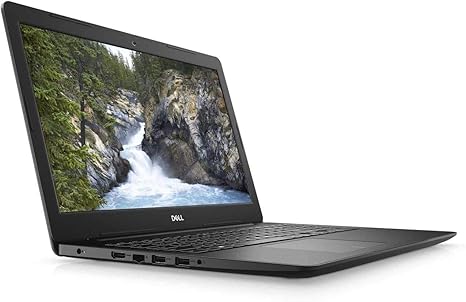
When it comes to comfort, the keyboard and trackpad are solid, though not extraordinary. The keyboard provides decent travel and feedback, making it comfortable for typing long documents or emails. The trackpad is responsive, though it could feel a bit cramped at times, especially for users with larger hands.
As for ports, the Inspiron 15 3520 has a standard array, including a USB-C port, USB-A ports, an HDMI output, an SD card reader, and an audio jack. However, there’s no Thunderbolt support, which is a bit of a bummer if you’re looking for high-speed external storage or future-proofing. Wi-Fi 6 is great for wireless speeds, and Bluetooth 5.0 will handle your peripherals with ease.
Now, let’s get into the nitty-gritty of performance. In terms of office and productivity tasks, the laptop performs admirably, with no noticeable slowdowns even when juggling multiple tasks. If you’re working from home, attending virtual meetings, or handling spreadsheets, this system will be more than capable. Media consumption, such as streaming Netflix or YouTube, is also enjoyable, and the 120Hz refresh rate helps make the visuals a bit smoother, though the display doesn’t reach the brightness or color accuracy of more premium models.
For light content creation like photo or video editing, the Inspiron 15 3520 holds its own, though don’t expect lightning-fast export times. The Iris Xe GPU can handle the basics, but it’s not designed for heavy-duty creative work. Gaming performance is okay for older or less demanding games like Fortnite or League of Legends at medium settings, but don’t expect to run AAA games like Cyberpunk 2077 or Call of Duty: Warzone smoothly, especially not at high settings or high resolutions.
In terms of thermals, the laptop performs decently under normal use, with the fans staying relatively quiet. Under load, the system can heat up, but it doesn’t throttle too much or get uncomfortably hot. The fan noise is audible but not intrusive unless you’re pushing the laptop hard, such as during long gaming sessions or video exports.
In summary, the Dell Inspiron 15 3520 is a well-rounded laptop with a focus on productivity and light media tasks. It’s perfect for students, office workers, and those who need a reliable device for everyday tasks without breaking the bank. The display is good for general use, but if you’re a creator or gamer looking for a higher-end experience, you may want to look elsewhere.
As for battery life, it’s pretty average, with around 6 to 7 hours of use. It’s not going to last you all day with heavy work, but it will get you through the majority of a workday if you’re on light tasks. The build quality feels solid, with an overall durable feel, though the design is fairly standard and not especially premium.
In terms of value for money, this laptop strikes a balance between price and performance. It’s not the cheapest laptop out there, but for what you get – solid performance, decent display, and a good array of ports – it offers good value for everyday users.
If you’re looking for alternatives, you might want to consider the HP Pavilion 15 or the Lenovo IdeaPad 3, which offer similar performance but with slight variations in build, design, and price.
Thank you for watching! The link to get the Dell Inspiron 15 3520 is in the comments box below. If you have any questions or already own this laptop, feel free to drop a comment and share your experience. Until next time, take care and stay tech-savvy!
Available to buy here:


