

Available to buy here:
Welcome to “Reviews inside tv”! Today, we’re taking a closer look at the HP ZBook 8 G1i, a mobile workstation that promises power and versatility for professionals on the go. With its impressive specs and sleek design, could this be the ultimate tool for creators, engineers, or anyone who needs serious performance in a portable package? Let’s find out.
The HP ZBook 8 G1i features an Intel Core Ultra 7 255H processor, with a staggering 16 cores designed to handle multi-threaded tasks like a pro. Whether you’re editing video, running simulations, or managing large datasets, this CPU can power through demanding workloads with ease. Paired with 32GB of RAM, this machine ensures smooth multitasking and snappy performance, even with multiple apps running simultaneously. The 1TB SSD offers ultra-fast read and write speeds, making file transfers and boot-ups practically instantaneous, which is a real game-changer for anyone who deals with large files or needs quick access to data.
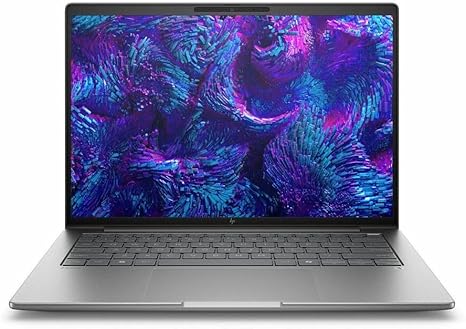
The 16-inch WUXGA display (1920 x 1200 resolution) is perfect for professionals who need a larger screen for precise work, whether it’s for photo editing, 3D modeling, or just juggling multiple windows. The panel delivers solid brightness and decent color accuracy for work that requires attention to detail. While not as vibrant as an OLED, it’s more than enough for most users in a business environment, offering clear visuals with crisp text and well-defined graphics. The 16:10 aspect ratio is a nice bonus, providing slightly more vertical screen real estate than a standard 16:9 display.
On the GPU front, the HP ZBook 8 G1i is equipped with the Intel Arc 140T, which is not a dedicated powerhouse like an Nvidia RTX, but for professional workloads, it handles graphics tasks well. Whether you’re working in CAD software, rendering videos, or occasionally gaming, the Arc 140T provides competent performance without hitting the limits too quickly. However, don’t expect it to run modern AAA games at ultra settings. It’s better suited for workstations that prioritize stability and reliability over raw gaming performance.
For real-world usage, this laptop really shines when it comes to productivity and creative tasks. With its powerful processor and ample RAM, you can breeze through office applications, web browsing, and video calls without any hiccups. When you’re working with media, like streaming 4K content or editing photos, the performance holds up well, offering smooth playback and efficient processing. Photo and video editors will appreciate how quickly the laptop can handle layers, filters, and exports. However, keep in mind that for more intense workloads like 3D rendering or large video projects, the Intel Arc GPU may not be as fast as a dedicated workstation GPU like those in higher-end models.
Now, let’s talk thermals and noise. The HP ZBook 8 G1i generally manages heat well under load, but don’t expect it to be whisper-quiet during intense tasks. The fans can get noticeable under heavy use, especially when pushing the CPU and GPU hard. On the plus side, the thermal design ensures that the laptop doesn’t get uncomfortably hot on your lap or on a desk, but you’ll definitely hear the fans working. The keyboard area stays cool for the most part, though the underside can get a little warm under extended use.
Battery life on the ZBook 8 G1i is solid, though it does vary depending on usage. For light office tasks, you can expect around 7 to 8 hours of use, which is impressive for a workstation of this caliber. Streaming video or running more demanding applications will naturally drain the battery faster, likely leaving you with 4 to 5 hours on a full charge. Charging speed is decent as well, with the included charger able to provide a quick top-up during breaks. However, considering the power demands of the hardware, it’s not a laptop that you can easily use for an entire day without plugging in.
Portability is another area where this laptop excels. While it’s not the lightest option out there, the HP ZBook 8 G1i is still relatively slim and easy to carry, especially considering its size and performance capabilities. At 16 inches, it strikes a good balance between providing ample screen space and remaining portable enough for on-the-go professionals. It weighs in at about 2.4kg, making it a bit on the heavier side for those used to ultrabooks, but it’s well within the realm of a high-performance mobile workstation.
Let’s take a closer look at the keyboard and trackpad. The keyboard is full-sized with excellent key travel and feedback. Typing for extended periods feels comfortable, with no noticeable fatigue, making this a great option for people who do a lot of typing. The trackpad is responsive and large enough for precise gestures and navigation, though it does lack a dedicated numpad, which could be a minor inconvenience for those who frequently work with numbers. It’s worth noting that the HP ZBook 8 G1i also features a fingerprint reader, adding a layer of security for those concerned with privacy.
In terms of connectivity, this laptop comes with a good range of ports. You get multiple USB-A ports, USB-C, HDMI, an SD card reader, and even Ethernet, which is a rarity in modern laptops. The Wi-Fi 6 and Bluetooth standards ensure reliable and fast connections, especially when working with external devices or monitors. The inclusion of Thunderbolt support makes it a future-proof option for anyone looking to add external GPUs or other high-bandwidth peripherals.
When comparing the HP ZBook 8 G1i to competitors in its category, it stands out for its balanced mix of performance, display quality, and portability. While you won’t get the same level of gaming performance as a dedicated gaming laptop, this is not that kind of machine. For professionals who need power for productivity and light to moderate creative tasks, this is a solid choice. If you’re willing to spend a bit more, other workstations with dedicated GPUs, like the Lenovo ThinkPad P Series or Dell Precision models, might offer a bit more raw power for rendering and 3D work.
In terms of build quality, the HP ZBook 8 G1i feels solid and durable, with a sleek meteor silver finish that gives it a professional look. The chassis is well-built, and the hinges feel firm and secure. This isn’t a flimsy, budget laptop—it’s a robust workstation that’s meant to last. That said, it’s important to mention that, like any machine in this category, long-term reliability will depend on how well you take care of it.
Customer support for HP is generally regarded as solid, with a good warranty program and support network in place. HP offers on-site repair services in some regions, which can be a big plus for professionals who can’t afford downtime.
Wrapping up, the HP ZBook 8 G1i is an excellent choice for professionals who need a portable, high-performance workstation without compromising on display quality or build. It’s ideal for office work, content creation, and light gaming, but it’s not the best choice for hardcore gamers or those who need ultra-heavy GPU performance. If you’re looking for a reliable, powerful laptop that can handle demanding tasks on the go, the ZBook 8 G1i is worth considering.
Thanks for watching! If you’re interested in this model, check out the link in the comments box. If you already own one, let us know your thoughts or drop any questions below. Don’t forget to like, subscribe, and hit the bell icon for more in-depth reviews. Catch you in the next video!
Available to buy here:


