

Available to buy here:
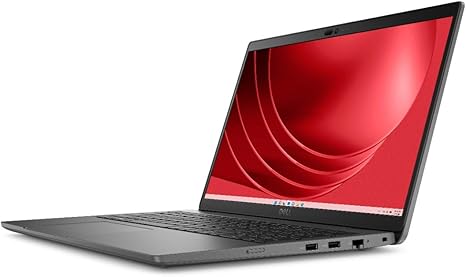
Welcome to “Reviews inside tv.” Today, we’re looking at the Dell Latitude 3440, a 14-inch touchscreen notebook designed for users who need reliable performance in a sleek, portable package. Whether you’re a student, office worker, or someone who simply wants a dependable laptop, the Latitude 3440 promises a lot on paper. But how does it really perform in everyday use? Let’s find out.
Under the hood, this laptop features an Intel Core i5 13th Gen processor, the i5-1335U. It’s a deca-core, 10-core chip, which might sound impressive for multitasking and running demanding applications. But what does that mean in practice? For most office tasks—like word processing, web browsing with multiple tabs, or light media consumption—the i5-1335U shines. You won’t experience significant slowdowns, even with a few applications running at once. When you start throwing heavier loads at it, like photo editing or video conferencing with multiple apps open, the laptop holds its own but can show some strain if you push it too hard.
Coupled with 16 GB of DDR4 SDRAM, the Latitude 3440 is well-equipped for multitasking. The ample RAM ensures that even with multiple programs open, you won’t experience significant lag. This setup allows for smooth operation during typical office tasks and light creative workloads. Whether you’re toggling between documents or handling a bunch of browser tabs, the laptop should be able to keep up without any noticeable hiccups. For heavy workloads like video editing, the performance will be decent, but don’t expect lightning-fast export times—this isn’t designed for professional content creation.
Storage is another key feature, with a 256 GB SSD. SSDs are much faster than traditional hard drives, meaning boot times and app loading speeds are quick. You’ll notice a big difference in overall responsiveness, especially when waking the laptop from sleep or switching between tasks. The 256 GB capacity is a bit limiting if you work with large files regularly, but it’s enough for most everyday users. Just be mindful if you plan on storing lots of media or games. The speed of the SSD ensures a smooth experience, but you may need to manage space carefully if you work with heavy files.
The 14-inch Full HD touchscreen display is a solid choice for general use. With a resolution of 1920 x 1080, everything looks sharp, from documents to videos. It’s a crisp screen that makes streaming movies or working on documents a pleasant experience. However, it’s not an OLED or mini-LED display, so color accuracy and contrast won’t match higher-end panels. For basic tasks, though, the screen performs well enough. Brightness is decent, and while it doesn’t offer a high refresh rate, it’s sufficient for the types of work this laptop is aimed at. Touchscreen functionality is responsive, but you might not be using it often unless you’re flipping between documents or zooming in on images.
Battery life is always an important consideration, and the Dell Latitude 3440 doesn’t disappoint here. The 256 GB SSD and efficient processor contribute to a solid battery life that can comfortably get you through a full day of work. Expect around 7-9 hours of use on a single charge for typical office tasks. If you’re watching videos or using more demanding apps, that number will dip, but it’s still plenty of juice for a full workday. The charging speed is respectable, and the charger is compact, which makes it easy to take on the go.
In terms of build, the Latitude 3440 is made of soft charcoal-colored plastic, giving it a professional look. It’s lightweight, weighing just a little over 3 pounds, making it easy to carry around. While the build feels sturdy enough, it’s not as premium as an aluminum chassis, so there’s some flex when you press on the top. It’s not a dealbreaker, but it’s something to keep in mind if you’re looking for something that feels more solid in hand.
Now, let’s talk about the keyboard and trackpad. The keys have decent travel, and typing feels comfortable for long sessions. The layout is straightforward, with a standard-sized keyboard and full-sized arrow keys. The trackpad is responsive, though it might feel a little cramped if you have larger hands. Palm rejection works well, so accidental taps won’t be an issue, and multi-finger gestures like scrolling or zooming are smooth. It’s not the best trackpad out there, but it gets the job done.
For ports and connectivity, the Latitude 3440 offers a solid selection. There are USB-A and USB-C ports, along with an HDMI port for connecting external monitors. You’ll also find an SD card reader, which is a nice touch if you work with photos or videos. The laptop supports Wi-Fi 6, ensuring fast and reliable internet speeds, and Bluetooth for connecting peripherals. However, it lacks Thunderbolt, which would have been a great addition for faster data transfer or external GPU support. Still, this setup covers most users’ needs, though you may want to use an adapter if you need more ports.
Thermal performance is where the Latitude 3440 shows some signs of its budget-friendly design. Under light use, it remains cool and quiet, but things change when you push the laptop harder. The fans do kick in during more intensive tasks, and while they’re not unbearable, they’re definitely noticeable. You might notice some heat buildup on the underside and the keyboard deck during extended periods of heavy work, though it’s not enough to make using the laptop uncomfortable. That said, if you plan on doing a lot of gaming or rendering, the laptop might not stay as cool as you’d like.
When it comes to value for money, the Dell Latitude 3440 strikes a good balance. It’s priced competitively for a mid-range laptop, offering solid performance for everyday office tasks, streaming, and light creative work. However, if you need something for heavier workloads or gaming, there are better options out there. The lack of premium materials and slightly limited thermal performance are noticeable when compared to higher-end models. But for someone who needs a reliable workhorse for general use, it delivers well without breaking the bank.
If we compare it to competitors, something like the Lenovo ThinkPad series offers similar performance but with a more premium build. The HP EliteBook lineup also competes in the same range, offering solid build quality and enterprise features. However, the Latitude 3440 holds its own thanks to its solid performance, display, and good battery life.
In the end, the Dell Latitude 3440 is a great option for students, office workers, and anyone who needs a lightweight, reliable laptop for everyday tasks. It’s not the most powerful machine out there, but it offers solid performance for most users. The display is good, the battery life is solid, and the build is decent for the price. If you need a laptop for basic to moderate use, this could be a great choice, but if you need something more powerful or feature-packed, you might want to look at higher-end models.
Thanks for watching! If you want to grab the Dell Latitude 3440, check the link in the comments. Let us know in the comments if you’ve used this laptop already or if you have any questions. See you next time on “Reviews inside tv,” where we help you make smarter tech decisions.
Available to buy here:


