

Available to buy here:
Welcome back to Reviews Inside TV! Today, we’re looking at the Lenovo ThinkPad P14s Gen 5, a sleek mobile workstation that promises impressive specs and powerful performance. But does it really deliver what professionals need? Let’s explore.
The P14s is built with high-end performance in mind, featuring an Intel Core Ultra 7 155H processor. This 12-core chip runs on the latest hybrid architecture, combining efficiency and performance cores to deliver smooth multitasking, even for demanding office applications, media work, and light creative tasks. Paired with 16GB of RAM, this machine handles running multiple applications, large spreadsheets, or virtual meetings without breaking a sweat. When you add in the 512GB SSD, you’ll get fast file access, quick boot times, and more than enough storage for daily tasks.
Now, let’s talk about the display. The 14.5-inch WUXGA (1920 x 1200) screen offers a solid viewing experience. While it’s not OLED or mini-LED, the WUXGA resolution ensures sharp detail for both productivity work and media consumption. It strikes a great balance for professionals who need sharp text and clear visuals but aren’t necessarily diving into high-end gaming or heavy-duty creative projects. Whether you’re working on documents or watching your favorite show, the display holds up well.
Battery life is always a concern with a powerful laptop, but the ThinkPad P14s comes with a 50Wh battery that can comfortably get you through a full workday. Under lighter workloads—think web browsing, writing, and video conferencing—you can expect anywhere from 6 to 8 hours of use. If you’re diving into something a bit more intensive, like media streaming or multitasking with demanding programs, you might see a drop to 4 to 6 hours. The included 65W rapid charger will juice it up relatively quickly, making it ideal for professionals who need to keep moving.
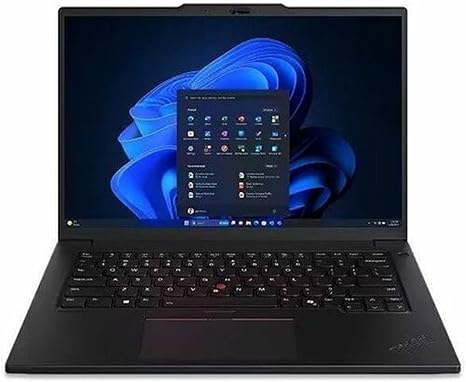
On the keyboard front, Lenovo continues its tradition of producing one of the most comfortable typing experiences on the market. The keys are well-spaced, with satisfying travel and feedback, making long typing sessions a breeze. The trackpad is responsive and accurate, and palm rejection works great for those who like to rest their hands while typing.
When it comes to connectivity, this model covers all the bases with a solid range of ports. You get two USB-A ports, two USB-C ports (one with Thunderbolt 4), HDMI 2.0, a microSD card reader, and an Ethernet port. This ensures you can connect to a wide range of peripherals, including external displays, storage devices, and docking stations. Wi-Fi 6 ensures speedy wireless performance, and Bluetooth 5.2 offers reliable connection with peripherals like headphones and mice.
Thermals are another key consideration. With this laptop, Lenovo has focused on keeping the system cool under load. When performing heavier tasks, the fans can get noticeable, but they never become unbearable. The underside stays relatively cool, but the top can get a bit warm during extended periods of intense use. However, it doesn’t feel hot enough to cause discomfort when using it on your lap. There’s no thermal throttling during gaming or video editing sessions, so the system holds its own under pressure.
Now, let’s get into the performance. The P14s is designed for professional use, so gaming isn’t its primary function, but it’s capable of handling light gaming and casual graphics work. In titles like Fortnite or even older AAA games, it can maintain a solid 30-60 FPS at medium settings, though anything heavier would likely require reducing graphics settings further.
For day-to-day tasks, the laptop is smooth and responsive, whether you’re running multiple office apps or using it for light photo or video editing. While it won’t replace a dedicated workstation for heavy creative workloads, it serves professionals well for editing tasks that don’t demand a high-end GPU.
What about portability? The ThinkPad P14s weighs in at around 3.5 pounds, which makes it easy to carry in a bag for all-day use. It’s slim enough to fit into most bags without being cumbersome but sturdy enough that it doesn’t feel fragile.
In terms of build quality, the P14s is classic ThinkPad: a solid, robust build with a premium feel. The black finish looks sleek, and the material quality is top-notch, with a chassis that resists flexing under pressure. The hinge is strong, providing a smooth opening and closing experience.
Now, let’s break down the pros and cons. On the plus side, the P14s is incredibly reliable with its impressive performance for office tasks, fast boot times thanks to the SSD, and a fantastic typing experience. Battery life is more than adequate for a full day of work, and the connectivity options are more than enough for professional needs. On the flip side, the display, while decent, might not be the best for creators who need ultra-high color accuracy or HDR support. Also, if you’re a gamer, you won’t get the top-tier performance that you might expect from a more gaming-focused laptop.
When it comes to value for money, this laptop is ideal for business professionals, students, or anyone in need of a reliable mobile workstation for everyday productivity. The price is justified when you consider the performance, build quality, and comprehensive feature set. If you’re looking for a workstation with a higher focus on gaming or extreme creative tasks, you might want to consider other options, but for those in need of a solid performer for office work, media consumption, and light creative tasks, the ThinkPad P14s really shines.
As for alternatives, you might look at something like the HP Elite Dragonfly or the Dell Latitude 7420, which offer similar specs but with slightly different trade-offs in terms of design, battery life, and price. However, the P14s stands out with its solid performance, keyboard feel, and overall durability.
Overall, the Lenovo ThinkPad P14s Gen 5 offers great value for business professionals or office users looking for a reliable, lightweight, and powerful machine. It delivers excellent performance for productivity tasks and media consumption while maintaining solid build quality and a good range of ports. If you’re someone who needs a workhorse laptop that won’t let you down, this one is a strong contender.
Thanks for watching, and if you’re interested, you’ll find the link to grab the ThinkPad P14s in the comments box below. Feel free to ask questions or share your thoughts if you already own one! Don’t forget to like, subscribe, and hit that bell icon for more reviews. Take care and catch you in the next one!
Available to buy here:


