

Available to buy here:
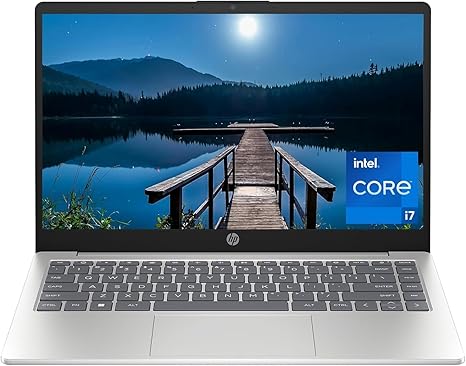
Welcome to “Reviews inside tv,” where we help you make informed decisions about the tech you buy. Today, we’re looking at the HP 14-inch Laptop, a device designed to balance performance and portability. With its sleek design and impressive specs, it targets users who want a solid laptop for daily tasks, light creative work, and entertainment without sacrificing performance or comfort. But does it really deliver on its promises? Let’s find out.
First, let’s talk specs. Under the hood, this HP laptop packs a 13th-generation Intel Core i7-1355U processor. This is a mid-range chip, offering excellent performance for office tasks, web browsing, video calls, and even light media editing. The i7-1355U features 10 cores, balancing power efficiency with multitasking ability, making it well-suited for work or study environments. It’s also supported by 16 GB of DDR4 RAM, which is more than enough for heavy multitasking. Whether you’re juggling multiple browser tabs or running several apps simultaneously, the memory ensures smooth performance without any noticeable lag.
For storage, the laptop comes with a 512 GB PCIe NVMe M.2 SSD, which is fast, efficient, and offers up to 15x the speed of traditional hard drives. This means quicker load times, faster file transfers, and overall snappier performance. If you’re dealing with large files, this SSD ensures that you won’t be left waiting around for apps to launch or documents to open. The added bonus of NVMe technology brings in high bandwidth, providing smooth operation during work-heavy days.
In terms of graphics, the HP 14-inch laptop relies on Intel Iris Xe integrated graphics. While not suited for heavy gaming or 3D rendering, it’s certainly capable of handling everyday tasks and light creative workloads. You’ll be able to run casual games, stream media, and even do some photo editing or light video work with ease, though more demanding tasks will show its limitations.
The display is a standout feature. The 14-inch Full HD screen gives you 2 million pixels of clear, crisp resolution, making it ideal for streaming videos, editing photos, or just browsing the web. The non-reflective, low-gloss anti-glare panel makes it easy on the eyes, even in bright rooms, while the DC dimming technology reduces flicker, which is a godsend for anyone who’s sensitive to screen flickering during long sessions. The 250 nits brightness might not rival some high-end laptops, but for its class, it’s more than adequate for everyday tasks.
Battery life is another important factor to consider. This HP laptop has a decent 41 Wh battery, providing enough juice for around 6 to 8 hours of light office work or streaming. Under more intensive tasks like video editing, expect it to last a bit less, but for regular use, it should easily make it through a workday. The charging speed is also relatively quick, so you can top it up during a short break and get back to work without much delay.
Now, let’s talk about the comfort and usability of this laptop. The keyboard feels well-spaced, with good key travel and feedback, which should make typing long documents or emails comfortable. However, it’s not a mechanical keyboard, so don’t expect a particularly ‘clicky’ feel. The trackpad is smooth and responsive, with accurate palm rejection and a satisfying click, which makes navigation easy. This makes the laptop perfect for students or office workers who need to type a lot without feeling fatigued.
When it comes to ports and connectivity, this HP laptop provides a solid range of options. You get two USB-A ports, one USB-C port (sadly, not Thunderbolt), an HDMI 2.1 port for external displays, an SD card reader, and a headphone jack. Wi-Fi 6 ensures stable internet connectivity, while Bluetooth 5.2 provides fast pairing with peripherals. It’s not the most port-heavy laptop on the market, but it certainly has enough to keep you covered for most tasks. One downside is that the RAM and storage are not upgradable, so if you’re planning on keeping this laptop for many years, you’ll have to work with what’s built in.
As for thermals, the HP 14-inch laptop stays relatively cool under light tasks like web browsing and media consumption. When running heavier workloads like video calls or editing, it does warm up a bit but remains comfortable on the keyboard deck and the underside. The fan noise is mostly unobtrusive, but under heavy load, you’ll notice some fan noise, though it’s not overly loud.
When it comes to portability, this laptop is impressively thin and light, weighing in at just under 3.3 pounds. It’s easy to carry in a backpack or laptop bag for all-day use, which makes it a great option for students or professionals who need something lightweight yet functional. Its compact 14-inch size means it can fit in most bags without feeling too bulky.
Now, let’s take a quick look at its competitors. At this price range, laptops like the Lenovo IdeaPad 5 or the Acer Swift 3 offer similar specs, but the HP 14-inch stands out with its slim design and the addition of Intel Iris Xe graphics, which give it a slight edge in media consumption and light creative work. However, for those who prioritize battery life or need a more powerful CPU for gaming or intensive creative tasks, you might want to look at alternatives like the Dell XPS 13 or MacBook Air M2, though they come at a premium price.
Is this laptop worth your money? In my opinion, it’s a solid choice for students, office users, or casual content creators. It balances performance, portability, and battery life well, especially for those who don’t need a powerhouse. The main weaknesses are its non-upgradable RAM and limited gaming potential, but for general productivity, media consumption, and light creative work, it’s an excellent option.
To sum up, if you’re someone who needs a reliable, portable laptop for everyday tasks, the HP 14-inch laptop is definitely worth considering. It performs well, has a good display, and is easy to carry around, making it a solid choice for work, study, and entertainment. Just don’t expect to push it to its limits with demanding games or intensive video editing.
Thanks for watching today’s review. You can find the link to purchase the laptop in the comments box. Let us know if you’ve used this laptop or if you have any questions. Until next time, stay productive, stay comfy, and as always, keep exploring with Reviews inside tv!
Available to buy here:


