

Available to buy here:
Welcome to “Reviews inside tv,” where we break down the latest tech with real, unfiltered insights. Today, we’re diving into the MSI Katana 15, a gaming laptop that’s packing some serious firepower. Whether you’re gaming, streaming, or creating, the Katana 15 claims to handle it all. But does it? Let’s find out.
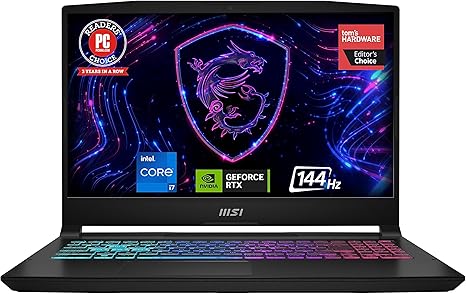
The MSI Katana 15 B13VGK-484US features a 13th Gen Intel Core i7 processor, paired with an NVIDIA GeForce RTX 4070 GPU. This combination promises top-tier performance, whether you’re pushing through intensive gaming sessions or diving into content creation. It also comes with 16GB of DDR5 RAM, a speedy 1TB NVMe SSD for storage, and a 15.6-inch FHD display with a 144Hz refresh rate. You’re getting high-speed Thunderbolt 4 connectivity, MSI’s Cooler Boost 5 technology, and the latest Windows 11 Home OS, which is solid for everyday tasks.
Now, let’s break down what this laptop actually means for you. The 13th Gen Intel Core i7 is a powerhouse, capable of handling pretty much anything you throw at it, from multiple browser tabs and office apps to more demanding tasks like video editing or heavy multitasking. But paired with the RTX 4070, it steps into the realm of serious gaming and creative workloads. The RTX 4070 isn’t just a performance upgrade; it’s part of NVIDIA’s Ada Lovelace architecture, which means it brings ray tracing capabilities, giving you more realistic lighting effects and overall smoother graphics in supported games.
The 16GB of DDR5 RAM is more than enough for gaming and productivity tasks. It handles multitasking like a champ and ensures that your system remains responsive even when you’re running a bunch of apps at once. As for storage, the 1TB NVMe SSD means fast boot times, quick file transfers, and no frustrating load times, so everything feels snappy and efficient.
The 15.6-inch Full HD display with a 144Hz refresh rate offers a fantastic experience, especially if you’re into fast-paced games or enjoy streaming. A 144Hz refresh rate is a big upgrade over the typical 60Hz you get with most laptops, and for gamers, it means smoother motion and better responsiveness in competitive games. The color accuracy is decent for gaming and casual media consumption, but if you’re a creator working with color-sensitive projects, it might not offer the same level of fidelity as a higher-end OLED or IPS display.
Now, let’s talk about real-world performance. If you’re using this laptop for office work—like web browsing, word processing, or video calls—expect a smooth experience. You’ll be able to keep a ton of tabs open without the system slowing down, and the keyboard is responsive enough for long typing sessions. The trackpad is smooth and reliable, with good palm rejection. For media consumption, streaming your favorite shows or movies on the Katana 15 is a pleasure. The display is bright enough for most indoor lighting conditions, and the speakers, while not audiophile quality, are decent for general use.
When it comes to content creation, whether you’re editing photos, videos, or producing music, the MSI Katana 15 holds its own. The combination of the Core i7 and RTX 4070 means that it can handle creative apps like Adobe Premiere Pro or Blender without too much trouble. Expect decent export times, though rendering large video files may cause the laptop to heat up a bit. Speaking of heat, MSI’s Cooler Boost 5 helps keep things under control, but more on that in a second.
As for gaming, let’s see how this laptop performs in some real-world scenarios. The RTX 4070 isn’t going to run the latest AAA titles on ultra settings at 4K, but it’s certainly capable of handling 1080p gaming at high to ultra settings with ease. For example, in Cyberpunk 2077 at 1080p with high settings, you can expect an average of around 75-80 FPS, with 1% lows hovering around 60 FPS. Call of Duty: Warzone fares similarly, offering 100+ FPS at medium settings, ensuring smooth gameplay in competitive shooters. The key here is that the laptop’s 144Hz display is well-matched to the GPU’s capabilities, so you’re getting a smooth, fluid experience without unnecessary bottlenecks.
However, keep in mind that under heavy load, like extended gaming sessions or video exports, the laptop does tend to get warm, particularly on the keyboard deck and the underside. The fans kick in, and while they’re not overly noisy, they’re noticeable when the laptop is pushed hard. If you’re planning to game for hours on end or run rendering tasks, you might want to keep the laptop on a hard surface to help with cooling.
Battery life is another important factor to consider. The Katana 15 comes with a decent-sized battery, but with the high-performance hardware inside, it’s not going to last as long as an ultraportable. Expect around 4 to 6 hours of light use, like web browsing or watching videos. When you’re gaming or doing anything resource-intensive, that number will drop significantly—closer to 1.5 to 2 hours. As for charging, the laptop supports fast charging, so you can get a decent amount of charge in about 30 minutes, but you’ll still want to have the charger with you if you’re out and about for a long day.
On the input side, the keyboard is comfortable, with good key travel and spacing for typing. The layout is standard, but it might feel a bit cramped if you’re used to full-sized keyboards, especially since the number pad is absent. The trackpad is large, accurate, and responsive, with solid palm rejection. If you’re someone who needs biometric security, there’s no fingerprint reader, though you do get Windows Hello facial recognition.
Ports are where the MSI Katana 15 really shines. It comes with a good selection, including USB-A, USB-C (with Thunderbolt 4), HDMI, and an SD card reader. This gives you plenty of options for connecting to external displays, storage, and peripherals, which is ideal for both gaming setups and content creation. Wi-Fi 6 ensures fast and stable connections, and Bluetooth 5.2 adds flexibility for wireless peripherals.
When it comes to portability, the Katana 15 weighs in at around 5.3 pounds, which isn’t the lightest, but still reasonable for a gaming laptop of this caliber. It’s thicker than an ultrabook, but if you’re willing to carry the extra weight for the power it delivers, it’s a great tradeoff.
In terms of build quality, the MSI Katana 15 feels solid with a plastic chassis that doesn’t feel too cheap. It’s not the most premium design out there, but it’s sturdy and well-built. The hinge quality is solid, and there’s little flex in the keyboard area, which adds to the overall durability.
When you look at the value for money, the Katana 15 is a competitive offering for its price. At this price range, you’re getting a gaming laptop with high-end GPU performance, solid RAM, and a good display. If you’re considering a gaming laptop with similar specs, options like the ASUS ROG Strix G15 or the Acer Predator Helios 300 might be in the same ballpark, but the Katana 15’s design and cooling might appeal more to those looking for something a bit more streamlined.
To wrap things up, the MSI Katana 15 is a powerful laptop that hits the sweet spot for gamers and content creators who need solid performance, but don’t want to break the bank. It’s not perfect—battery life and thermals could be better—but if you’re looking for a solid, no-nonsense gaming laptop with great performance for the price, this is definitely worth considering.
Thanks for watching! Be sure to check the comments for the link to grab this laptop, and feel free to leave any questions or share your thoughts if you already own it. Don’t forget to like, subscribe, and hit that bell icon for more in-depth reviews. Catch you next time on “Reviews inside tv,” where we keep you informed and ahead of the game.
Available to buy here:


