

Available to buy here:
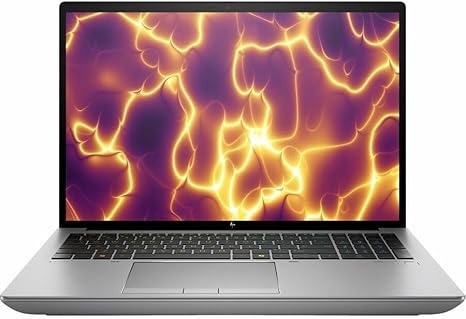
Welcome to Reviews inside tv, your go-to spot for in-depth, honest tech reviews. Today, we’re checking out the HP ZBook Fury G11 16” Mobile Workstation, a powerhouse designed with professionals in mind. With its Intel Core i7 13th Gen processor, an impressive 32GB of RAM, and 1TB of SSD storage, this laptop promises to handle demanding tasks like content creation, engineering, and heavy multitasking. But does it live up to the hype? Let’s find out.
The ZBook Fury G11 comes with some serious hardware: the Intel i7-13850HX, a 20-core, 28-thread beast built for performance. It’s paired with 32GB of high-speed RAM, which should easily handle even the most intense workloads, from complex spreadsheets to rendering large 3D models. That 1TB SSD ensures quick access to files and smooth app launches, so you won’t be bogged down by slow storage. In terms of display, you’re getting a 16” WUXGA panel at 1920 x 1200 resolution. While not as sharp as some 4K options, it strikes a balance between clarity and battery life, making it ideal for professional use.
Now, the heart of this machine is the Intel Core i7-13850HX, part of Intel’s 13th Gen lineup. With 20 cores and 28 threads, it’s designed to excel in multi-core workloads, like video editing or data crunching, while still providing single-core performance that’s great for everyday tasks. This processor allows the laptop to perform well under heavy loads, whether you’re working with large files or running multiple applications simultaneously.
As for gaming, while the focus is clearly on professional work, the ZBook Fury should still handle light gaming or GPU-accelerated tasks with ease. It might not be a dedicated gaming laptop, but it can run demanding programs like Adobe Creative Suite without breaking a sweat.
In terms of storage, the 1TB SSD is more than enough for most users. Whether you’re storing large design files or a hefty collection of videos, you’ll appreciate how quickly apps load and files transfer. The 32GB RAM will also make multitasking smooth, allowing you to have multiple apps open without a hitch. You won’t see slowdowns or stutters, even when juggling different tasks at once.
But what about the display? The 16-inch WUXGA screen hits a sweet spot for workstations, offering a wide viewing area without being too large or heavy. The color accuracy is solid, but it doesn’t offer the punch of higher-end OLED or mini-LED displays. The resolution, though not 4K, is still sharp enough for detailed design work or presentations. The screen brightness is decent, making it usable in most office environments, but it might struggle in direct sunlight or brighter settings.
Let’s talk about how this laptop feels to use day-to-day. The HP ZBook Fury has an easy-to-use keyboard with good key travel and responsive feedback, perfect for long typing sessions. The trackpad is smooth, accurate, and well-sized, with palm rejection that works well during casual browsing or intensive use. The typing experience is solid, and the layout, including the number pad, is well thought out.
Battery life is a critical factor for any workstation laptop, and this one delivers. With a 6-cell, 83Wh battery, you can expect anywhere from 6 to 8 hours of moderate use. Of course, this depends on the workload—more demanding tasks like video editing or rendering will drain the battery faster. When it’s time to recharge, the ZBook Fury charges up quickly, so you won’t be tied down for too long.
Thermal performance is where this laptop really shines. The cooling system does an excellent job of keeping things cool even under load, which means you can work for long hours without worrying about overheating. The fans stay relatively quiet during normal use, but they do kick into higher gear when pushing the CPU or GPU to their limits. That said, the noise isn’t unbearable, and the laptop remains comfortable to use, even during intensive tasks like video rendering or 3D modeling.
In terms of connectivity, the ZBook Fury comes with a great selection of ports. You get multiple USB-A and USB-C ports, along with a Thunderbolt 4 port, HDMI 2.1, and an SD card reader, making it easy to connect to external monitors, docking stations, or other peripherals. Wi-Fi 6 and Bluetooth 5.2 ensure fast and reliable wireless connections, so you won’t face any issues when working remotely or connecting to external devices.
This laptop’s build quality feels premium. It’s sturdy, with a well-designed chassis that’s made from high-quality materials. The hinge is solid, and the overall rigidity gives it a professional, durable feel. At around 5 pounds, it’s not the lightest 16” workstation, but it’s portable enough to take on the go for business trips or meetings.
Now, let’s take a quick look at the competition. The ZBook Fury G11 sits in a competitive market alongside other workstation laptops like the Lenovo ThinkPad P Series and the Dell Precision lineup. Compared to these models, the ZBook Fury offers a similar level of performance, but it has a slight edge in terms of build quality and cooling. If you need something with a more powerful GPU or 4K display, you might want to consider alternatives, but for pure professional work, the ZBook Fury holds its own.
For customers who are all about performance and reliability in a workstation, this is a solid choice. If you’re someone who needs top-tier graphics for gaming or rendering, there are other laptops with more dedicated GPU power. But for office workers, creators, and professionals needing power and portability, the ZBook Fury G11 hits the mark.
In conclusion, the HP ZBook Fury G11 offers excellent performance, great cooling, and a solid build, making it an ideal option for professionals needing a mobile workstation. It may not be the best fit for hardcore gamers, but it’s perfect for anyone who needs reliable performance for content creation, engineering, or business tasks. With a premium feel, solid specs, and ample connectivity options, it delivers on its promises. Thanks for watching, and if you’ve got any questions or your own experiences to share with this laptop, feel free to drop them in the comments. Catch you next time on Reviews inside tv.
Available to buy here:


