
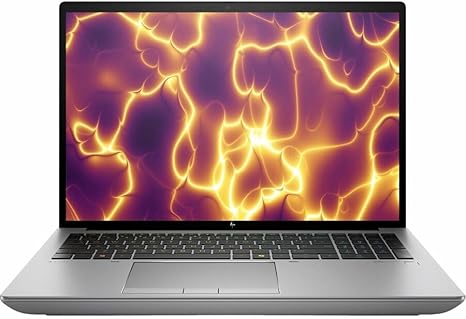

Available to buy here:
Welcome to “Reviews inside tv”! Today, we’re taking a close look at the HP ZBook Fury G11 16″ Mobile Workstation. Whether you’re a creator, office worker, or professional, this powerhouse is designed to handle demanding tasks without breaking a sweat. But does it live up to the hype? Let’s break it down.
With the HP ZBook Fury G11, you get a 16-inch WQUXGA display with a sharp 3840 x 2400 resolution. This level of clarity is ideal for professionals who need precision, whether you’re editing photos, designing graphics, or just streaming high-quality media. Paired with the Intel Core i7-13850HX processor from Intel’s 13th generation, this laptop is built to handle intensive workloads. The i7 is an 8-core, 16-thread powerhouse, which means you can multitask without feeling any lag. If you’re editing large files, running virtual machines, or even rendering videos, the CPU performance is more than enough to handle it all.
Now, let’s talk about RAM and storage. With a whopping 32GB of memory, the ZBook Fury G11 ensures that you can keep multiple programs running at once, with no slowdowns. Whether you’re juggling Photoshop, Excel, or dozens of browser tabs, this laptop handles it smoothly. The 1TB SSD storage is a huge plus, offering fast read and write speeds for quick access to your files, whether you’re working with large video projects or databases.
On to the GPU: While this model doesn’t come with a dedicated gaming GPU, it still handles content creation tasks with ease. The integrated graphics are perfect for most office tasks and light media consumption. If you’re a creator who occasionally dabbles in 3D modeling or video editing, the ZBook Fury is up to the task, though it’s not intended for gaming at high settings. It’s worth noting that while you won’t be running Cyberpunk 2077 on ultra, this laptop is more than sufficient for professional applications, media creation, and general multitasking.
Battery life is a key consideration here. HP claims that the ZBook Fury G11 provides a solid workday’s worth of power, but in real-world use, expect between 7 to 10 hours depending on what you’re doing. Lighter office work will push the battery to the higher end, while more intense tasks like rendering or video editing will reduce battery life. Charging is efficient, with the 200W charger powering the system back up quickly, though it’s a bit bulky for travel.
Now, onto the user experience. The keyboard on this model feels fantastic for long typing sessions. The keys have great travel and feedback, so whether you’re writing emails or coding for hours, it stays comfortable. The trackpad is smooth, responsive, and works well for everyday tasks. The layout is also solid, with dedicated arrow keys and a full number pad, making it a great choice for anyone who works with numbers or data-heavy tasks.
Connectivity options are excellent. You’ve got multiple USB-A ports, a couple of Thunderbolt 4 USB-C ports, and HDMI for connecting to monitors or projectors. For those who need to plug in additional devices, there’s an SD card reader and an Ethernet port for wired internet connections. If you’re using this workstation with an external monitor or docking station, the variety of ports ensures you won’t run out of options anytime soon. The ZBook Fury also includes Wi-Fi 6, so you can rely on fast and stable internet connections.
Thermal performance on this laptop is generally solid. Under load, like when running heavy software, you’ll hear the fans spin up, but they’re not overwhelmingly loud. In terms of heat, the laptop does get warm on the underside during extended use, but the keyboard deck stays cool enough for comfortable typing. HP has clearly designed this with professional workloads in mind, meaning it’s built to last through long sessions without throttling the performance too much.
Build quality is top-notch, with the ZBook Fury G11 offering a sturdy, premium feel. The chassis is made of durable materials that resist flexing, and the hinge feels solid, giving you confidence that this laptop can handle the rigors of daily work. It’s a little on the heavier side, but that’s to be expected from a workstation-class laptop—at 2.45 kg, it’s not the lightest, but it’s still portable enough for professionals who need to take it to meetings or presentations.
So, who is this laptop really for? If you’re a creative professional, an engineer, or someone who needs reliable performance for work that demands processing power and memory, the HP ZBook Fury G11 should definitely be on your radar. It has everything you need for demanding workloads without compromising too much on portability. It’s not a gaming laptop, but it handles business and creative tasks like a pro. If you’re a student or just need something for everyday tasks, you might find it overkill, but for heavy-duty work, it’s a great choice.
When it comes to value, you’re paying for premium build quality, fantastic performance, and a solid display. It may not be the cheapest laptop around, but if you need something for heavy multitasking and professional workloads, it’s hard to find a better workstation in this category. You’ll find similar competitors in the market, like the Lenovo ThinkPad P Series or Dell Precision models, but the HP ZBook Fury G11 stands out for its balance of power and features.
In conclusion, the HP ZBook Fury G11 delivers solid performance, excellent build quality, and a fantastic display, making it perfect for professionals who need reliability, power, and portability. Whether you’re into video editing, software development, or data-heavy tasks, this laptop will handle it all. It’s a strong contender in the mobile workstation space, though its weight and price might make it less appealing for casual users.
Thanks for watching! If you’re interested in the HP ZBook Fury G11, check out the link in the comments below. Feel free to leave your thoughts or ask any questions if you’ve used this laptop or are considering it for your next purchase. Until next time, this is Reviews inside tv—stay tuned!
Available to buy here:


