Available to buy here:
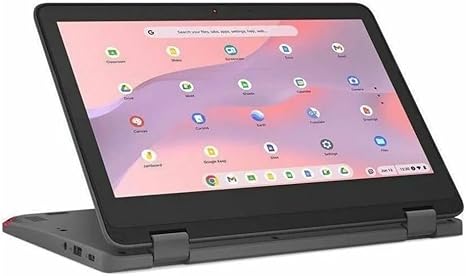
Welcome to “Reviews inside tv”! Today, we’re taking a closer look at the Lenovo 300e Yoga Chromebook Gen 4, a compact, convertible 2-in-1 device that’s geared toward those who need a dependable, on-the-go laptop for basic tasks. This model, the 82W2000AUS, offers a unique combination of functionality and portability, making it an appealing choice for students or light users who don’t need the heavy lifting of high-end performance machines. Let’s dive into its specifications and see how well it holds up in real-world usage.
Starting with the basics, the Lenovo 300e Yoga comes equipped with an ARM-based octa-core processor, combining Cortex A76 and Cortex A55 cores. This chipset is designed to provide a balanced performance, handling everyday tasks like web browsing, office applications, and media consumption without breaking a sweat. It’s not a powerhouse for gaming or intensive creative work, but it gets the job done for productivity and entertainment at this price range. The 4GB of RAM is more than sufficient for light multitasking, though you might hit limits if you push it too hard with too many apps or browser tabs open at once. As for storage, the 32GB of flash memory is fairly limited, but it’s what you typically get with Chromebooks aimed at budget-conscious users. You’ll want to rely on cloud storage for documents and files if you plan to use this machine long-term.
The 11.6-inch display, with a resolution of 1366 x 768, is on the smaller side, but this screen is fine for basic tasks like watching videos, browsing the web, or reading documents. The touchscreen functionality adds a layer of flexibility, allowing you to switch between laptop and tablet modes seamlessly. While the resolution isn’t the sharpest by today’s standards, it’s perfectly adequate for casual use and light media consumption. Watching a movie or browsing through photos feels smooth enough, though you won’t be seeing vibrant details or deep contrast like you would with a higher-end display.
Moving on to real-world performance, this Chromebook is best suited for users who need a lightweight, affordable machine for school, office work, or entertainment. Opening a few tabs in a browser and typing up documents in Google Docs is a breeze, and streaming videos is smooth on the HD screen. For more demanding tasks like photo or video editing, you’d want to look elsewhere, but for basic productivity, it’s solid. The device handles light media consumption well, with no significant lag during video streaming, though you’ll want to keep an eye on the limited storage space if you’re looking to store a lot of media locally.
When it comes to the keyboard and trackpad, the 300e Yoga offers a satisfying typing experience for short sessions. The keys have decent travel and provide responsive feedback, though it might feel a bit cramped if you’re used to larger keyboards. The trackpad is smooth, responsive, and accurate, though it’s not as spacious as those on more premium models. It’s also important to note that this model doesn’t come with a number pad, which is typical for small laptops like this.
Battery life is always a crucial factor, and the Lenovo 300e Yoga Chromebook doesn’t disappoint. With its lightweight design and efficient ARM-based chip, you can expect up to 10 hours of battery life on a full charge, depending on your usage. Whether you’re browsing the web, watching videos, or working on documents, this Chromebook will likely last you through the day. It charges quickly too, making it easy to top up during lunch or a break.
As for the build quality, the Lenovo 300e Yoga has a solid, durable feel, designed with students and on-the-go users in mind. The chassis is made of plastic, which keeps the weight down but might feel a bit less premium than metal-bodied alternatives. At just under 3 pounds, it’s light enough to slip into a backpack and carry around all day. The convertible nature of the laptop makes it versatile, easily transitioning from a laptop for typing to a tablet for watching videos or browsing.
Ports and connectivity are another area where the Lenovo 300e Yoga keeps things simple. You get two USB Type-A ports, a USB Type-C port, a headphone jack, and a microSD card reader, which should cover most basic needs. There’s no HDMI port, which could be a dealbreaker if you frequently need to connect to external monitors or projectors. Wi-Fi 5 and Bluetooth 4.2 provide reliable connections for everyday web use, though they’re not the latest standards.
Now, as with any device, there are a few things to keep in mind. While this Chromebook excels in portability and affordability, its limited storage and lower-resolution display are definite trade-offs. If you’re looking for a laptop for productivity, light media use, or as a secondary device for casual tasks, it’s a solid choice. However, if you need more robust performance for creative work or gaming, you’ll want to consider alternatives.
In terms of value for money, the Lenovo 300e Yoga Chromebook offers a good balance of features at its price point. For students or casual users who just need a dependable machine for web browsing, document editing, and media consumption, it checks all the boxes. There are certainly faster Chromebooks and those with better displays out there, but for the price, this one is hard to beat.
If you’re considering other options in this category, you might look at models like the Acer Chromebook Spin or the HP Chromebook x360, which offer similar versatility but might come with better specs or displays. That said, the Lenovo 300e Yoga does a great job of offering the essentials without overcomplicating things.
So, to wrap things up, the Lenovo 300e Yoga Chromebook Gen 4 is a great option for light users who need a compact, reliable, and affordable laptop. It won’t win any awards for performance or design, but it gets the basics right. If you’re a student, casual user, or someone who needs an inexpensive secondary device, this Chromebook is well worth considering.
Thanks for watching! The link to grab this laptop is in the comments box. Feel free to leave any questions or share your own experience with the 300e Yoga if you’ve had a chance to use it. Until next time, happy browsing!
Available to buy here: