Available to buy here:
Welcome to “Reviews inside tv”! Today, we’re taking a closer look at the Lenovo 500e Yoga Chromebook Gen 4, a compact and versatile 2-in-1 convertible device designed for those looking for a budget-friendly, flexible laptop experience. With a 12.2-inch touchscreen display, Intel N100 Quad-core processor, and a 32GB storage option, this Chromebook promises ease of use for day-to-day tasks. But does it live up to the hype? Let’s find out.
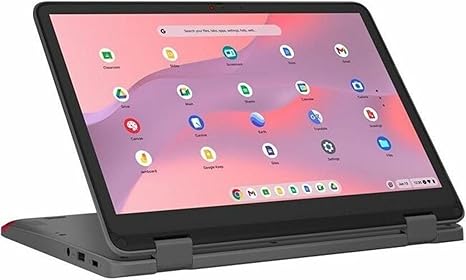
The Lenovo 500e Yoga Chromebook Gen 4 packs a 12.2-inch WUXGA screen with a 1920 x 1200 resolution, which delivers a solid movie-watching experience, although it’s not quite as crisp as the higher-end 1080p or 4K options you might find on premium devices. The resolution ensures decent clarity, with vibrant enough colors for most casual tasks. While the screen isn’t the brightest on the market, it’s adequate for indoor use, making it a good fit for students or casual users who prefer an affordable convertible laptop. The 360-degree hinge lets you easily switch between laptop and tablet mode, a nice feature for presentations, note-taking, or media consumption on the go.
Under the hood, the Lenovo 500e Yoga Chromebook is powered by the Intel N100 Quad-core processor, an entry-level chip designed for light workloads. You won’t be editing 4K videos or running complex software, but for web browsing, light office work, and streaming, it performs just fine. Paired with 4GB of RAM—split between 4GB of on-board memory and the total system memory—multitasking is relatively smooth. However, expect some slowdowns if you try to run too many tabs or apps simultaneously. For everyday use, the laptop feels responsive enough, but if you’re someone who regularly juggles multiple programs or uses memory-heavy apps, you might find it a bit limiting.
In terms of storage, the Lenovo 500e Yoga comes with 32GB of eMMC storage, which is a bit on the smaller side but par for the course with budget Chromebooks. While eMMC storage is slower than an SSD or NVMe drive, it’s enough for cloud-based workflows and light local file storage. You’ll be relying on cloud storage like Google Drive, but if you need more space, you can easily add an SD card for additional storage.
One of the key selling points of this Chromebook is its 12-hour battery life. This is great for students or professionals on the go who need a reliable device that can last through a full day of work or study without needing to plug in. Of course, actual battery life will vary depending on usage, but for everyday tasks like web browsing, document editing, or video streaming, the battery should comfortably get you through an entire day. Charging time is reasonable, but with such a small battery, it’s not the fastest to recharge, so don’t expect rapid turnaround when you need a quick top-up.
When it comes to comfort, the Lenovo 500e Yoga Chromebook’s keyboard and trackpad offer a solid experience for light typing. The keyboard has decent key travel and feedback, which helps reduce fatigue during short to medium typing sessions. The trackpad is responsive and accurate, though it’s not the most spacious. For basic tasks, both input devices perform well enough, but if you’re doing extensive typing or working on detailed design tasks, you might want something with a bit more comfort and precision.
In terms of ports and connectivity, the Lenovo 500e Yoga is a bit minimalistic. You get a couple of USB-A ports, a USB-C port for fast data transfer and charging, and a headphone jack. It’s lacking an HDMI port or a full-size SD card reader, which could be a downside if you regularly work with external monitors or cameras. But with Wi-Fi 5 and Bluetooth 4.2 support, you’ll have solid wireless connectivity for most tasks.
When it comes to thermals, the Lenovo 500e Yoga stays relatively cool under light use, like web browsing or document editing. You won’t feel any significant heat on the keyboard or underside during regular tasks. However, under heavier loads, like streaming or multitasking with several tabs open, it does heat up a little, but it’s nothing that should cause discomfort for regular use. As for fan noise, the fan is pretty quiet most of the time but can get a little audible if you push it too hard with more intensive tasks. Still, it’s far from a dealbreaker.
For those looking for portability, the Lenovo 500e Yoga is easy to carry around. Weighing just under 3 pounds, it’s light enough to toss in a bag and take with you on the go. Its slim profile and convertible design also make it easy to adjust to various use cases, from typing on a desk to watching movies or reading in tablet mode.
As far as value for money, this Chromebook delivers a solid performance for its price. It’s not a powerhouse, but it excels in being a reliable and flexible device for light work, study, or media consumption. You won’t get the same performance as a more expensive laptop, but for students or anyone who needs a budget-friendly device for daily tasks, it’s a reasonable choice. Compared to other similarly-priced Chromebooks, it stands out with its 2-in-1 design, decent battery life, and reasonable performance.
That said, there are some trade-offs. The 4GB of RAM and 32GB of storage might be restrictive for anyone who needs more power or space, especially for tasks like photo or video editing, or running multiple apps at once. The screen could also be brighter, and the ports are a bit limited for users who need more expandability. However, if you’re looking for an affordable, lightweight laptop for basic tasks, it does a solid job.
Now, let’s talk about how it compares to other devices in the same price range. If you’re considering the Acer Chromebook Spin 11 or the HP Chromebook x360, the Lenovo 500e Yoga stands out with its longer battery life and more robust 2-in-1 design. However, the HP model offers slightly better build quality, and the Acer provides a better overall performance with higher RAM options. If you’re looking for something more powerful, the Asus Chromebook Flip 14 offers a bigger screen and faster internals, but it comes at a higher price point.
In terms of build quality, the Lenovo 500e Yoga feels sturdy enough for everyday use, though it’s built mainly with plastic. It’s not the most premium-feeling device, but considering its price, it’s well-constructed. The hinges are solid, and it doesn’t feel flimsy when flipping between modes.
Customer support from Lenovo is generally reliable, with a standard 1-year warranty and support services available online. There aren’t any standout issues with reliability or known long-term problems for this model, so you can expect decent durability for the price range.
To wrap up, the Lenovo 500e Yoga Chromebook Gen 4 is a practical, versatile laptop for students, light office users, or anyone who needs a flexible, budget-friendly device. It offers a good screen, solid battery life, and a convertible design for a variety of use cases, but if you’re looking for more power, storage, or a higher-quality display, you might want to look at other options in this price range.
Thanks for watching, and don’t forget to hit that like button, subscribe, and tap the bell icon so you won’t miss our future reviews. If you’ve got any questions or if you already own the Lenovo 500e Yoga, drop a comment below and share your thoughts. You can find the link to this laptop in the comments box. Until next time, happy browsing!
Available to buy here: