

Available to buy here:
Welcome back to Reviews inside tv, where we get deep into the details of the latest tech gadgets. Today, we’re looking at the Lenovo ThinkStation P360, a compact powerhouse designed for professionals who need high performance in a space-saving form. Whether you’re running intensive workloads, editing large files, or even gaming, this workstation claims to handle it all with ease. But does it live up to the hype? Let’s find out.
The Lenovo ThinkStation P360 is built to cater to those who demand a lot from their machines—whether you’re an office professional, content creator, or even a gamer looking for serious power in a tiny package. This compact desktop features the 12th Gen Intel Core i7-12700T processor, which boasts 12 cores and a base clock speed of 1.40 GHz. On paper, this looks like it can easily handle everything from multitasking to resource-heavy applications. But how does it actually perform when you put it to work?
For starters, the 16 GB of DDR5 RAM is a solid amount of memory, perfect for heavy multitasking and running demanding applications without the sluggishness you’d typically expect from lower-end configurations. But when you’re juggling multiple tasks—say, working on documents, editing photos, or switching between multiple applications—you can really feel the difference this faster memory makes. DDR5 gives you a noticeable speed boost compared to DDR4, especially when pushing the system to its limits.
Then there’s the 512 GB SSD storage. This is enough space for most users, especially when paired with the fast data transfer speeds of the solid-state drive. Whether you’re storing files, applications, or just need to open large projects quickly, the SSD ensures that your workflow remains fluid without the delays you’d experience with older HDD storage. That said, if you plan on storing massive amounts of data, you might find yourself looking for an upgrade, but for general office use and creative tasks, this SSD offers a great balance between performance and capacity.
When it comes to performance, the Intel Core i7-12700T really stands out. With its 12 cores, the processor can easily tackle productivity tasks like web browsing, spreadsheet management, and document editing, even with several apps running at once. The system can also handle more creative tasks, such as video editing or rendering in programs like Adobe Premiere Pro or After Effects. Although it’s not designed specifically for gaming, with the right GPU, it could manage light gaming without issue, though you’re better off with a dedicated gaming rig for more intense experiences. The real benefit here is for professionals who need a workstation that doesn’t slow down when the workload gets heavy.
Battery life isn’t exactly relevant here given that this is a desktop, but let’s talk about power efficiency. The 230W power supply unit (PSU) is designed to meet the needs of this machine even under load, which is crucial for sustained performance. It’s efficient enough to ensure the system doesn’t consume more power than necessary, even when running at full tilt. But you’ll still want to keep the workstation plugged in during extended use to avoid any interruptions.
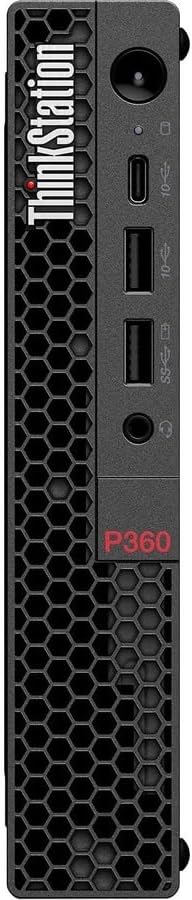
Now, how does this workstation feel in terms of comfort and usability? With its compact design, the ThinkStation P360 is definitely not bulky, and it can easily fit into a small office setup or on a desk where space is limited. While its footprint is small, it doesn’t skimp on ports. You’re getting USB-A, USB-C, and Ethernet for connectivity, which gives you a lot of flexibility when connecting external devices. However, the lack of HDMI or SD card slots could be limiting depending on your needs, especially for users who regularly connect to monitors or external cameras.
One of the key selling points of this machine is its cooling system. Given its compact form factor, it’s impressive how well the ThinkStation P360 handles heat. The fans stay relatively quiet under most conditions, and even when pushing the system with demanding tasks like video rendering or multi-app multitasking, it maintains solid thermals. You won’t feel the unit heating up to uncomfortable levels, and the fan noise is fairly minimal, though it’s worth noting that the fan can get louder under heavy, sustained workloads.
As for the user experience, the overall setup process is seamless, with Windows 11 Pro pre-installed. It offers all the features you’d expect, from productivity tools to creative software that integrates well with the hardware. The machine wakes from sleep quickly, and the keyboard and trackpad offer a satisfying experience when typing or navigating through your tasks. For those who need even more speed or want to keep their device quiet, Lenovo also offers optional performance tweaks in the settings, letting you choose between silent or performance modes depending on your needs.
When it comes to display, this is where the ThinkStation P360 is a little more flexible. While it doesn’t have a built-in screen (it’s a tiny desktop after all), it can easily support multiple monitors thanks to its solid graphics options. Whether you’re working on spreadsheets, editing videos, or gaming, you’ll appreciate having the ability to connect to high-quality displays, though the resolution and color accuracy will depend on the monitor you pair it with.
So, who exactly is this workstation suited for? If you’re a content creator or a professional who needs raw power for multitasking, creative work, or even some light gaming, the Lenovo ThinkStation P360 will serve you well. It’s compact, powerful, and doesn’t overheat, making it a great option for those with limited desk space or those who need to take their workstation on the go. However, if you’re looking for a machine strictly for high-end gaming or specialized tasks that require specific GPU power, this might not be the best fit for you, especially if you want top-tier graphics performance.
The price point is also a consideration here. It’s not the cheapest workstation on the market, but the combination of performance, compactness, and reliability makes it a solid investment for those who need it. And when compared to other similarly priced workstations, you’re getting strong performance without the heavy bulk of a traditional desktop, so it’s a win in terms of portability and power balance.
In terms of value, the Lenovo ThinkStation P360 gives you great performance for the price, especially if you’re in the market for a small form-factor machine that can handle both productivity and creative tasks. It’s not for hardcore gamers, and if you’re looking for GPU-heavy tasks, you might want to look elsewhere, but for most professional work, it’s a reliable and efficient choice.
Before we wrap up, remember to hit like, subscribe, and ring that bell so you don’t miss out on any of our in-depth reviews. It really helps us keep bringing you these videos, and we’ve got tons of exciting content lined up!
Thanks for watching. Let us know in the comments if you’ve used the Lenovo ThinkStation P360 or if you have any questions. See you in the next video, where we’ll take a closer look at more powerful laptops that bring professional-grade performance to your desk—or your lap. Until then, keep those specs sharp!
Available to buy here:


