Available to buy here:
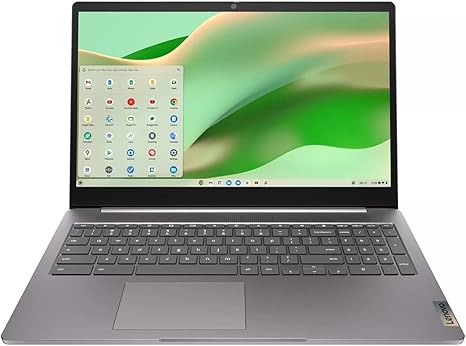
Welcome to “Reviews inside tv,” where we explore the tech that matters to you. Today, we’re taking a look at the Lenovo Ideapad 3 Chrome 15IJL6, a Chromebook designed to offer a solid mix of performance and portability for users on the go. Whether you’re a student, a professional, or someone who needs a reliable device for everyday tasks, the 15IJL6 could be what you’re looking for. Let’s dive into the specs, performance, and how it holds up in real-world usage.
The Lenovo Ideapad 3 Chrome 15IJL6 is designed for simplicity, speed, and efficiency. It features an Intel Celeron processor, which, while not a powerhouse, is more than capable of handling day-to-day tasks like web browsing, document editing, and media consumption. This processor, paired with 4GB of RAM, provides a decent level of multitasking ability, though you might notice some lag if you push it too hard with too many browser tabs open. It’s built for those who need a straightforward experience for light productivity and casual entertainment. For storage, the 64GB eMMC drive provides quick access to files but will be a bit limiting if you’re planning on storing large media files or running several applications simultaneously. It’s fast enough for typical use but, like the RAM, could feel a bit restrictive if you’re dealing with larger files or heavy apps.
When it comes to the display, the Ideapad 3 Chrome features a 15.6-inch screen with a full HD resolution. The IPS panel offers good viewing angles and solid color accuracy for the price, though don’t expect the deep blacks or vibrant colors of more expensive displays. At 250 nits of brightness, it can handle indoor environments just fine but might struggle a bit under bright sunlight. For those who like watching videos or casually editing photos, the display is adequate but won’t wow you. However, it’s perfect for the daily browsing and media consumption tasks it’s intended for.
On the battery front, the Lenovo Ideapad 3 comes with a 42Wh battery. Expect to get around 7 to 8 hours of light use, which is typical for a Chromebook in this class. It’s not the longest-lasting laptop on the market, but it should easily get you through a workday with some energy to spare for an evening movie. Charging is relatively quick, so it’s not a hassle to top up during the day.
The keyboard and trackpad on the Ideapad 3 are both functional and comfortable enough for extended typing sessions. The keys offer a soft but responsive feel, with good travel for this price range. If you type a lot, you’ll appreciate the solid, tactile feedback. The trackpad, while not as premium as more expensive models, is responsive and accurate, though it might feel a bit small for those who prefer more space for multitouch gestures. There’s no backlighting on the keyboard, but again, this is typical for a Chromebook in this budget range.
Connectivity on the Ideapad 3 Chrome is fairly standard, offering two USB-A ports, a USB-C port, an HDMI port, and a headphone jack. There’s also an SD card reader for easy file transfer from cameras or other devices. It’s a good range of ports for basic tasks, though a Thunderbolt 3 port would have been a nice addition for anyone looking to do more intensive work with external monitors or high-speed storage devices. Wi-Fi 5 and Bluetooth 4.2 are included, offering decent performance for streaming, web browsing, and working from home.
In terms of performance, the Celeron processor, 4GB of RAM, and eMMC storage hold up well for light productivity tasks like document editing, web browsing, and media consumption. Expect quick boot-up times thanks to Chrome OS, which is streamlined for efficiency. However, if you plan on running resource-heavy applications or multitasking with dozens of tabs open, you might run into some performance hiccups. It’s also not the best choice for gaming or demanding creative work like video editing or photo manipulation. The fan noise is minimal, and the thermals are well-managed; the laptop doesn’t get hot even under light load, which is a good sign for long-term performance and comfort during work sessions.
Now, when it comes to portability, the Lenovo Ideapad 3 is pretty lightweight for a 15-inch laptop, weighing in at around 5.5 pounds. While it’s not the lightest Chromebook out there, it’s still manageable for tossing into a backpack and taking to class or the office. The build quality, though plastic, feels solid enough for everyday use. The hinge is sturdy, and there’s minimal flex in the chassis. It’s not a premium-feeling laptop, but it gets the job done without feeling flimsy.
So, who is this laptop best suited for? If you’re someone who needs a Chromebook for everyday tasks—like checking emails, browsing the web, watching videos, or working with Google Docs—then the Ideapad 3 is a solid option. It’s also a good pick for students who need a reliable, no-frills laptop for schoolwork and casual use. However, if you’re looking to run more demanding software or games, you might want to look elsewhere, as the Celeron processor and limited RAM won’t handle anything too intensive.
In terms of value for money, this is a very affordable option for those who don’t need high-end specs but still want a solid and reliable laptop. You can find similar models at a similar price point, but the Lenovo Ideapad 3 offers decent build quality, good port selection, and a screen that performs well enough for its intended use case.
To wrap it up, the Lenovo Ideapad 3 Chrome 15IJL6 is a great choice for anyone who wants a budget-friendly Chromebook for light tasks, media consumption, and schoolwork. It won’t blow you away with its performance or features, but it delivers a solid, reliable experience without breaking the bank. If you’re looking for something more powerful or feature-packed, you’ll need to explore higher-end options, but for everyday use, this laptop checks all the boxes.
Thanks for tuning in! If you’re interested in picking up the Lenovo Ideapad 3 Chrome 15IJL6, be sure to check out the comments box below for more info. Have you tried this Chromebook? Drop your thoughts in the comments, and if you’ve got any questions, feel free to ask! Until next time, stay tech-savvy, and don’t forget to hit that subscribe button.
Available to buy here: