

Available to buy here:
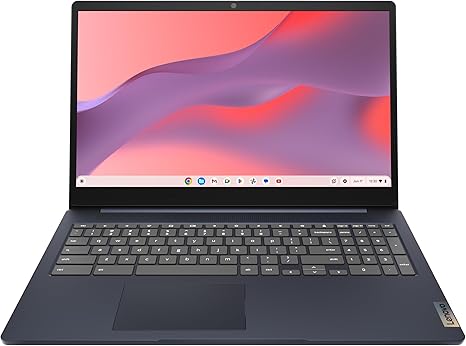
Welcome back to Reviews inside tv! Today, we’re taking a closer look at the Lenovo IdeaPad 3i Chromebook, a device that promises a sleek design and a smooth, reliable performance for both work and play. With a 15.6-inch FHD display, an Intel Celeron N4500 processor, 8GB of RAM, and 64GB of eMMC storage, this Chromebook offers a mix of portability and functionality. But does it live up to the hype for everyday use? Let’s find out.
First, let’s break down the specs. The IdeaPad 3i comes with an Intel Celeron N4500 processor, which is a low-power CPU designed for basic tasks like web browsing, email, and document work. It’s not going to win any awards for raw processing power, but for typical Chromebook tasks, it’s more than adequate. The 8GB of RAM is a nice touch here, offering a good balance for multitasking without pushing the system too hard. When paired with 64GB of eMMC storage, which is pretty standard for budget Chromebooks, it should be enough for light users who don’t store large media files locally. However, you may feel a bit of a squeeze if you start pushing the device with heavier apps or need to store lots of data. The display is a 15.6-inch Full HD screen with a resolution of 1920×1080 pixels. It’s not the brightest display around, but the picture quality is decent for a budget device—colors pop just enough for streaming videos and web browsing, though it may struggle under direct sunlight.
Real-world performance is where the Lenovo IdeaPad 3i shines for most people. When it comes to office and productivity tasks, this Chromebook does its job without breaking a sweat. Web browsing with multiple tabs open, writing documents, and checking emails are all handled smoothly. The 8GB of RAM helps with multitasking, so you won’t run into sluggishness when switching between applications. In terms of media consumption, the 15.6-inch display provides a comfortable size for watching movies or videos, and the speakers are acceptable for basic audio needs. Streaming Netflix or YouTube in Full HD is a breeze, and the visuals look crisp, though it’s worth noting the screen doesn’t have the brightest peak luminance for outdoor use. For content creators or power users, this Chromebook might feel a bit limiting. It won’t handle complex photo editing or video rendering, but for casual work like editing Google Docs, spreadsheets, or light image editing, it’s more than enough.
Gaming? Well, don’t expect much from the Lenovo IdeaPad 3i in that department. The Intel Celeron N4500 simply doesn’t have the horsepower to run modern games, and with its integrated graphics, you’re looking at playing very basic games at best. Titles like Stardew Valley or older browser-based games should run fine, but more graphically demanding games will be a no-go.
Thermals and noise are not major concerns for this Chromebook. Since it’s not a powerhouse device, it doesn’t generate much heat under load. You’ll find it remains cool on the keyboard deck and the underside, even when using it for extended periods. The fan is mostly silent, occasionally kicking on when you push the system a bit harder, but it never gets loud enough to be distracting. Under lighter use, it’s virtually silent.
Battery life is one of the standout features of the Lenovo IdeaPad 3i. With up to 10 hours of battery life, you can easily get through a full workday of web browsing, document editing, and video calls without having to worry about finding an outlet. It’s perfect for students or anyone who needs a reliable, all-day device. The charging speed is decent, with a USB-C port that supports fast charging, so you won’t be tied down to an outlet for too long.
In terms of portability, the IdeaPad 3i is lightweight and slim. At just 3.3 pounds, it’s easy to carry around in a backpack, making it a solid option for students or professionals who need a device for on-the-go use. Its slim profile also means it fits easily into bags without taking up much space, so if you’re constantly moving, this Chromebook won’t weigh you down.
The keyboard and trackpad on this device are pretty standard for the price. The keyboard has decent key travel and feedback for a budget laptop. While it’s not the most premium typing experience, it’s comfortable enough for short to medium typing sessions. The trackpad is responsive, though it’s not the largest, so if you do a lot of trackpad-heavy tasks, you may want to consider using an external mouse. The lack of extra input features like a fingerprint reader or touchscreen is something to note, but it’s not a dealbreaker for this type of Chromebook.
Connectivity is solid for the price, with USB 3.2 Gen 1 and USB-C ports available for plugging in accessories. It’s worth noting that there’s no HDMI port, so if you need to connect this laptop to an external display or monitor, you’ll need an adapter for the USB-C port. Wi-Fi 5 and Bluetooth 4.2 are standard here, so while they’re not the latest standards, they work well for most users. Unfortunately, the RAM and storage are soldered, meaning you can’t upgrade them down the line, which may be limiting if your needs change in the future.
In terms of build quality, the Lenovo IdeaPad 3i is made of plastic, which helps keep the weight down but does make the device feel a little less premium. The hinge feels solid enough, and the screen doesn’t wobble when touched. It’s not a luxury device by any means, but it’s durable enough for everyday use.
When it comes to value for money, the Lenovo IdeaPad 3i Chromebook is a solid choice for those on a budget. For light office work, media consumption, and casual use, it performs admirably. At its price point, it’s hard to find many alternatives with the same level of portability and battery life. Sure, it’s not the most powerful device, but it offers enough for most everyday tasks, making it a great entry-level Chromebook for those who don’t need a powerhouse.
In conclusion, the Lenovo IdeaPad 3i Chromebook is best suited for students, office workers, or casual users who need an affordable, reliable laptop for everyday tasks. If you’re looking for a powerful machine for gaming, video editing, or heavy multitasking, this is not the laptop for you. But for its intended purpose, it delivers a lot of value at a reasonable price.
Thanks for watching! Don’t forget to like, subscribe, and hit that bell icon so you won’t miss out on our latest reviews. The link to get the Lenovo IdeaPad 3i can be found in the comments box below. If you already own one, drop a comment and let us know your thoughts, or ask any questions you might have. Until next time, keep reviewing, and stay tech-savvy!
Available to buy here:


