

Available to buy here:
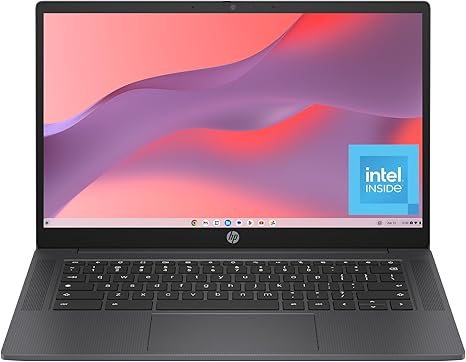
Welcome back to “Reviews inside tv.” Today, we’re checking out the HP Chromebook 14a-nf0099nr, a sleek, budget-friendly laptop that promises solid performance for everyday tasks. It’s perfect for those who need reliable computing without breaking the bank, but is it the right choice for you? Let’s find out.
This Chromebook packs an Intel Processor N100, which offers a good balance of performance and efficiency. With 8GB of LPDDR5 RAM and 128GB of UFS storage, it strikes a solid balance for most casual users, offering smooth multitasking and quick access to your files and apps. The Intel UHD Graphics help with light gaming and streaming, ensuring a smooth 4K video experience. That’s a plus if you’re a media consumer looking to relax after work or school.
The display is a 14-inch HD panel with a micro-edge design. It’s not the sharpest on the market, but it does offer 1 million pixels with a non-reflective anti-glare coating, making it easy to use outdoors. If you’re someone who spends a lot of time on video calls, browsing, or watching movies in sunlight, this could be a useful feature to help reduce glare. But do keep in mind, the display resolution won’t satisfy those looking for ultra-crisp visuals or high-end graphics performance.
When it comes to real-world performance, this Chromebook handles daily tasks with ease. Whether you’re browsing the web with multiple tabs open, working on documents, or streaming media, it delivers a smooth experience. The 8GB of RAM is plenty for multitasking, and the UFS storage is notably faster than traditional eMMC storage, meaning apps and files open quicker, and the laptop feels snappier overall. But remember, this is a Chromebook—while it’s great for light work and media consumption, it’s not a powerhouse for demanding tasks like video editing or heavy gaming.
As far as battery life goes, the Chromebook does pretty well, offering around 8 to 10 hours of use with typical workloads. So, whether you’re attending virtual meetings, watching a movie, or working on documents, it can easily get you through the day. The charging is fairly quick as well, thanks to USB-C, though you won’t find fast-charging speeds here. In terms of portability, it weighs just around 3.2 pounds, which is light enough to toss in your bag for class or work, making it a solid choice for those on the go.
The keyboard and trackpad are fairly comfortable. The keys have decent travel and feedback for typing, but don’t expect a premium feel like you’d get on a high-end laptop. The trackpad is smooth and responsive, but some users might find it a bit small for extensive use. The overall layout is user-friendly, but the absence of a backlit keyboard is something to consider if you often work in low-light environments.
In terms of ports, it offers the essentials: two USB-A ports, one USB-C port, a headphone jack, and an SD card reader. You’re also getting Wi-Fi 5 and Bluetooth 5.2, so the wireless performance is decent, though it’s not the latest tech. It’s a good set for light work but lacks the kind of connectivity you might want for more serious expansion or gaming setups.
Now, let’s talk thermals. The Chromebook stays pretty cool under light loads, but you will notice the fans kicking up if you’re doing something a bit more demanding like streaming 4K video for extended periods. It’s not loud by any means, but it’s not silent either. Under sustained load, like long video calls or some heavier browsing, the bottom does get warm, though nothing that feels uncomfortable for regular use.
As for build quality, it feels sturdy for a budget Chromebook, with a sleek chalkboard gray design. While it’s made of plastic, it doesn’t feel flimsy, and the hinges are solid. However, don’t expect it to feel as premium as more expensive laptops on the market. It’s built to last for general everyday use, though, and for the price, it’s quite impressive.
Who’s this laptop for? If you’re a student, casual office worker, or someone who spends most of their time online, the HP Chromebook 14a is a solid choice. It’s lightweight, portable, and handles everyday tasks without a hitch. However, if you need to run demanding software or want better performance for gaming or content creation, this may not be the right fit.
But if you’re looking for a reliable, affordable Chromebook for light tasks like web browsing, media consumption, and video calls, it delivers. The value here is solid—especially when compared to other budget Chromebooks, which may not offer the same performance, display, and battery life.
Now, don’t forget to like, subscribe, and hit that bell icon so you won’t miss any of our upcoming reviews. We’re constantly bringing you the latest and greatest in tech, so stay tuned!
In conclusion, the HP Chromebook 14a-nf0099nr is an excellent budget choice for anyone needing a reliable, no-frills laptop for everyday tasks. It delivers solid performance, a functional display, and good portability, all at a great price. If you don’t need a ton of power, but want something that’s easy to use and gets the job done, this is definitely worth considering.
Thanks for watching, and don’t forget—if you’ve got any questions or thoughts, drop them in the comments below. And remember, the link to grab this laptop is right there in the comments box. Until next time, keep those reviews coming, and we’ll see you soon!
Available to buy here:


