Available to buy here:
Welcome to “Reviews inside tv,” where we take a deep dive into the tech that matters most to you. Today, we’re talking about the Lenovo ThinkBook 14 G7 IML, a compact and sleek 14-inch notebook designed to keep you productive, whether you’re working from home, in the office, or on the go. If you’re looking for a laptop that balances performance with portability, this could be the one to watch. But does it deliver on those promises? Let’s break it down.
First up, the specs. The Lenovo ThinkBook 14 G7 IML is powered by the Intel Core Ultra 5 125U processor. This is a mid-tier chip from Intel’s latest lineup, designed for efficient performance while still keeping power consumption in check. This means it’s well-suited for everyday tasks like web browsing, working in Office applications, and managing several tabs at once without hiccups. With 16 GB of RAM, you’ll have no problem running multiple programs simultaneously, which is a huge benefit if you often work with several windows open or do light multitasking.
The 256 GB SSD is another highlight. Not only does it offer fast boot times and quick access to files, but it also helps with overall system responsiveness. That means your laptop will resume from sleep in just a couple of seconds, keeping you productive without delays. The storage size might be a bit tight for those who store a lot of large media files, but it’s a solid option for people who mainly rely on cloud storage or external drives.
For the display, Lenovo has chosen a 14-inch WUXGA screen with a resolution of 1920 x 1200. While it’s not as sharp as a 4K display, it’s more than sufficient for everyday use. The screen offers decent brightness levels, making it easy to use in most lighting conditions, and the extra vertical pixels (compared to traditional 1080p displays) give you more space for reading or multitasking. If you’re into media consumption, the display provides a pleasant experience for streaming movies or shows, though it might not be quite as vibrant as higher-end options like OLED.
Now, let’s talk battery life. With a 13.01-hour runtime, this ThinkBook is a champ for extended use. Whether you’re working through a long conference call, writing reports, or watching videos, you can expect this laptop to keep going without needing to plug in. Of course, actual battery life will vary depending on what you’re doing, but for typical office work, you’ll have plenty of juice to last you through a full day, and then some.
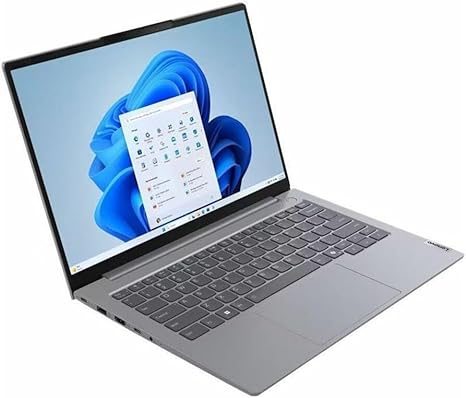
At just 3.2 pounds (1.45 kg), the ThinkBook 14 G7 IML strikes a good balance between portability and sturdiness. It’s light enough to carry around in a bag all day, yet feels solid in hand. The Arctic Gray color gives it a professional look without being too flashy. The build quality is sturdy, but it’s still a plastic construction, so you’ll get a premium feel without the heavy price tag that comes with aluminum bodies.
When it comes to the keyboard and trackpad, the ThinkBook 14 G7 IML doesn’t disappoint. The keyboard has a nice amount of key travel, which makes typing for extended periods comfortable. It’s not quite as soft as some ultra-portables, but the feedback is satisfying for a laptop in this range. The trackpad is responsive with smooth gliding, and the palm rejection works well. However, if you’re a fan of larger trackpads, you might find it a little cramped, but it’s more than functional for everyday use.
In terms of connectivity, the ThinkBook offers a decent selection of ports. You get two USB-A 3.2 ports, two USB-C 3.2 ports (one of which supports Power Delivery), an HDMI 2.0 port, an SD card reader, and a headphone jack. For wireless, it supports Wi-Fi 6 and Bluetooth 5.1, meaning you’ll have a stable and fast connection for all your online needs, whether you’re working or streaming content. The only downside here is that there’s no Ethernet port, which might be a deal-breaker for users who require a wired connection, but most people won’t miss it with the fast Wi-Fi support.
As for real-world performance, the ThinkBook 14 G7 IML excels at office and productivity tasks. The Intel Core Ultra 5 125U handles word processing, spreadsheets, web browsing, and video calls without any noticeable slowdowns. It’s a strong choice for professionals who need a reliable device for everyday work. However, if you’re into heavier tasks like video editing or 3D rendering, this laptop might struggle a bit, especially since it lacks a dedicated GPU.
In terms of thermals, the ThinkBook stays relatively cool under light use, but it does heat up slightly under load. During a few hours of web browsing and media consumption, the keyboard deck remains comfortable, but it can get warmer when doing heavier tasks like video calls or multi-tasking with several tabs open. Fan noise is minimal most of the time but becomes slightly audible during more intense workloads.
Let’s touch on battery life again. For light office work, expect around 13 hours of use, which is ideal if you’re someone who spends a lot of time in meetings, writing emails, or working through reports. Streaming video will drain the battery faster, but you should still see around 10 hours of playback. Charging is also quick, and you can top it off in about an hour or so, which is convenient if you’re in a pinch.
The ThinkBook 14 G7 IML isn’t a powerhouse laptop, but it’s an excellent option for professionals and students who need a portable, reliable device for everyday tasks. If you’re into gaming or heavy content creation, you might want to look elsewhere, as it doesn’t have the power or specialized graphics needed for those use cases. But for most users, this laptop offers strong performance for the price, a solid display, and a comfortable design that’ll make it a pleasure to work on all day.
As far as value for money goes, the ThinkBook 14 G7 IML is a solid contender in the mid-range business laptop category. It offers a balanced set of features, from its decent performance to long battery life, all at a reasonable price. If you compare it to competitors like the HP ProBook 440 or the Dell Latitude 5420, the Lenovo offers better battery life and a cleaner, more professional design at a similar price point. The only real downside is its lack of a dedicated GPU, which might be a dealbreaker for users who need graphics-heavy performance.
Build quality is strong for its price, but it’s not the premium feel of some higher-end models. That being said, Lenovo has a good reputation for making durable and reliable devices, so long-term reliability shouldn’t be an issue here.
So who is the ThinkBook 14 G7 IML best suited for? It’s perfect for office workers, students, or casual users who need something light, dependable, and budget-friendly. If you’re looking for a laptop to run demanding games or do intensive video editing, this isn’t the one for you, but for most everyday tasks, it should serve you well.
Thanks for watching today’s review. If you’ve got any questions or thoughts about the ThinkBook 14 G7 IML, feel free to drop them in the comments below. Don’t forget to hit the like button and subscribe to “Reviews inside tv” for more in-depth reviews. See you in the next one, and until then, happy computing!
Available to buy here: